





Showing55 Workflows

Minimax_H3_Image_to_Video_OpenWeight
Minimax H3を使用したImage to Videoワークフローです。オープンウェイトモデルのためAPIウォレットを消費せず、Load Imageにスタートフレーム画像をアップロードし、aspect_ratio、duration、promptを設定するだけで、すぐに動画生成できます。This is an Image to Video workflow using Minimax H3. Since it uses an open-weight model, it does not consume your API wallet.

MiniMax H3 Open Weights · Image & Text to Video
Generate 2K video with stereo sound from a start image and a prompt using MiniMax H3 (Hailuo 3.0), the open-weights model. Mute the image to go text-only.
MiniMax H3 Open Weights - Reference to Video
Swap a character or object into an existing clip with MiniMax H3 (Hailuo 3.0), the open-weights editor. Add a reference image, describe the change, and hit run.
Static Watermark Remover

MiniMax H3 · Character Motion Transfer
Upload a character image and a driving video. MiniMax H3 maps the motion onto the character and returns a new video with AI-generated stereo audio.
Minimax H3 for Video to Video Character Swap
Replace a person in a video clip with a character from a single image using MiniMax H3 and the Character Swap LoRA. Upload a clip, upload a character, describe the swap, and hit run.

MiniMax H3 Cinematic Start–End Frame I2V
MiniMax H3の開始・終了フレーム対応I2Vワークフロー。0.6MPの高速な動作検証から高品質化へ進められ、人物・背景・照明の一貫性を保つプロンプト設計に対応します。 / MiniMax H3 start/end-frame I2V workflow for efficient 0.6 MP motion tests with prompt controls for identity, background and lighting consistency.
MiniMax H3 · Clay Render to Final Render V2V
Render a grey Blender clay pass into a finished, textured, lit clip with sound using MiniMax H3. Load your clay video, describe the look, and hit run.
Minimax H3 FLF2V + Orbit LoRA for 360 View
Upload a photo and MiniMax H3 with the Orbit LoRA animates a full 360 camera rotation around it, with synchronized stereo audio, in one pass. Upload, run, download.
⚡ MiniMax H3 I2V Turbo 4-Step|高速画像動画化
【日本語】開始画像1枚を動画化する4-Step Turbo高速ワークフロー。16:9サンプル付き。画像と出力比率を合わせ、動き・カメラ・音を指定。5秒・24fps・音声ON。 【English】Fast 4-Step Turbo image-to-video workflow with a 16:9 sample. Match the input/output ratio; default 5s, 24 fps, audio on.
MiniMax H3 · Reference to Multi-Shot Video
Upload a reference image and up to three guide images as timed keyframes, write a prompt describing the motion, and MiniMax H3 generates a multi-shot video with synchronized audio in one pass.

MiniMax H3 - UGC Product Video
Upload a photo of your model and your product, write a beat-by-beat script, and MiniMax H3 generates a vertical UGC-style video with native audio in one pass.
MiniMax H3 · Music Video Generator
Upload 4 reference shots and your track. MiniMax H3 animates your subject across all four scenes and cuts to the beat automatically.
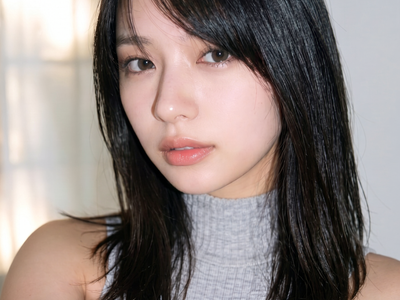
Minimax_H3_Image_Edit_OpenWeight
Minimax H3を使用した画像編集ワークフローです。画像を読み込み、編集指示文を日本語で書くだけで、すぐに顔や服装を保ったままポーズ・背景・アングルを変えられます。APIウォレットは消費しません。This is an image edit workflow using Minimax H3. Just load an image and write an instruction to change the pose, background, and angle while keeping the face and outfit.
MiniMax H3 ControlNet Pose · Video Pose Control
Upload a video of someone moving and describe a new scene. MiniMax H3 follows the motion with ControlNet pose tracking and generates a matching video with synced audio.
R2V MiniMax H3
MiniMax H3 Reference to Video
⚡ MiniMax H3 Start & End Turbo 4-Step|開始・終了指定
【日本語】開始・終了画像を指定して、その間を生成する4-Step Turbo高速ワークフロー。背景・画角・比率を揃えた16:9サンプル付き。5秒・24fps・音声ON。 【English】Fast 4-Step Turbo workflow for continuous motion between matching start and end frames. Includes aligned 16:9 samples; default 5s, 24 fps, audio on.
⚡ MiniMax H3 T2V Turbo 4-Step|高速テキスト動画生成
【日本語】画像不要で映像と音声を生成するMiniMax H3 4-Step Turbo高速T2V。5秒・864×480・24fps・音声ON。promptとサイズを変えて実行できます。 【English】Fast MiniMax H3 text-to-video powered by the 4-Step Turbo LoRA. No image required; default 5s, 864×480, 24 fps, audio on.
Minimax H3 with Audio Refiner for Text to Video
Generate video with synchronized stereo audio from a text prompt using MiniMax H3, the open-source multimodal model by MiniMax. Write what you want to see and hear, then hit run.

MiniMax H3 Anime 768p Generation to True 60 FPS
A tested one-reference workflow for stable anime motion, native audio, and smooth delivery
Open
MiniMax H3 Open Weights TI2V with Style Embedding
Generate video with native stereo audio using MiniMax H3 open weights. Write a prompt, add an optional start image and a style embedding, and hit run.
Pika_H3_Flex_Image_to_Video
Pika H3 Flexを使用したImage to Videoワークフローです。画像を読み込み、promptに動き・カメラ・音を入力するだけで、音付きの動画を生成できます。This is an Image to Video workflow using Pika H3 Flex. Load an image and describe the motion, camera, and sound in the prompt to generate a video with sound.
Pika_H3_Flex_Text_to_Video
Pika H3 Flexを使用したText to Videoワークフローです。promptに作りたい映像を入力し、aspect_ratio、megapixels、durationを設定するだけで、すぐに音付きの動画を生成できます。This is a Text to Video workflow using Pika H3 Flex. Just enter a prompt and set aspect_ratio, megapixels, and duration to generate a video with sound right away.
MiniMax H3 Camera Control · Image to Video
Turn a still image into a video that follows a camera path you choose, using the MiniMax H3 (Hailuo 3.0) model. Upload a reference image, supply a camera reference video, write a prompt, and hit run.
My_WorkFlow_Minimax_H3_I2V

Open
Full Anime Shot · H3 seq Interpolation Adapter
Animates one anime first frame into a whole 124-frame shot with MiniMax H3 open weights and our seq adapter.
Anime Tween Between Two Keys · H3 seq Adapter
Generates the 22 frames between a first and last key with MiniMax H3 open weights and our seq adapter. Built for redoing one short span inside a longer take.
MinimaxH3
MinimaxH3

MiniMax H3 Open Weights Image to Reference 480P
MiniMax H3 Open Weightsイメージリファレンス480P

MiniMax Music 3 for Text to Music
Generate complete songs with vocals and full instrumentation using MiniMax Music 3. Write a style caption, add lyrics, and hit run. Up to five minutes.
Pika_H3_Flex_Reference_to_Video
キャラシートや人物画像を参照して、同じ人物・服装で音付きの動画を作ります。Pika H3 Flexを使い、Partner Node不要でFlo Timeだけで動きます。 / Create videos with sound that keep the same person and outfit from a character sheet or portrait. Runs on Floyo GPU with Flo Time, no Partner Node.
異和 -IWA- / AI Brand Film — FL2VA + I2VA Chain
90秒の架空ライフスタイルブランド「異和」のブランドフィルム制作ワークフロー。Midjourney生成画像をSeeDanceのFL2VA(2画像間モーフ)とI2VA(単画像アニメーション)で映像化し、歌詞タイミングに完全同期させた「歌詞シンク構成」で編集。全21カットをFL2VA 12本+I2VA 9本のチェーン構造で接続。楽曲も自作。画像生成→動画生成→編集→タイポグラフィ→LPまで、一人のクリエイターによるトータルブランディング。
Minimax H3 Video Ref
Minimax H3 Video Ref
Pika H3 Flex for Reference to Video
Upload reference images, describe the scene, and Pika H3 Flex generates a video with synced stereo audio in six sampling steps. Hit run.
FastVideo FastH3 for Image to Video
Animate any image into a video with synchronized audio using FastVideo FastH3, a distilled version of MiniMax H3. Upload a starting frame, describe the motion, and hit run.
MiniMax H3 Product Ad · Reference to Video
Upload a product photo and a style reference video, write a prompt describing the ad, and MiniMax H3 generates a cinematic product advertisement with stereo audio.
Pika H3 Flex for Text to Video
Generate video with synchronized audio from a text prompt using Pika H3 Flex, the open-weight model built on MiniMax H3. Describe the scene, the action, and the sounds you want, then hit run.
MiniMax H3 VFX · Reference-to-Video
Upload a subject photo and a VFX style image, describe the scene, and MiniMax H3 generates a video with synced audio that blends both. Hit run to start.
Pika H3 Flex for Text Image to Video Upscale
Generate a 5-second video with synced audio from a text prompt or image using Pika H3 Flex, then upscale it to 2K. Write a prompt, hit run, download.
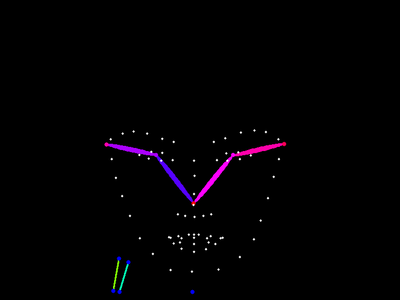
MiniMax H3 ControlNet · Pose-Guided Generation
Transfer motion from a control video into an entirely new scene using MiniMax H3 Ref2VA with ControlNet pose guidance, describe the new visuals, and hit run.
MiniMax H3 I2V · Image to Video with Upscale
Animate a starting image into video with synchronized audio using the open-weight MiniMax H3 FL2VA model, then automatically upscale the result 1.5x in a single run.
Pika H3 Flex for First Last Frame to Video
Set a start image and an end image, describe the motion between them, and Pika H3 Flex generates a video with synchronized audio in six steps. Upload two frames, write a prompt, and hit run.
MiniMax H3 R2V · Reference to Video
Generate video with synchronized audio from reference images, video, and voice clips using MiniMax H3 Ref2VA, then describe the scene you want in a text prompt and hit run.

写真1枚→2K動画|Pika H3 Flex
スマホ写真1枚を、質感そのままの2K動画(音つき・5秒)に。Pika H3 Flex(MiniMax H3)で下書き→2Kに仕上げます。触るのはオレンジの5つだけ(写真・動き・音・秒数・仕上げの強さ)。動きと音は日本語OK、細かいタイミングは英語が確実。2Kで顔が変わったら仕上げの強さを下げてください(0.18→0.12)。Partner Nodes なし。 One photo → 2K video with sound. Edit only the 5 orange nodes.
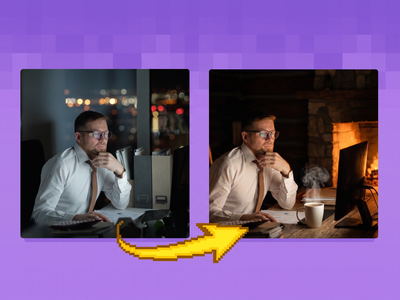
Minimax H3 for Image Editing
Edit any image with a text instruction using MiniMax H3-Image, an open-weight model that generates up to 4K resolution. Upload an image, describe the change, and hit run.
FastVideo FastH3 for Text to Video
Generate video with synchronized stereo audio from a text prompt using FastVideo FastH3, the 8-step distilled MiniMax H3 model. Write a scene, pick an aspect ratio, and hit run.
MiniMax H3 Masking · Video Identity Replacement
Replace the person in an existing video with a new identity and wardrobe using MiniMax H3 Ref2VA and SAM segmentation, then describe the new look and hit run.
MiniMax H3 RefMod · Reference to Video
Generate identity-locked video with synchronized audio from pre-encoded reference bundles using MiniMax H3 Ref2VA and the RefMod system, then describe the scene with a structured prompt and hit run.