LTX 2.3 IC LoRA Union Control - Video to Video
Restyle video with LTX 2.3 using IC-LoRA Union Control for structure guidance
Audio
Controlnet
LoRA
LoRAs
LTX 2.3
Restyle
Video
Video to Video
1.6k

Nodes & Models
LoadVideo
LTXVAudioVAELoader
ltx-2.3/ltx-2.3-22b-dev.safetensors
CheckpointLoaderSimple
ltx-2.3/ltx-2.3-22b-dev.safetensors
LTXAVTextEncoderLoader
gemma_3_12B_it_fp4_mixed.safetensors
ltx-2.3/ltx-2.3-22b-dev.safetensors
LoadImage
PrimitiveBoolean
RandomNoise
KSamplerSelect
ManualSigmas
GetVideoComponents
LoraLoaderModelOnly
ltx-2.3-22b-distilled-lora-384.safetensors
CLIPTextEncode
ImageResizeKJv2
LTXICLoRALoaderModelOnly
ltx-2.3-22b-ic-lora-union-control-ref0.5-ltx-2-3-ic-lora-control-MplWpT-2.safetensors
LTXVConditioning
LTXVPreprocess
ImageBlend
GetImageSize
EmptyLTXVLatentVideo
LTXVEmptyLatentAudio
LTXVImgToVideoConditionOnly
LTXAddVideoICLoRAGuide
CFGGuider
LTXVConcatAVLatent
SamplerCustomAdvanced
LTXVSeparateAVLatent
LTXVCropGuides
LTXVAudioVAEDecode
VAEDecodeTiled
CM_FloatToInt
AIO_Preprocessor
CannyEdgePreprocessor
DWPreprocessor
AIO_Preprocessor
CannyEdgePreprocessor
DWPreprocessor
DWPreprocessor
VHS_VideoCombine
VHS_VideoCombine

Restyle an existing video with LTX 2.3 while keeping the original motion and structure intact. Upload a reference video, upload a reference image for the starting frame, write your prompt, and get a new video that follows the same poses and edges but in your described style. Audio is generated alongside the video. Runs on the distilled model for faster results.
How do you use IC-LoRA Union Control with LTX 2.3 for vid2vid?
Upload a reference video and a reference image. The workflow extracts canny edges and pose data from your video, blends them into a combined control signal, and feeds that into LTX 2.3 through the IC-LoRA Union Control adapter. Your prompt and reference image drives the style. The structure follows the original video.
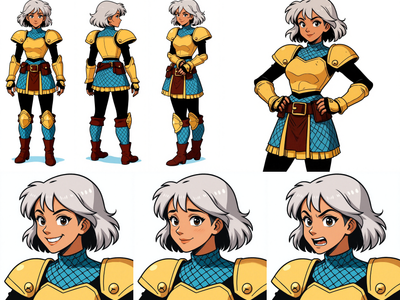
Positive Prompt Describe the style, scene, and look you want. The model will apply this to the structure from your reference video. The example uses "anime style woman in medieval armor looking around a dark forest." Be specific about visual style and setting.
Negative Prompt List things you want to avoid. Default is "pc game, console game, video game, cartoon, childish, ugly." Add or remove terms based on what you're seeing in outputs.
Reference Image This is your I2V starting frame. It anchors the first frame of the generated video. Want pure text-to-video instead? Set the bypass_i2v toggle to True and skip the image upload.
Reference Video The source video for structural control. The workflow extracts canny edges and body pose from each frame, then blends them (75% canny, 25% pose by default). This combined signal tells the model where things are and how they move.
IC-LoRA Guide Strength Controls how closely the output follows the control signal. Default is 0.75. Want tighter adherence to the original video's structure? Push it toward 1.0. Want more creative freedom for the model? Drop it toward 0.5. Below 0.3, the control signal gets weak and the output may drift from the original motion.
Distilled LoRA Strength Default is 0.5. This LoRA speeds up generation by reducing the steps needed. Higher values lean harder into the distilled behavior. The workflow uses manual sigmas tuned for the distilled model, so changing this value significantly may need sigma adjustments too.
IC-LoRA Model Strength Default is 1.0. This controls the overall weight of the IC-LoRA Union Control adapter on the model. Most users won't need to change this. Lower it only if the control signal feels too rigid.
Resolution Default is 1920x1088. Both values are set by primitive nodes at the top of the workflow. Change both together to maintain your aspect ratio.
Seed Lock the seed for reproducible results. Change it to explore variations with the same settings.
What is LTX 2.3 IC-LoRA Union Control good for?
Vid2vid restyling where you need the output to track specific motion, poses, and scene composition from a source video. The combined canny and pose control keeps both hard edges and body movement aligned, while your prompt handles the visual style. Audio is generated as part of the pipeline.
This workflow fits best when you have existing footage and want to transform its look without losing the choreography. Dance videos, action sequences, character animation references. Anything where the motion matters and the visual style needs to change.
The audio generation is a bonus. LTX 2.3's AV pipeline produces audio that matches the video content, so you get a complete output without post-processing.
The tradeoff: this is a heavy workflow. LTX 2.3 22B with two LoRAs, canny extraction, pose estimation, and audio decoding all in one run. Expect longer generation times compared to a standard LTX text-to-video workflow. The distilled LoRA helps, but it's still a lot of compute.
If you don't need structural control and you're doing text-to-video from scratch, a simpler LTX 2.3 workflow will be faster and cheaper. This one earns its complexity when you need that motion fidelity.
FAQ
What does the bypass_i2v toggle do in this LTX 2.3 workflow? It switches between image-to-video and text-to-video mode. Set it to True for pure text-to-video (no reference image needed). Set it to False (default) to use your uploaded image as the starting frame for the video generation.
Can I change the control blend between canny and pose? Yes. The ImageBlend node controls the mix. Default is 0.75, which gives 75% weight to canny edges and 25% to pose. Lower the value for more pose influence, raise it for sharper edge tracking. Try different ratios depending on whether your source has strong outlines or complex body movement.
Why does this workflow use manual sigmas instead of a normal scheduler? The distilled LoRA uses a specific sigma schedule tuned for fewer steps. The default schedule is 9 values (8 steps), optimized to work with the distilled model. Changing this without understanding the distilled model's behavior can produce blurry or incoherent results.
Does LTX 2.3 IC-LoRA Union Control need a trigger word? No trigger word needed. The IC-LoRA Union Control adapter activates through the control signal (your reference video's extracted structure), not through prompt keywords.
What resolution should I use for LTX 2.3 vid2vid? Default is 1920x1088. LTX 2.3 works well at this resolution but you can adjust both width and height to match your source video's aspect ratio. Keep dimensions divisible by 32 for best results.
Read more