Z-Image Turbo · Text to Image
Fast Image Generation in Seconds
Image
Marketing
Photography
Production
Text2Image
z-image
Z-Image Turbo
27.5k

















Nodes & Models
FloyoStickyNote
VAELoader
ae.safetensors
EmptySD3LatentImage
UNETLoader
z_image_turbo_bf16.safetensors
CLIPLoader
qwen_3_4b.safetensors
ModelSamplingAuraFlow
CLIPTextEncode
SaveImage
KSampler
VAEDecode
ABOUT THE WORKFLOW
Type a prompt, get an image
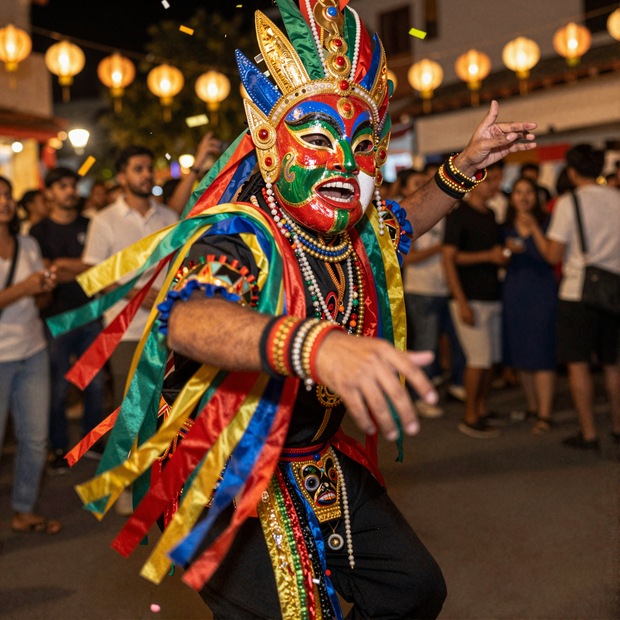
Type a prompt and the model generates a photorealistic image in about nine fast passes. No reference and no setup needed, and prompts work in English and Chinese.
Model
Z-Image Turbo by Alibaba Tongyi Lab (Tongyi-MAI), the team behind Qwen. A 6B text-to-image model distilled to generate in about nine steps, strong at photorealistic and cinematic images and at readable text in both English and Chinese. Open source under Apache 2.0.
HOW IT WORKS
Step 1. Write your prompt
Describe the image you want, in English or Chinese. A negative prompt comes pre-filled with things to avoid.
Works great with: photorealistic scenes · cinematic shots · text and typography
Step 2. Hit run
The model generates the image in about nine passes at sub-second speed on fast hardware.
Step 3. Download your image
The result saves as a PNG. Preview it, then download.
Ready for: Photoshop · Figma · Canva · any editor
First time? Leave every setting as-is. The defaults (1024x1024 · 9 steps · CFG 1) are the right starting point for almost everyone.
RECOMMENDED SETTINGS
Quick-start guide. Find the goal that matches yours and copy the settings.
Standard use (most people) — 1024x1024, 9 steps, CFG 1. The right starting point for almost everyone.
Want more detail — raise the steps above 9. It adds refinement and takes a little longer.
Want options to choose from — raise the batch size to generate several images in one run and keep the best.
Change the size — set the width and height, keeping to sizes the model accepts. Odd dimensions can fail, and past 2K the output can soften.
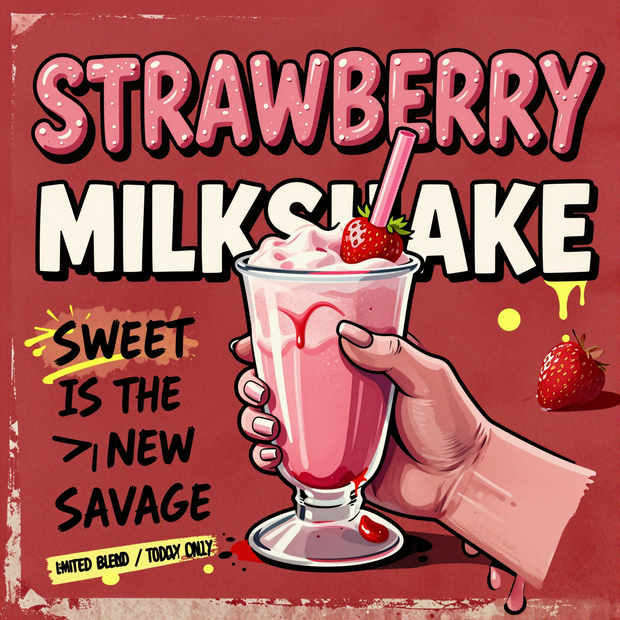
Text in the image looks off — spell out the exact words in the prompt and keep them short. The model renders readable text but does better with fewer words.
Want the exact same result again — set a fixed seed in place of random. Random gives you a fresh take on each run.
Prompt: Z-Image Turbo rewards detailed, cinematic prompts. Name the subject, setting, lighting, and camera, like "a photorealistic postcard of a man in casual wear held in front of a city skyline at sunset, golden hour light, soft depth of field." Prompts work in English and Chinese, and the model renders readable text well, so spell out any words you want in the image.
LEARN
📹 Videos
ComfyUI 101 Free Course ft. Sebastian Kamph
Floyo 101 for Team Collaboration
✨ Quick links
USE CASES
📸 Photoreal Images
Generate lifelike photos and portraits from a written description.
🎬 Cinematic Concepts
Block out a shot with mood, lighting, and composition for a pitch or board.
🔤 Text & Typography
Render readable English or Chinese text inside an image for posters and ads.
⚡ Fast Iteration
Generate variations quickly to explore a concept before you commit to one.
WHAT WORKS BEST / WHAT TO AVOID
✅ Works great
Detailed, cinematic prompts
Photorealistic subjects and scenes
English or Chinese text in the image
Sizes around 1024 on the long side
⚠️ May produce softer results
One-word or vague prompts
Sizes far above 2K
Odd dimensions the model does not accept
Subjects that need many refinement passes
FAQ
What is Z-Image Turbo?
Z-Image Turbo is a 6B open-source text-to-image model from Alibaba's Tongyi Lab, the team behind Qwen. Released in November 2025 under Apache 2.0, it is distilled to generate in about nine steps, runs on a 16GB consumer GPU, and is strong at photorealistic images, cinematic compositions, and readable text in English and Chinese.
Is Z-Image Turbo free to use?
Yes. Z-Image Turbo is released under the Apache 2.0 license, so it is free for both personal and commercial use with minimal restrictions. The images you generate are yours to use, with no license fee on the model itself.
How is Z-Image Turbo different from FLUX?
Z-Image Turbo is a 6B model under Apache 2.0, so it runs on a 16GB GPU in about nine steps and allows commercial use out of the box. FLUX.1 dev is larger and ships under a non-commercial license, so it needs more hardware and a paid license for commercial work. Z-Image is the faster, lighter, more permissive option, while FLUX can edge ahead on some artistic styles.
How fast is Z-Image Turbo?
Z-Image Turbo generates in about nine steps, which is sub-second on fast data-center GPUs and a few seconds on a 16GB consumer card. The speed comes from distillation, which collapses the usual dozens of steps down to a handful without a big drop in quality.
What are the best settings for Z-Image Turbo?
The defaults suit most images: 1024x1024, 9 steps, and CFG 1. Raise the steps for extra detail, keep the resolution to sizes the model accepts since odd dimensions can fail, and rewrite the prompt before touching any setting, since a detailed, cinematic prompt moves the result more than any slider.
Does Z-Image Turbo render text and support Chinese?
Yes. Readable text is one of its strengths, in both English and Chinese, including mixed layouts. It also reads prompts in either language, so you can describe the scene and spell out the exact words you want in the image, which suits posters, ads, and typography.
How to run Z-Image Turbo online?
You can run Z-Image Turbo online through Floyo. No installation, no setup, no API key to wire up. Open the workflow in your browser, type a prompt, and hit run. Free to try.
WHY FLOYO?
Floyo is the only platform with team collaboration for ComfyUI in the browser. You run workflows with no install. You share run history, assets, and models across your team. You pay only when you generate. Floyo supports open-source and closed-source models.
A designer generates an image and likes it. A teammate opens that exact run from shared history and keeps going. No file handoffs. No version confusion.
For studios and enterprise teams, Floyo adds private workspaces, pooled resources, and a team usage dashboard. Other ComfyUI cloud tools run for one person at a time. Floyo runs for the whole team, with transparent per-generation costs.
Ready to try it?
Type a prompt and run it. You get a photorealistic image in seconds.
Questions? Watch the free course or check the FAQ above.
Read more
0
Reply
0
Reply
0
Reply
0
Reply
1
Reply
0
Reply
0
Reply
3
Reply
0
Reply
0
Reply