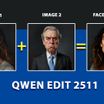
Qwen Edit 2511 Face Swap
Face Swap
Face Swap
Image
Qwen edit
Qwenedit
Qwenedit2511
Qwen Edit 2511
Qwen edit face swap
10.7k




Nodes & Models
MarkdownNote
Note
VAELoader
qwen_image_vae.safetensors
CLIPLoader
qwen_2.5_vl_7b_fp8_scaled.safetensors
LoadImage
UNETLoader
qwen_image_edit_2511_fp8_e4m3fn.safetensors
ImageScaleToTotalPixels
LoraLoader
Qwen\2511\Qwen-Image-Edit-2511-Lightning-4steps-V1.0-bf16.safetensors
VAEEncode
ModelSamplingAuraFlow
TextEncodeQwenImageEditPlus
CFGNorm
FluxKontextMultiReferenceLatentMethod
KSampler
VAEDecode
SaveImage
Workflow for swapping faces with the Qwen Edit 2511 model
Guide:
Load the person whose face you want to change into image 1.
Load the face you want to place in image 1 into image 2.
Prompts to try :
01 :
swap the face of the person in the image1 with the face of the person in the image2
02:
Use image1 as the base image.
Replace only the face of the person in image1 with the face from image2.
Preserve the original head shape, hair, pose, background, and clothing from image1.
The result should look photorealistic, seamless, and identity-consistent.
Recommendations
Try both prompts. The first radically changes the face by attempting to copy the one from image 2.
The second prompt applies the face from image 2 while retaining as many features as possible from the face in image 1.
Change the seed to obtain different results.
Lora:
If you are using a 4-step Lora, don't forget to change the steps in Ksampler. In this case, remember to set the value to 1 in CFG.
Read more
0
Reply