Insert Products in Ecommerce Ads - NanoBanana Pro
Ecommerce
Image
Image to Image
NanoBanana
Reference Image
958
_1766997541061.png?width=1400&height=620&quality=80&resize=contain)
_1766997541061.png?width=1400&height=620&quality=80&resize=contain)
_1766997541061.png?width=1400&height=620&quality=80&resize=contain)
_1766997621884.png?width=1400&height=620&quality=80&resize=contain)
_1766997621884.png?width=1400&height=620&quality=80&resize=contain)
_1766997541061.png?width=104&height=104&quality=80&resize=cover)
_1766997541061.png?width=104&height=104&quality=80&resize=cover)
_1766997541061.png?width=104&height=104&quality=80&resize=cover)
_1766997621884.png?width=104&height=104&quality=80&resize=cover)
_1766997621884.png?width=104&height=104&quality=80&resize=cover)

Nodes & Models
NanoBananaProUnified_floyo
WorkflowGraphics
LoadImage
Note
GetImageSize
ResizeAndPadImage
ImageBatch
SaveImage
Empty-Hand to Product Placement
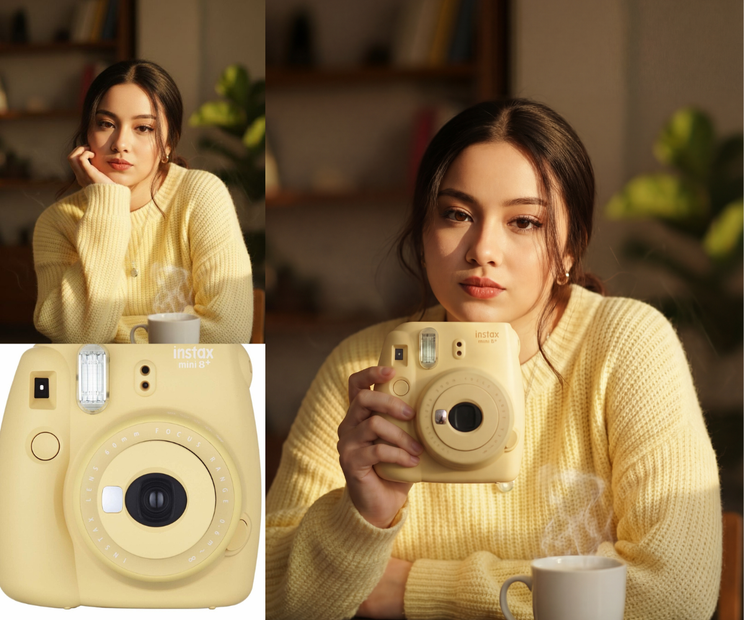
This workflow lets you add a product into a model’s empty hand using a reference product image—making it look like the model was originally holding the product during the shoot.
You don’t need a reshoot.
The system introduces the product while keeping the original image fully intact:
✔ Same face and expression
✔ Same pose and hand position
✔ Same background
✔ Same lighting and mood
The model starts empty-handed.
Only the product is added—cleanly and realistically.
How It Works
1. Upload the Model Image (Empty Hand)
Add the image of the model with an empty hand.
This image defines:
✔ pose and hand position
✔ facial expression
✔ lighting and background
Nothing in this image is changed.
2. Upload the Product Reference Image
Add the image of the product you want the model to hold
(for example: lipstick, phone, bottle, cosmetic).
This tells the system:
“Place this product into the model’s hand.”
3. Match Scale & Position
The workflow automatically:
✔ resizes the product
✔ matches perspective
✔ aligns it to the hand naturally
So it fits the grip and orientation correctly.
4. Insert the Product Into the Hand
The product is placed into the model’s hand with:
✔ realistic proportions
✔ correct angle
✔ natural placement
The hand pose remains unchanged.
5. Save the Final Image
Download the completed image once processing is finished.
🎯 Final Result
You get a seamless image where:
✨ A product is added to an originally empty hand
✨ The model remains completely unchanged
✨ No reshoot or reposing is required
✨ Ideal for ads, branding, and e-commerce
The final output looks like the product was always part of the original photoshoot.
Read more