

Hunyuan 3D v3.1 Pro for Text to 3D
Generate a textured 3D model from a text description using Tencent's Hunyuan 3D v3.1 Pro. Describe the object, set your polygon count, and hit run.
3D
Hunyuan 3D v3.1 Pro
Text to 3D
35



Nodes & Models
Hunyuan3dProTextTo3d_floyo
ShowText|pysssss
ShowText|pysssss
Preview3D
PreviewImage
ABOUT THE WORKFLOW
Generate a 3D Model from Text
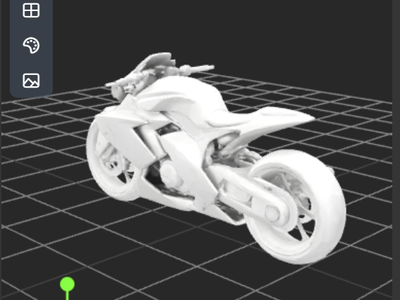
Describe an object in plain language and the workflow generates a fully textured 3D model. You get a downloadable GLB file and a thumbnail preview. Optional PBR materials add metallic, roughness, and normal maps for production use.
Partner node. This workflow calls an external API, so each run uses credits from your API wallet. No API key needed. Floyo handles the connection.
Model
Hunyuan 3D v3.1 Pro by Tencent. A professional-grade text-to-3D model that produces clean geometry with configurable polygon counts up to 1.5M faces and optional PBR textures.
HOW IT WORKS
Step 1. Write your prompt
Describe the object you want. Include shape, materials, and style. "A cute chibi robot with round eyes, metallic blue body, small antenna on top" works better than "a robot."
Step 2. Hit run
The settings are already dialled in. For a first run, change nothing. The model generates geometry and textures, then returns a GLB file.
Step 3. Preview and download
Inspect the 3D model in the built-in viewer. Download the GLB and drop it into your engine or editor.
Ready for: Unity · Unreal · Blender · 3D printing slicers
First time? Leave every setting as-is. The defaults (Normal mode · PBR off · 500K faces) are the right starting point for almost everyone.
RECOMMENDED SETTINGS
Quick-start guide. Find the goal that matches yours and copy the settings.
Standard generation (most people) — Normal mode · PBR off · 500K faces. The right starting point for almost everyone.
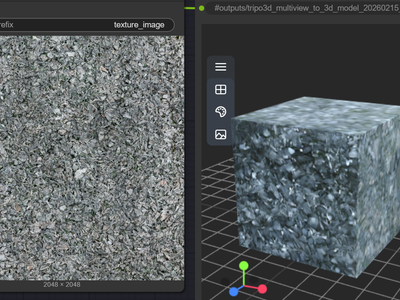
Need PBR textures for a game engine — Turn enable_pbr on. The output includes albedo, metallic, roughness, and normal maps alongside the mesh.
Want a high-detail hero asset — Raise face_count to 1,000,000 or 1,500,000. Use this for close-up renders or cinematics where geometry detail matters.
Quick preview or concept check — Drop face_count to 100,000 or lower. Faster generation, good enough to evaluate the shape before committing to a full-res run.
3D printing — Set a high face_count for smooth surfaces. Leave PBR off since print slicers ignore material maps.
The model is missing detail or looks blobby — Make the prompt more specific. Name the materials, proportions, and surface finish. "Smooth matte plastic shell with chrome trim" gives the model more to work with than "shiny robot."
Prompt: Be specific about shape, material, and style. "A weathered wooden treasure chest with iron bands and a brass latch" produces a better result than "a chest." Include surface descriptions like glossy, matte, brushed metal, or rough stone. Keep it under a few sentences.
LEARN
📹 Videos
ComfyUI 101 Free Course ft. Sebastian Kamph
Floyo 101 for Team Collaboration
✨ Quick links
USE CASES
🎮 Game Developers
Describe a prop, character, or environment piece and get a game-ready GLB with optional PBR materials. Set the polygon count to match your target platform.
🎬 Pre-visualization & Film
Generate 3D assets for blocking out scenes, camera tests, and storyboard visualization without waiting on a modeling team.
🛍️ E-commerce & Product Visualization
Turn a product description into a 3D model for interactive viewers, AR try-on, or catalog renders.
🖨️ 3D Printing & Prototyping
Go from a text description to a printable mesh. Raise the face count for smooth surfaces and export the GLB to your slicer.
🎨 Concept Artists & Worldbuilders
Rapidly generate 3D references for characters, creatures, and objects to validate a concept before committing to a full manual build.
WHAT WORKS BEST / WHAT TO AVOID
✅ Works great
Single objects with clear shape descriptions
Specific material callouts (wood, chrome, matte plastic)
Props, characters, creatures, and furniture
Descriptions that define proportions and surface finish
⚠️ May produce softer results
Full scenes or multi-object compositions
Vague prompts like "something cool" or "a vehicle"
Extremely fine surface detail (engraving, tiny text)
Articulated poses with complex joint positions
FAQ
What is Hunyuan 3D v3.1 Pro?
Hunyuan 3D v3.1 Pro is a professional-grade text-to-3D model from Tencent. It generates fully textured 3D meshes from natural language descriptions, with configurable polygon counts up to 1.5 million faces and optional PBR material output. It is the latest production release in Tencent's Hunyuan 3D model family.
What file format does the output use?
The workflow outputs a GLB file, which is the binary version of glTF. GLB is supported natively in Unity, Unreal Engine, Blender, and most 3D viewers. You can convert it to OBJ, FBX, or STL using free tools if your pipeline needs a different format.
What does enable PBR do?
Turning on PBR (physically-based rendering) adds metallic, roughness, and normal maps to the output alongside the base texture. This is useful when the model is going into a game engine or renderer that uses PBR shading. Leave it off for previews, 3D printing, or when you only need the base color texture.
What face count should I use?
The default of 500,000 faces works for most use cases. For hero assets, cinematics, or close-up renders, raise it to 1,000,000 or 1,500,000. For quick previews or mobile game assets, drop it to 100,000 or lower. Higher counts produce smoother surfaces but take longer to generate.
Can I use Hunyuan 3D v3.1 Pro outputs commercially?
Hunyuan 3D v3.1 Pro is a proprietary Tencent model accessed via API. Commercial use of generated outputs is generally permitted under Tencent's terms, but review the current license terms for your specific use case, especially for shipped products or client deliverables.
How is this different from the Hunyuan 3D image-to-3D workflow?
This workflow generates a 3D model from a text prompt alone. The image-to-3D workflow starts from a reference photo or render and reconstructs the 3D shape from that image. Use text-to-3D when you are starting from an idea. Use image-to-3D when you have a visual reference you want to match.
How to run Hunyuan 3D v3.1 Pro online?
You can run Hunyuan 3D v3.1 Pro online through Floyo. No installation, no setup, no API key to wire up. Open the workflow in your browser, write your prompt, and hit run. Free to try.
WHY FLOYO?
Floyo is the only platform with team collaboration for ComfyUI in the browser. You run workflows with no install. You share run history, assets, and models across your team. You pay only when you generate. Floyo supports open-source and closed-source models.
A designer runs a generation and likes the result. A teammate opens that exact run from shared history and keeps going. No file handoffs. No version confusion.
For studios and enterprise teams, Floyo adds private workspaces, pooled resources, and a team usage dashboard. Other ComfyUI cloud tools run for one person at a time. Floyo runs for the whole team, with transparent per-generation costs.
Ready to try it?
Describe your first object and run it. The settings are already set.
Questions? Watch the free course or check the FAQ above.
Read more

_1783028563354.gif?width=400&height=300&quality=80&resize=contain&format=origin)


