floyo logo
Powered by
ThinkDiffusion
floyo logo
Powered by
ThinkDiffusion

Meshy v6 Text to 3D Model

Create a 3D using Meshy v6 text to model

60

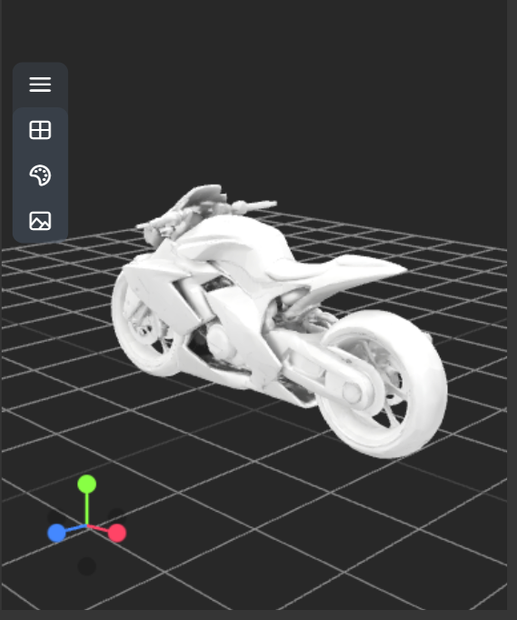
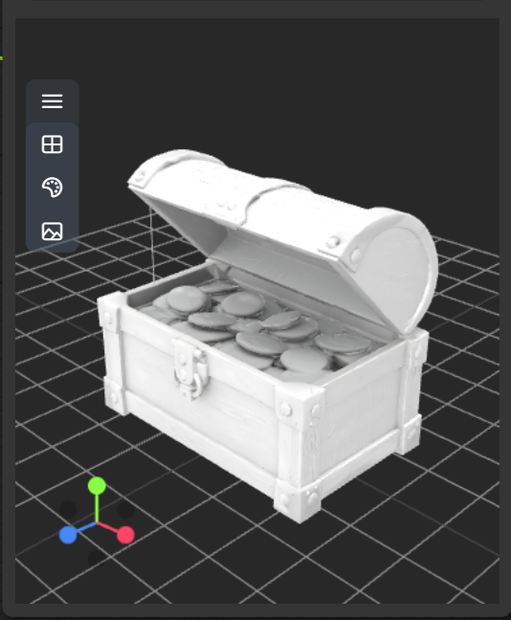
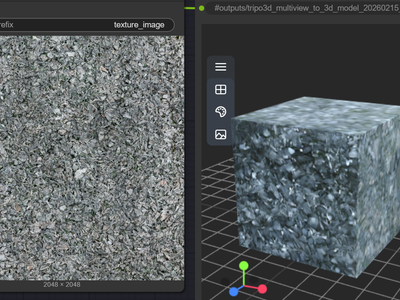
Meshy v6 Text to 3D lets you generate production-ready 3D models directly from prompts, with cleaner geometry and better textures than previous versions.

What Meshy v6 Text to 3D is

  • A web-based AI 3D generator that turns natural-language prompts into fully textured 3D assets (GLB/FBX/OBJ/USDZ).

  • The sixth‑gen Meshy model, focused on smarter geometry, higher texture fidelity, and faster generation workflows.

Key features

  • Smarter geometry: Smoother, more anatomically accurate characters and cleaner hard-surface edges, reducing manual cleanup.

  • Multiple input modes: Text‑to‑3D, Image‑to‑3D, Multi‑view‑to‑3D, plus separate AI texturing and retexturing.

  • Low Poly Mode for games: Generates optimized low‑poly meshes ready for real‑time engines, minimizing retopo work.

  • PBR texture support: Can output metallic, roughness, normal and other maps for realistic rendering in modern engines.

  • Export options: Download models in GLB, FBX, OBJ, USDZ, and even 3MF for multi‑color 3D printing.

  • Workflow extras: Free retries with same prompt, AI texturing editor, 3D‑to‑video previews, and API access.

Best-fit use cases

  • Rapid game asset prototyping: Stylized or realistic props, weapons, environment pieces, and even low‑poly characters via Low Poly Mode.

  • Character and creature concepts: Quickly block out humanoids or creatures, then refine in DCC tools or game engines.

  • Product visualization & 3D mockups: Turn product ideas into 3D for marketing, UI previews, or quick client pitches.

  • 3D printing (including multi‑color): Generate printable geometry and use multi‑color printing presets for FDM workflows.

  • Education, demos, and ideation: When you need “something usable now” from text without doing traditional modeling.​

If you tell me your target (game assets vs 3D print vs cinematic renders), I can give you prompt structures and setting recommendations specifically for v6 Text to 3D.

Read more
N
Generates in about -- secs

Nodes & Models

Meshy6TextTo3d_floyo
WorkflowGraphics
Preview3D
PreviewImage
ShowText|pysssss
ShowText|pysssss

Meshy v6 Text to 3D lets you generate production-ready 3D models directly from prompts, with cleaner geometry and better textures than previous versions.

What Meshy v6 Text to 3D is

  • A web-based AI 3D generator that turns natural-language prompts into fully textured 3D assets (GLB/FBX/OBJ/USDZ).

  • The sixth‑gen Meshy model, focused on smarter geometry, higher texture fidelity, and faster generation workflows.

Key features

  • Smarter geometry: Smoother, more anatomically accurate characters and cleaner hard-surface edges, reducing manual cleanup.

  • Multiple input modes: Text‑to‑3D, Image‑to‑3D, Multi‑view‑to‑3D, plus separate AI texturing and retexturing.

  • Low Poly Mode for games: Generates optimized low‑poly meshes ready for real‑time engines, minimizing retopo work.

  • PBR texture support: Can output metallic, roughness, normal and other maps for realistic rendering in modern engines.

  • Export options: Download models in GLB, FBX, OBJ, USDZ, and even 3MF for multi‑color 3D printing.

  • Workflow extras: Free retries with same prompt, AI texturing editor, 3D‑to‑video previews, and API access.

Best-fit use cases

  • Rapid game asset prototyping: Stylized or realistic props, weapons, environment pieces, and even low‑poly characters via Low Poly Mode.

  • Character and creature concepts: Quickly block out humanoids or creatures, then refine in DCC tools or game engines.

  • Product visualization & 3D mockups: Turn product ideas into 3D for marketing, UI previews, or quick client pitches.

  • 3D printing (including multi‑color): Generate printable geometry and use multi‑color printing presets for FDM workflows.

  • Education, demos, and ideation: When you need “something usable now” from text without doing traditional modeling.​

If you tell me your target (game assets vs 3D print vs cinematic renders), I can give you prompt structures and setting recommendations specifically for v6 Text to 3D.

Read more

N
FloYo: Meshy v6 Text to 3D Model