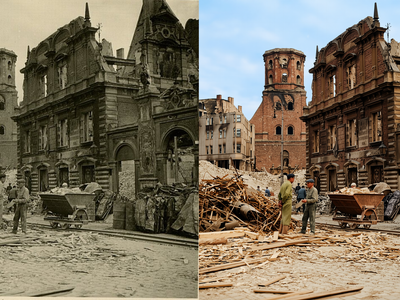
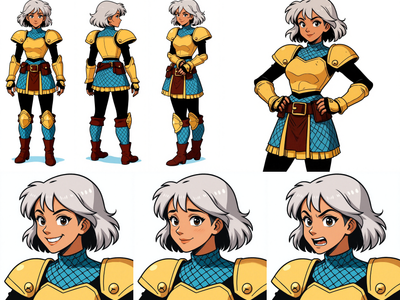
Upscaling Images to 4k using Qwen Image Edit 2511
Upscale to 2k to 4k
4k Upscale
Image
Image2Image
Image Edit
Image Upscale
Qwen Image Edit 2511
2.8k





Nodes & Models
VAELoader
qwen_image_vae.safetensors
UNETLoader
qwen_image_edit_2511_bf16.safetensors
EmptyLatentImage
CLIPLoader
qwen_2.5_vl_7b_fp8_scaled.safetensors
LoadImage
LoraLoaderModelOnly
Qwen-Image-Edit-2511-Lightning-8steps-V1.0-fp32.safetensors
qwen_image_edit_2511_upscale.safetensors
CLIPTextEncode
TextEncodeQwenImageEditPlus
KSampler
VAEDecode
PreviewImage
ImageConcanate
ImageConcanate
Upscaling with Qwen Image Edit 2511 plus an upscale LoRA is about using the edit model as a smart super‑res engine: it enlarges the image while reconstructing detail, not just stretching pixels.
Overview
Qwen Image Edit 2511 already supports high native resolutions (around 2.5K square) and image‑to‑image editing, which makes it suitable for “edit = upscale” tasks. Community upscale LoRAs plug into this base to specialize it for 2K+ enlargement, sharpening, and deblurring, while preserving colors, lighting, and overall composition.
Why use this approach
Produces cleaner, more natural high‑res results than simple interpolators, recovering fine edges, textures, and small details.
Lets you phrase upscale as an edit (“upscale / sharpen / unblur, keep the same look”), so the model respects content instead of restyling it.
Can chain with other Qwen LoRAs (style, character, pose) in one pass, so you refine design and resolution at the same time.
Use cases
Enlarging thumbnails or mid‑res AI renders to ~2K–4K while cleaning blur and noise for print, close‑up crops, or video backgrounds.
Restoring low‑quality or compressed images by upscaling and deblurring without creating overly plastic, over‑sharpened artifacts.
Preparing high‑resolution stills for downstream pipelines (I2V, camera‑angle edits, or further compositing) that benefit from extra detail headroom.
Read more
0
Reply