Qwen Image Edit 2511 Restore Damage Old Photograph
Restore Damage Old Photograph
Image
Image2Image
Qwen
Qwen Image Edit 2511
2.6k


Nodes & Models
CLIPLoader
qwen_2.5_vl_7b_fp8_scaled.safetensors
VAELoader
qwen_image_vae.safetensors
UNETLoader
qwen_image_edit_2511_bf16.safetensors
LoadImage
LoraLoaderModelOnly
Qwen-Image-Edit-2511-Lightning-4steps-V1.0-bf16.safetensors
ConditioningZeroOut
KSampler
VAEDecode
SaveImage
PreviewImage
QwenEditConfigPreparer
TextEncodeQwenImageEditPlusCustom_lrzjason
Qwen Image Edit 2511 photo restoration. Upload a damaged scan, run, get a restored version.
The workflow uses the Lightning LoRA for 4-step restoration at CFG 1 with euler_ancestral sampling. The restoration prompt is pre-loaded with production instructions: facial preservation, grain and scratch removal, torn edge repair, optional colorization, and professional color grading at 4K. The model's 2511 update specifically targets identity stability across edits, which matters for family portraits and historical photos where faces must stay recognizable.
Upload a scan, adjust the prompt if needed, and run. The output is a cleaned, sharpened reconstruction that handles most of the heavy repair work, leaving only subtle corrections for final manual polish if required.
How do you use Qwen Image Edit 2511 for photo restoration?
Upload a damaged photograph, review the pre-loaded restoration prompt, and run. The Lightning LoRA completes the restoration in 4 steps. The default prompt covers scratch removal, facial preservation, torn edge repair, colorization, and professional color grading. Adjust the instruction text for specific damage types before running.
Input image Upload a scan of the damaged photograph. Higher-resolution scans produce better restoration results. The QwenEditConfigPreparer node resizes the reference to 1536px on the longest edge and the vision-language processor to 384px. Both are handled automatically. Scan at the highest resolution your hardware supports before feeding the image in.
Restoration prompt The default prompt is production-grade: "High-resolution photo reconstruction. Detailed facial preservation, zero identity drift. Remove dust, scratches, and grain. Full colorization with lifelike subsurface scattering on skin. Naturalistic lighting, professional color grading. Repair torn edges and artifacts. 4K, highly detailed, sharp focus, neutral white balance, professional photography, realistic textures, volumetric lighting."
This prompt covers the full restoration range. Adjust it based on the specific damage in your photo:
For black-and-white restoration without colorization: remove the colorization language and add "black and white, maintain original tones." For heavy structural damage (large tears, missing sections): add "reconstruct missing areas, fill large gaps with contextually appropriate content, maintain original composition." For mild damage (light scratches, fading): simplify to "remove scratches and grain, enhance sharpness and contrast, restore natural tones, preserve original composition." For faces specifically: keep "detailed facial preservation, zero identity drift." This is the 2511 update's primary improvement.
Lightning LoRA (4-step) The Lightning LoRA (Qwen-Image-Edit-2511-Lightning-4steps-V1.0-bf16) runs at full strength by default. This reduces the restoration to 4 inference steps, making it fast enough for batch workflows. For maximum restoration detail on heavily damaged photos, the community recommends using the fp32 variant of V1.0 when character consistency is the priority.
Steps (default: 4) 4 steps with the Lightning LoRA. This is enough for production-quality restoration output. If output quality feels insufficient on heavily damaged inputs, try 6-8 steps without the Lightning LoRA. Slower but with more refinement capacity.
CFG (default: 1) CFG 1 is set for the Lightning LoRA. Do not increase significantly. High CFG with the Lightning LoRA produces artifacts. If running without the LoRA, increase CFG toward 2.5-3 for better instruction-following.
Instruction field The QwenEditConfigPreparer instruction tells the model how to interpret the edit: "Describe the key features of the input image, then explain how the user's text instruction should alter or modify the image." This is pre-configured and handles the model's vision-language processing. Leave it as-is.
What is Qwen Image Edit 2511 photo restoration good for?
Qwen Image Edit 2511 is strongest for damaged photographs where face and composition preservation matter: family portraits, historical photos, archival scans, and prints with structural damage. The 2511 update's identity-stability improvements make it more reliable for restoration than earlier versions when faces are the priority detail.
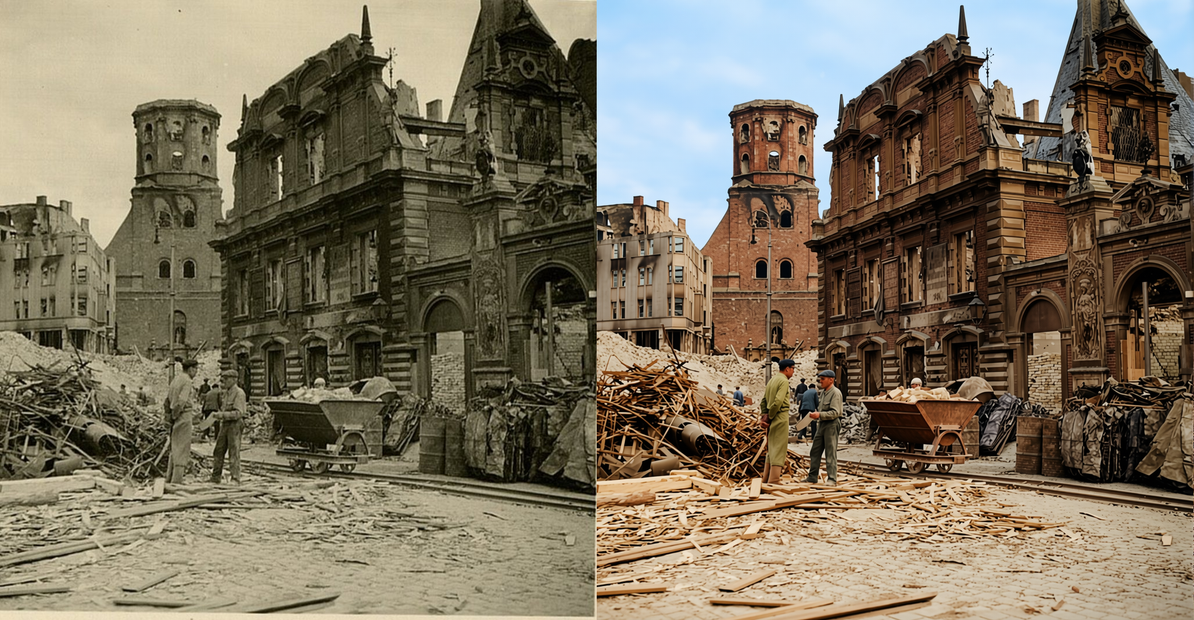
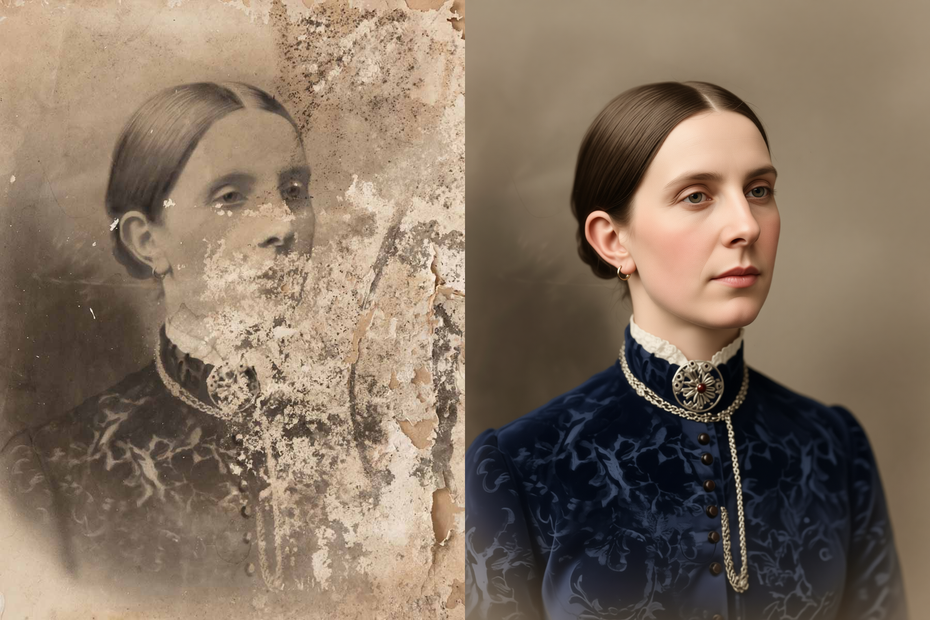
Family and heirloom photos. Scratched, faded, torn, or water-damaged prints of family portraits. The model handles the heavy repair work: removing surface damage, reconstructing torn edges, sharpening subjects. The restored output is usable as a modern reprint of the original scene. Faces and composition stay recognizable.
Black-and-white to color restoration. The default prompt includes full colorization with realistic skin subsurface scattering. For historical B&W photos, the model adds contextually appropriate color based on the scene content. Adjust the colorization instructions in the prompt for specific color preferences.
Archive and museum digitization. Batch-restore scanned prints from a collection. The 4-step Lightning LoRA makes this fast enough for high-volume workflows. For archival use where authenticity is critical, use the output as a starting point and apply light manual corrections to any areas where the model's reconstruction may have deviated.
Photography studios and restoration services. Generate a strong AI base restoration that handles most of the structural repair, then apply fine corrections in Photoshop, Krita, or GIMP. The 4-step output is a working draft, not always a final. Plan for light manual finishing on complex damage.
Honest notes: the model produces strong base restorations but can occasionally alter fine background details or small objects when reconstructing heavily damaged areas. For photos where background accuracy is as important as face accuracy, review the output carefully and rerun with a stronger preservation instruction if needed. Large missing sections (more than 20% of the image) may produce less convincing fills. Supplement with manual cloning for major structural gaps.
How does Qwen Image Edit 2511 compare to standard photo restoration tools?
Qwen Image Edit 2511 produces contextually aware restorations rather than interpolating pixels. It understands what's in the photo and reconstructs missing content accordingly. Compared to Photoshop healing brush or ESRGAN upscaling, it handles structural damage (tears, missing sections, heavy grain) more effectively. The tradeoff is less predictability on fine details.
Photoshop and GIMP manual tools are predictable and non-destructive. They're the right finishing layer. Qwen Image Edit 2511 is the right starting point. It handles the heavy structural repair that would take hours manually, in seconds.
ESRGAN and similar upscalers sharpen and scale but don't repair damage. They work well after a Qwen restoration pass to bring the output to print resolution.
The practical workflow: Qwen Image Edit 2511 for base restoration, ESRGAN or SeedVR2 for upscaling, and Photoshop for final touch-up. Each tool does what it's best at.
FAQ
What types of photo damage can Qwen Image Edit 2511 restore?
Dust, grain, scratches, creases, tape marks, paper tears, fading, yellowing, and small missing areas. The model removes surface damage, sharpens subjects, and reconstructs torn edges. For B&W photos, it can add realistic colorization. Large missing sections (more than 20% of the image) produce less convincing fills and benefit from supplementary manual work.
Does Qwen Image Edit 2511 preserve the faces in old photographs?
Yes, and face preservation is the 2511 update's specific improvement. The default prompt includes "detailed facial preservation, zero identity drift." The model keeps faces and composition recognizable while restoring the surrounding damage. For portraits, this is the most important setting in the prompt.
How long does photo restoration take with the Lightning LoRA?
4 steps with euler_ancestral sampling. Generation completes in seconds rather than minutes. For batch workflows processing many photos, the 4-step Lightning LoRA makes high-volume restoration practical without long generation queues.
Should I scan the photo at high resolution before restoring?
Yes. The QwenEditConfigPreparer automatically handles resizing, but higher input resolution gives the model more detail to work with. Scan at 600 DPI or higher for standard prints. The restoration output will be sharpened and enhanced, but it can only recover detail that exists in the scan.
How do I run Qwen Image Edit 2511 photo restoration online?
You can run this workflow online through Floyo. No installation, no setup. Open the workflow in your browser, upload your damaged photo, and hit run. Free to try.
Read more