

Turn Any Podcast into Blog and Social Content
Drop in a podcast recording. Get back an SEO blog post, a ready-to-post social media package, and a hero image grounded in the actual episode visuals.
content creation
gemini flash
nano banana
productivity
text to image
video
whisper
103

Nodes & Models
VLM_floyo
NanoBanana2Unified_floyo
LLM_floyo
VHS_LoadVideo
ImageFromBatch
PreviewImage
SaveImage
Apply Whisper
PreviewAny
One podcast recording in, three content pieces out.
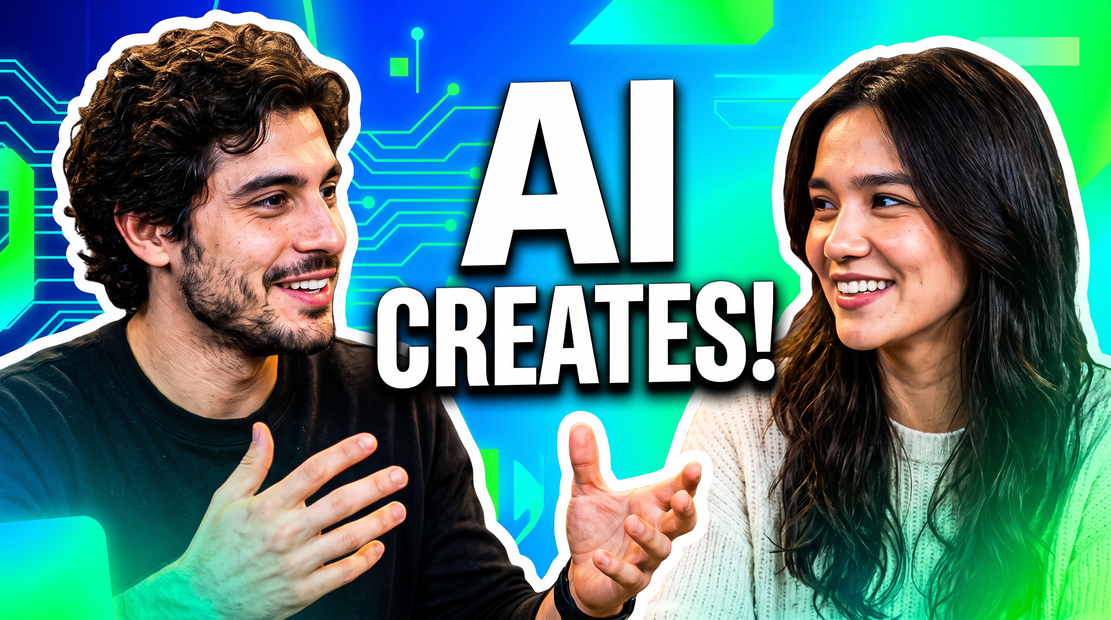
Upload a video podcast episode. The workflow transcribes the audio, analyzes the transcript for key points and hooks, then generates three things in parallel: an SEO blog post, a social media content package (LinkedIn post, X thread, short-form captions, and pull quotes), and a hero image. The image is not a generic stock graphic. Gemini Flash vision looks at the actual podcast frames and writes an image prompt grounded in the real hosts, studio, and energy of that specific episode. Nano Banana 2 renders it.
Drop your file in, hit run. No prompts to write.
How does the podcast-to-content workflow generate a blog, social posts, and hero image?
The workflow runs four AI models in sequence. Whisper transcribes the audio. A content analyzer extracts key points, quotes, hooks, and a visual theme from the transcript. That brief fans out to three generators in parallel: one writes the blog post, one builds the social package, and one creates a hero image using Nano Banana 2 with a prompt written by Gemini Flash vision after seeing the actual podcast frames.
Video file
Drop in your podcast recording. Video podcasts work best because the workflow uses the visual frames for image generation. Audio-only files will still produce the blog and social content, but the hero image needs video frames to work from.
Transcription
Whisper (large model) handles the audio-to-text step. Language detection is automatic. Nothing to configure here.
Content brief
The first LLM pass extracts the episode topic, key points, notable quotes, actionable takeaways, content hooks, and a visual theme. This brief feeds every downstream generator, so all three outputs stay aligned with the same source material.
Blog post output
An 800-1200 word SEO blog post in markdown. Headline, hook paragraph, 3-5 sections built around key points, embedded quotes from the episode, an actionable takeaway section, and a CTA to listen to the full episode. Written in a conversational tone.
Social content output
A full package in one output: a LinkedIn post (150-250 words with hashtags), an X/Twitter thread (5-7 tweets), three short-form captions for Reels/TikTok/Shorts, and three pull quotes ready for quote cards or audiogram overlays. Each piece is written native to its platform.
Hero image
Gemini Flash vision studies sampled frames from the podcast video, sees the real hosts, studio, lighting, and expressions, then writes an image prompt connected to the episode content. Nano Banana 2 renders it at 2K in 16:9. The result looks like a designed YouTube thumbnail, not a stock photo.
What is a podcast-to-content AI workflow good for?
Best for podcast teams, content marketers, and creators who need to turn every episode into a full content package without spending hours writing and designing. One upload produces everything you need to promote an episode across blog, social, and video platforms.
Weekly podcast with a backlog of episodes and no blog posts? Run each recording through and build out your content library in minutes instead of days.
Marketing team promoting a company podcast? The social package gives you platform-ready posts. No need to brief a copywriter for each episode or resize the same quote card five times.
Solo creator doing everything yourself? This collapses the post-production content step. Record, upload, get your blog and social posts, schedule them, move on.
The hero image works well for YouTube thumbnails, blog headers, and social cards. Because it's grounded in the actual episode (real hosts, real studio), it looks specific to your show instead of generic.
Where it won't help: audio-only podcasts still get the blog and social content, but the hero image needs video frames to see the hosts and studio. If your podcast is audio-only, the image output will be less grounded.
FAQ
What video formats work with this podcast workflow?
Any standard video format: MP4, MOV, MKV, WebM. Zoom recordings, Riverside exports, OBS captures, or any screen recording of a video call all work. The file needs both a video track (for frames) and an audio track (for transcription).
Can I use this with an audio-only podcast?
The blog post and social content will generate from the audio transcript. The hero image needs video frames to ground the visual, so audio-only files will produce a less specific image. For best results, use a video recording.
What does the social content package include?
One LinkedIn post with hashtags, a 5-7 tweet X/Twitter thread, three short-form captions for Reels/TikTok/Shorts, and three standalone pull quotes for quote cards. All in one output, ready to copy and paste into each platform.
How long does the workflow take to run?
Most of the time is spent on Whisper transcription. A 30-60 minute episode takes a few minutes to process end to end. The blog, social, and image generation happen in parallel after the transcript is ready.
How do I run a podcast-to-content workflow online?
You can run this podcast-to-content workflow online through Floyo. No installation, no setup. Open the workflow in your browser, upload your recording, and hit run. Free to try.
Read more


_1756358901929.png?width=400&height=300&quality=80&resize=cover)

%20(1)_1777105835912.webp?width=400&height=300&quality=80&resize=contain&format=origin)


