Tripo3D v2.5 for Multivew to 3D
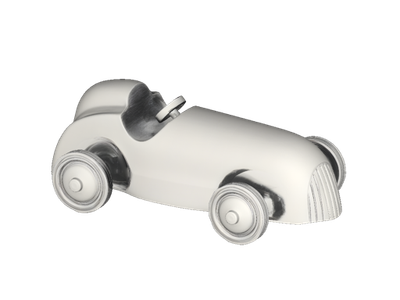
Upload up to four photos of your subject from different angles and Tripo3D v2.5 builds a textured 3D mesh, ready for game engines, animation, or 3D printing.
3D
Image to 3D
Multiview to 3D
Tripo 3D v2.5
32

Nodes & Models
Tripo3dMultiviewTo3d_floyo
LoadImage
Preview3D
PreviewImage
ShowText|pysssss
ShowText|pysssss
ABOUT THE WORKFLOW
Build a 3D Model from Photos
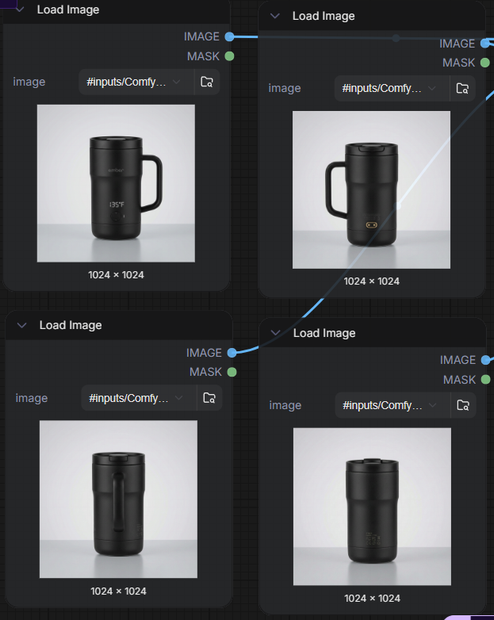
Upload photos of your subject from the front, back, left, and right. The model reconstructs a textured 3D mesh from all views at once and returns a downloadable file you can open in any 3D app.
Partner node. This workflow calls an external API, so each run uses credits from your API wallet. No API key needed. Floyo handles the connection.
Model
Tripo3D v2.5 by VAST (Tripo AI). Builds clean, geometrically accurate 3D meshes with UV-mapped textures from multiview images.
HOW IT WORKS
Step 1. Upload your front image
The main view of your subject. This is the only required image. It sets the primary shape and texture.
Works great with: products · characters · props · vehicles
Step 2. Add more angles (optional)
Upload back, left, and right views of the same subject. More angles give a cleaner, more accurate mesh. All images should show the same subject under similar lighting.
Step 3. Hit run
The images go to the Tripo API, which builds a textured 3D mesh from all views at once. A rendered preview comes back alongside the model file.
Step 4. Preview and download
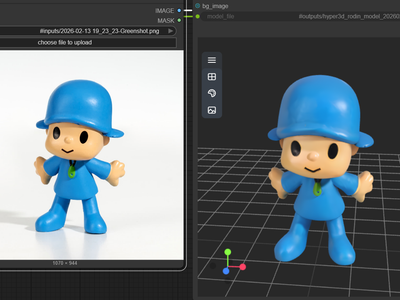
The 3D model opens in an on-canvas viewer where you can spin it around and inspect it. Download the file when you are satisfied.
Ready for: Unity · Unreal · Blender · 3D printing software
First time? Leave every setting as-is. Upload a front image on a plain background with even lighting and hit run.
RECOMMENDED SETTINGS
Quick-start guide. Find the goal that matches yours and copy the settings.
Standard 3D model (most people) — Front image only · standard texture · random seed. The right starting point for almost everyone.
Want a more accurate mesh — Upload all four views (front, back, left, right). More angles reduce guesswork on unseen sides.
Need PBR maps for a game engine — Turn PBR on. The output includes physically based rendering maps you can plug into Unity or Unreal materials.
Building for real-time or mobile — Lower the face limit. Fewer polygons keep the model lightweight for in-engine use.
Want quad topology for animation — Turn quad on. Quad meshes deform better for rigging and animation than triangulated output.
Mesh has texture artifacts — Shoot on a plain, evenly lit background. Busy backgrounds bleed into the surface texture.
Reproduce a previous result — Lock the seed to a fixed number. Same inputs plus same seed returns the same mesh.
Prompt: This workflow has no text prompt. The 3D model is built entirely from the images you upload. Quality depends on clean, well-lit photos with a consistent background across all views.
LEARN
📹 Videos
ComfyUI 101 Free Course ft. Sebastian Kamph
Floyo 101 for Team Collaboration
✨ Quick links
USE CASES
🎮 Game Developers
Turn reference photos of props, characters, or vehicles into game-ready 3D assets with clean topology and optional PBR maps.
🎬 3D Artists & Animators
Build base meshes from photo references in seconds instead of modeling from scratch. Enable quad topology for rigging and animation.
🏭 Product & E-commerce
Photograph a product from four angles and generate a 3D model for interactive viewers, AR previews, or catalog renders.
🖨️ 3D Printing
Go from photos to a printable mesh without manual modeling. Adjust the face limit to match your printer's resolution needs.
WHAT WORKS BEST / WHAT TO AVOID
✅ Works great
Solid objects on plain backgrounds
Even, consistent lighting across all views
Hard-surface subjects (products, props, furniture)
Four matched views of the same subject
⚠️ May produce softer results
Thin or transparent parts (hair, glass, foliage)
Busy or cluttered backgrounds
Mixed lighting or color temperature across views
Single-image input for complex subjects
FAQ
What is Tripo3D v2.5 and who makes it?
Tripo3D v2.5 is a 3D reconstruction model made by VAST (Tripo AI). It takes one to four photos of a subject and builds a textured polygonal mesh from them. Version 2.5 was released in January 2025 and is accessed through an API.
How many images do I need to generate a 3D model?
One front image is the minimum. The model reconstructs unseen sides on its own when given fewer views. Adding back, left, and right images improves accuracy and reduces guesswork, so four views produce the cleanest mesh.
What file format does the 3D model output in?
The workflow outputs a standard 3D model file that opens in the on-canvas viewer and can be downloaded for use in Unity, Unreal, Blender, and other 3D applications. You also get a rendered preview image of the model.
Does Tripo3D v2.5 support PBR maps for game engines?
Yes. Turn the PBR setting on and the output includes physically based rendering maps (albedo, normal, roughness, metallic) that plug into standard material setups in Unity, Unreal, and Blender.
What is the difference between Tripo3D v2.5 and TripoSR?
TripoSR is an earlier, open-source single-image-to-3D model from VAST. Tripo3D v2.5 is a newer, API-only model that accepts multiview input, produces higher-quality meshes with UV-mapped textures, and supports PBR maps, quad topology, and adjustable face counts. If you need multiview reconstruction and production-quality output, v2.5 is the stronger option.
Can I use the output commercially?
Tripo3D v2.5 is a proprietary API model, so commercial use is governed by VAST's terms. Review their current licensing to confirm coverage for your use case (shipped games, client work, product renders, or 3D printing).
How to run Tripo3D v2.5 online?
You can run Tripo3D v2.5 online through Floyo. No installation, no setup, no API key to wire up. Open the workflow in your browser, upload your images, and hit run. Free to try.
WHY FLOYO?
Floyo is the only platform with team collaboration for ComfyUI in the browser. You run workflows with no install. You share run history, assets, and models across your team. You pay only when you generate. Floyo supports open-source and closed-source models.
A designer runs an edit and likes the result. A teammate opens that exact run from shared history and keeps going. No file handoffs. No version confusion.
For studios and enterprise teams, Floyo adds private workspaces, pooled resources, and a team usage dashboard. Other ComfyUI cloud tools run for one person at a time. Floyo runs for the whole team, with transparent per-generation costs.
Ready to try it?
Upload a front photo of your subject on a plain background and hit run.
Questions? Watch the free course or check the FAQ above.
Read more