Hunyuan 3D v3.1 for Smart Topology
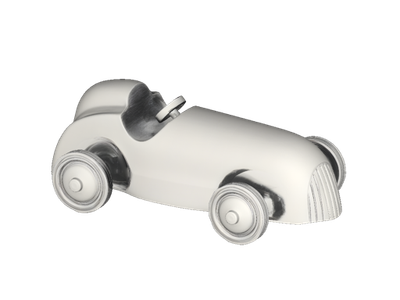
Upload a high-poly 3D model and retopologize it into clean, optimized geometry using Tencent's Hunyuan 3D PolyGen 1.5. Paste a model URL, pick your settings, and hit run.
3D
Hunyuan 3D v3.1
Image to 3D
Smart Topology
64

Nodes & Models
Hunyuan3dSmartTopology_floyo
PrimitiveString
Preview3D
PreviewImage
ShowText|pysssss
ShowText|pysssss
ABOUT THE WORKFLOW
Retopologize a 3D Model
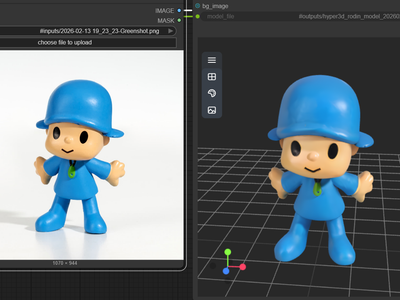
Paste a URL to a GLB or OBJ file. The model rebuilds the mesh with cleaner, structured topology and fewer polygons, then returns a download link, a thumbnail, and an interactive 3D preview. Upload a dense sculpt, get back a production-ready asset.
Partner node. This workflow calls an external API, so each run uses credits from your API wallet. No API key needed. Floyo handles the connection.
Model
Hunyuan 3D PolyGen 1.5 by Tencent. An AI retopology model that converts dense meshes into clean, structured geometry with proper edge flow, supporting both triangle and quad faces.
HOW IT WORKS
Step 1. Paste your 3D model URL
Provide a publicly accessible URL to a GLB or OBJ file. This is the model that gets retopologized.
Works great with: AI-generated meshes · sculpts · photogrammetry scans
Step 2. Pick your settings (optional)
Choose triangle or quad topology, and set the face reduction level. Leave everything as-is for a first run.
Step 3. Hit run and inspect
PolyGen 1.5 rebuilds the mesh topology and returns the result. Spin it in the built-in 3D viewer, check the wireframe, and download.
Ready for: Unity · Unreal · Blender · Maya · any 3D engine
First time? Leave every setting as-is. The defaults (GLB · triangle · medium) are the right starting point for almost everyone.
RECOMMENDED SETTINGS
Quick-start guide. Find the goal that matches yours and copy the settings.
Standard retopology (most people) — GLB · triangle · medium. The right starting point for almost everyone.
Need quads for animation or rigging — Switch polygon type to triangle (the model outputs a mix of quads and triangles when set to triangle, or pure triangles). Quads deform more smoothly for character rigs and blend shapes.
Want the lightest possible mesh for mobile or web — Set face level to low. Polygon count drops further, but fine surface detail may soften.
Want maximum detail preserved — Set face level to high. Keeps more geometry, better for hero assets viewed up close.
Working with an OBJ file instead of GLB — Switch file type to match your upload format. The output format follows the input.
The result looks too simplified — Step up from low to medium or high. Dense meshes with lots of surface variation need a higher face level to hold their shape.
Input: The model must be a publicly accessible URL pointing to a GLB or OBJ file. Local files need to be hosted first. Clean geometry going in means clean geometry coming out.
LEARN
📹 Videos
ComfyUI 101 Free Course ft. Sebastian Kamph
Floyo 101 for Team Collaboration
✨ Quick links
USE CASES
🎮 Game Developers
Turn dense AI-generated or sculpted models into optimized, engine-ready assets with proper polygon counts for real-time rendering.
🎬 3D Animators & Riggers
Get clean edge flow and structured topology that deforms correctly for character rigs, blend shapes, and motion capture.
🏗️ Architects & Product Designers
Convert photogrammetry scans or detailed CAD exports into lighter models for real-time walkthroughs, web viewers, and client presentations.
🎨 AI 3D Pipeline Users
Slot retopology into a multi-step pipeline: generate a model with any text-to-3D or image-to-3D tool, then run it through PolyGen 1.5 to make the output production-grade.
WHAT WORKS BEST / WHAT TO AVOID
✅ Works great
Dense, high-poly meshes from AI generators
Sculpted models from ZBrush or similar tools
Photogrammetry scans with heavy geometry
Single-object assets with clear surface structure
⚠️ May produce softer results
Models that are already well-topologized
Meshes with complex internal structure or nested parts
Extremely low-poly models with little to optimize
Files with broken geometry or open holes
FAQ
What is AI retopology and why does it matter for 3D production?
Retopology is the process of rebuilding a 3D model's mesh into cleaner, more efficient geometry. In traditional pipelines, this is done by hand and can take hours per asset. AI retopology automates it: you feed in a dense model, and the AI reconstructs it with structured edge flow, lower polygon counts, and topology that works for animation, games, and real-time engines.
What is Hunyuan 3D PolyGen 1.5?
PolyGen 1.5 is Tencent's AI retopology model, part of the Hunyuan 3D family. It uses an autoregressive mesh generation approach to rebuild topology face by face, producing continuous edge loops and clean wireframe structure. It supports both triangle and quad output and three reduction levels (high, medium, low).
Can Hunyuan PolyGen 1.5 output quad topology for animation?
Yes. The polygon type setting controls whether the output uses triangles or a mix of quads and triangles. Quad-dominant output is better for animation and rigging because quads deform more predictably than triangles across joints and blend shapes.
What is the difference between high, medium, and low face level?
Face level controls how aggressively the polygon count is reduced. High keeps the most geometry and preserves fine surface detail. Medium balances file size with visual fidelity. Low produces the lightest mesh, suited for mobile, web, or background assets where detail matters less.
Can I use retopologized models commercially?
PolyGen 1.5 is a proprietary Tencent API, so commercial use is governed by Tencent's terms rather than an open license. Review Tencent's current usage policy, and make sure you hold the rights to any model you upload for processing.
What 3D file formats does Hunyuan PolyGen 1.5 support?
The workflow accepts GLB and OBJ files. The input must be a publicly accessible URL, not a local file. The output format matches the input: upload a GLB, get a GLB back.
How to run Hunyuan 3D PolyGen 1.5 retopology online?
You can run Hunyuan 3D PolyGen 1.5 online through Floyo. No installation, no setup, no API key to wire up. Open the workflow in your browser, paste your model URL, and hit run. Free to try.
WHY FLOYO?
Floyo is the only platform with team collaboration for ComfyUI in the browser. You run workflows with no install. You share run history, assets, and models across your team. You pay only when you generate. Floyo supports open-source and closed-source models.
A 3D artist retopologizes a model and likes the result. A teammate opens that exact run from shared history and applies the same settings to a different asset. No file handoffs. No version confusion.
For studios and enterprise teams, Floyo adds private workspaces, pooled resources, and a team usage dashboard. Other ComfyUI cloud tools run for one person at a time. Floyo runs for the whole team, with transparent per-generation costs.
Ready to try it?
Paste a 3D model URL and run it. The settings are already set.
Questions? Watch the free course or check the FAQ above.
Read more