

FLUX.2 Max · Text to Image
Write a prompt and FLUX.2 Max by Black Forest Labs generates the highest-quality image in the FLUX.2 family, with photorealistic detail, accurate text rendering, and strong prompt adherence.
flux 2 max
Image
photorealistic
text rendering
text to image
310
_1783065533774.png?width=1400&height=620&quality=80&resize=contain)
_1783065533774.png?width=1400&height=620&quality=80&resize=contain)
_1783065533774.png?width=104&height=104&quality=80&resize=cover)
_1783065533774.png?width=104&height=104&quality=80&resize=cover)

Nodes & Models
Flux2Max_floyo
FloyoStickyNote
SaveImage
ABOUT THE WORKFLOW
Generate an Image from Text
Write a prompt describing the image you want. FLUX.2 Max generates it with studio-grade photorealism, accurate in-image text, and precise spatial composition. Pick your aspect ratio, output format, and seed, then download. One prompt in, one image out.
Partner node. This workflow calls an external API, so each run uses credits from your API wallet. No API key needed. Floyo handles the connection.
Model
FLUX.2 Max by Black Forest Labs. The top-tier model in the FLUX.2 family, built on a transformer-based flow matching architecture. Strongest prompt adherence, highest editing consistency, and the best photorealism across the FLUX.2 lineup. Handles complex multi-subject prompts, legible text rendering, and fine anatomical detail (hands, eyes, skin) with fewer artifacts than any prior FLUX release.
HOW IT WORKS
Step 1. Write your prompt
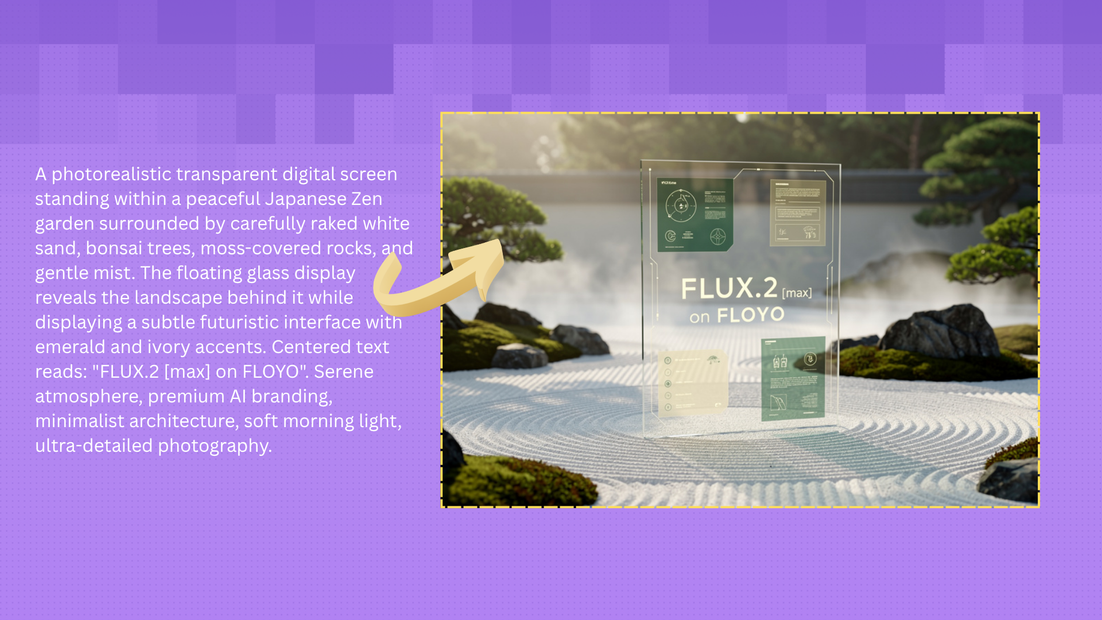
Describe the image: subject, setting, lighting, camera, composition, and style. To add text inside the image, put the words in quotes. "A transparent digital screen in a Japanese Zen garden displaying 'FLUX.2 Max', soft morning light, ultra-detailed photography" gives the model clear direction.
Works great with: product photography · editorial stills · concept art · posters · UI mockups
Step 2. Choose your aspect ratio
Pick the shape that fits your output: 16:9 landscape for widescreen, 9:16 portrait for vertical, 1:1 square for social, or other presets.
Step 3. Hit run and download
FLUX.2 Max generates the image and returns it in your chosen format (JPEG or PNG).
Ready for: Figma · Photoshop · Canva · print · social media · web
First time? Leave every setting as-is. The defaults (16:9 landscape, JPEG, random seed) are the right starting point for almost everyone.
RECOMMENDED SETTINGS
Quick-start guide. Find the goal that matches yours and copy the settings.
Standard image generation (most people) — 16:9 landscape, JPEG, random seed. Write your prompt and run.
Need lossless quality for print or compositing — Switch output format from JPEG to PNG. Larger file, no compression artifacts.
Want a specific aspect ratio for social or web — Switch from 16:9 to 9:16 for vertical, 1:1 for square, or 4:3 for standard. The model adapts composition to the chosen ratio.
Adding text inside the image — Put the exact words in quotes in the prompt. FLUX.2 Max renders in-image text with high accuracy across multiple font sizes and placements.
Reproduce or refine a result — Lock the seed. Same seed with a small prompt edit lets you adjust one element at a time without regenerating the whole composition.
Result looks too generic — Add photographic anchors to the prompt. "Shot on Hasselblad X2D, natural window light, 35mm lens, slight film grain" gives the model specific visual targets that sharpen the output.
Prompt: Write like a photographer or art director. Include the subject, setting, lighting, camera, and style. "A leather wallet on a marble surface with brass accents, product photography, detailed texture, professional lighting" is specific. "A nice picture of a wallet" is not.
LEARN
📹 Videos
ComfyUI 101 Free Course ft. Sebastian Kamph
Floyo 101 for Team Collaboration
✨ Quick links
USE CASES
📸 Product and Commercial Photography
Generate marketplace-ready product shots with photorealistic lighting, material rendering, and composition that match studio photography.
🪧 Posters, Signage, and Design with Text
Generate layouts with legible headlines, labels, and body text rendered directly in the image. No post-production text overlay needed.
🎨 Concept Art and Editorial Stills
Generate hero visuals, mood boards, and editorial images with precise prompt adherence across complex multi-subject compositions.
📱 Social Media and Marketing Assets
Generate on-brand visuals across aspect ratios for social posts, banners, ads, and web content from a single prompt.
WHAT WORKS BEST / WHAT TO AVOID
✅ Works great
Detailed prompts with subject, setting, lighting, camera, and style
Photographic language (lens, exposure, color grading, film stock)
Text in quotes for accurate in-image rendering
Multi-subject prompts with clear spatial relationships
⚠️ May produce softer results
Very short or vague prompts with no visual anchors
Expecting exact brand logo reproduction (composite approved assets instead)
Extremely small text at low resolution
Prompts with no lighting or composition direction
FAQ
What is FLUX.2 Max?
FLUX.2 Max is the top-tier image generation model from Black Forest Labs, released December 2025. It sits above FLUX.2 Pro in the model family and delivers the highest quality, strongest prompt adherence, and best editing consistency across all FLUX.2 variants. It is built on a transformer-based flow matching architecture and excels at photorealism, anatomical precision, and legible text rendering.
How is FLUX.2 Max different from FLUX.2 Pro?
FLUX.2 Max improves on FLUX.2 Pro across all dimensions. It is easier to prompt, delivers higher prompt adherence, and produces more consistent results for complex edits involving multiple references. If FLUX.2 Pro lacks consistency for a specific prompt, FLUX.2 Max will produce a higher hit rate. The trade-off is a higher per-image cost.
Can FLUX.2 Max render text inside images?
Yes. FLUX.2 Max handles typography, UI mockups, signage, and infographics with legible text. Put the exact words in quotes in your prompt and describe the placement. It renders text accurately across multiple sizes and positions within a single image.
What resolution does FLUX.2 Max output?
FLUX.2 Max supports output up to 4 megapixels (e.g., 2048x2048). This workflow defaults to 16:9 landscape. You can change the aspect ratio preset to match your target format.
Is FLUX.2 Max good for product photography?
Yes. FLUX.2 Max rivals professional photography in lighting, composition, and material rendering. It handles reflective surfaces, transparent materials, fabric textures, and fine details at a level suitable for marketplace-ready product images and client-facing assets.
Is FLUX.2 Max licensed for commercial use?
FLUX.2 Max is a proprietary API model from Black Forest Labs. Commercial use is permitted under their API terms of service. Review the current terms on the Black Forest Labs site for your specific use case.
How to run FLUX.2 Max online?
You can run FLUX.2 Max online through Floyo. No installation, no setup, no API key to wire up. Open the workflow in your browser, write your prompt, and hit run. Free to try.
WHY FLOYO?
Floyo is the only platform with team collaboration for ComfyUI in the browser. You run workflows with no install. You share run history, assets, and models across your team. You pay only when you generate. Floyo supports open-source and closed-source models.
A designer runs an edit and likes the result. A teammate opens that exact run from shared history and keeps going. No file handoffs. No version confusion.
For studios and enterprise teams, Floyo adds private workspaces, pooled resources, and a team usage dashboard. Other ComfyUI cloud tools run for one person at a time. Floyo runs for the whole team, with transparent per-generation costs.
Ready to try it?
Write your prompt and hit run. The aspect ratio and format are already set.
Questions? Watch the free course or check the FAQ above.
Read more





_1783028563354.gif?width=400&height=300&quality=80&resize=contain&format=origin)

