



COMMUNITY PAGE
Capybara on Floyo
Home / Model / Capybara on Floyo
AI IMAGE & VIDEO GENERATION
Run Capybara on Floyo
One open-source model for image generation, video generation, image editing, and video editing.
Run xgen-universe's Capybara through ComfyUI in your browser. No API key, no installs, no local GPU.
Free to try · No installation · Runs in browser · Updated March 2026






What You Get
Capybara is an open-source unified visual creation model from xgen-universe. One model handles four tasks: text-to-image, text-to-video, instruction-based image editing, and instruction-based video editing. It supports up to 1080p output, multi-turn editing, FP8 quantization for lower VRAM usage, and multi-GPU distributed inference. Released under the MIT license. Available as custom ComfyUI nodes on Floyo.
CAPYBARA WORKFLOWS ON FLOYO
What is Capybara?
Capybara is a unified visual creation model that handles image generation, video generation, image editing, and video editing in a single framework. It was released on February 17, 2026 by the xgen-universe research team. The model uses diffusion transformers built on HunyuanVideo 1.5 as its base, with ComfyUI custom nodes added on February 20, 2026.
The key idea behind Capybara is unification. Instead of separate models for each task, one model switches between text-to-image (T2I), text-to-video (T2V), instruction-based image editing (TI2I), and instruction-based video editing (TV2V). You change the task type, and the same pipeline handles it.
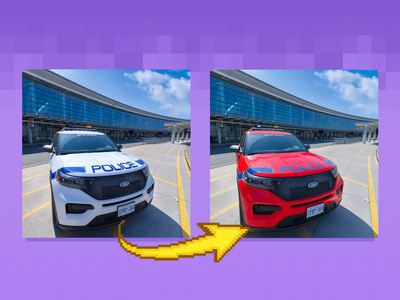
For editing tasks, Capybara takes natural language instructions. You can tell it to change the time of day, replace a background, swap an object, adjust an expression, or restyle a scene. It supports multi-turn editing, where you apply changes sequentially to the same image or video. Video edits preserve temporal coherence and identity across frames.
On Floyo, you access Capybara through its custom ComfyUI nodes. Search "Capybara" in the template library for ready-made workflows. Floyo handles the GPU and model weights, so you can start generating and editing without setting up a local environment.
What are Capybara's technical specifications?
Capybara is a diffusion transformer model built on HunyuanVideo 1.5. It uses Qwen2.5-VL-7B and ByT5-small as text encoders, SigLIP as a vision encoder, and supports FP8 quantization to halve VRAM usage. Output resolution goes up to 1080p for images and 480p (recommended) for video. Five aspect ratios are supported.
| Spec | Details |
|---|---|
| Developer | xgen-universe |
| Architecture | Diffusion transformer built on HunyuanVideo 1.5 |
| Task Types | T2I, T2V, TI2I (image editing), TV2V (video editing) |
| Image Resolution | Up to 1080p (720p recommended for quality) |
| Video Resolution | 480p recommended, up to 1080p |
| Video Frames | 81, 101, or 121 frames per generation |
| Aspect Ratios | 16:9, 9:16, 4:3, 3:4, 1:1 |
| Text Encoders | Qwen2.5-VL-7B + ByT5-small |
| Vision Encoder | SigLIP |
| Prompt Rewriting | Qwen3-VL-8B-Instruct (optional, auto-enhances prompts) |
| Inference Steps | 50 recommended (30-40 for faster generation) |
| FP8 Quantization | Supported (halves transformer VRAM, requires Ada Lovelace or Hopper GPU) |
| Multi-GPU | Distributed inference via Accelerate |
| License | MIT |
| ComfyUI Access | Custom Capybara nodes for all task types |
| Status | v0.1 (released February 17, 2026; training code coming soon) |
What can you create with Capybara?
Capybara supports four core tasks in one model: text-to-image, text-to-video, instruction-based image editing, and instruction-based video editing. Editing tasks accept natural language instructions and support multi-turn workflows. The model covers local edits, global edits, style changes, background replacement, expression control, and object replacement in video.
| Capability | What It Does | Use Case |
|---|---|---|
| Text-to-Image | Generates images from text prompts at up to 1080p across 5 aspect ratios | Concept art, product mockups, social media graphics |
| Text-to-Video | Generates video from text prompts with temporally coherent motion and natural movement | Short-form content, storyboard previews, motion tests |
| Image Editing (TI2I) | Edits images using natural language instructions. Supports local edits, global style changes, background replacement, expression control. | Photo retouching, style transfer, product variations |
| Video Editing (TV2V) | Edits video using natural language. Replace objects, change scenes, apply dense prediction edits while preserving identity and temporal coherence. | VFX, object swaps, scene restyling, post-production |
| Multi-Turn Editing | Apply edits sequentially to the same image or video, building up changes one instruction at a time | Iterative refinement, client revision workflows |
How does Capybara work?
Capybara is a diffusion transformer built on HunyuanVideo 1.5. It uses Qwen2.5-VL-7B and ByT5-small for text encoding, SigLIP for vision encoding, and the HunyuanVideo 1.5 VAE for latent decoding. A task type selector switches the model between generation and editing modes. All four tasks share the same pipeline and weights.
For editing tasks, you provide a source image or video alongside a text instruction. The model interprets your instruction (for example, "Change the time to night" or "Replace the monkey with Ultraman") and applies the edit while keeping everything else intact. An optional prompt rewriting step uses Qwen3-VL-8B-Instruct to expand short instructions into more detailed prompts for better results.
Capybara supports FP8 quantization through torchao, which roughly halves the transformer's weight memory. This makes it practical to run at higher resolutions or with longer videos on GPUs like the RTX 4090, L40, or H100. On Floyo, Capybara runs on H100 NVL GPUs with 94GB VRAM, so quantization is handled for you.
Fair warning: Capybara is at v0.1. The inference framework is released, but training code is still coming. Expect ongoing updates and improvements. Video generation is best at 480p for now. Higher resolutions work but are experimental.
Frequently Asked Questions
Common questions about running Capybara on Floyo.
Capybara is open-source under the MIT license, so there is no additional API cost beyond Floyo's GPU time. You can try it with Floyo's free tier, which gives you 20 minutes of GPU time per day.
Open Floyo in your browser, find a Capybara workflow (search "Capybara" in the template library), and click Run. Floyo handles the GPU, the ComfyUI environment, and the model weights. No local install, no Python setup, no API key required.
The xgen-universe research team. Capybara v0.1 was released on February 17, 2026 under the MIT license. Full model weights and inference code are available on HuggingFace and GitHub.
Capybara is a unified model. One set of weights handles text-to-image, text-to-video, image editing, and video editing. Most other models specialize in one or two of these tasks. This means you can generate an image, edit it with instructions, then animate it to video, all within the same model and pipeline.
Yes. Floyo runs ComfyUI, which lets you chain multiple models in a single workflow. Use Capybara for generation and editing, then pass results to other models for upscaling, audio, or further processing. All in one pipeline, all in your browser.
Capybara uses 50 inference steps by default for the best quality balance. You can reduce to 30-40 steps for faster generation. FP8 quantization halves VRAM usage without impacting speed, making it practical on consumer GPUs. On Floyo's H100 NVL GPUs, generation runs at full speed.
Yes. Capybara is released under the MIT license, which permits commercial use without restriction.
Yes. You can apply edits sequentially to the same image or video. For example, change the background first, then adjust the lighting, then modify an expression. Each edit builds on the previous result.
Try Capybara on Floyo
Image generation, video generation, image editing, and video editing in one model. Run it in your browser.
Related Reading
Setting Up an AI Production Pipeline for Your Studio
VFX and Post Production Workflows on Floyo
Last updated: March 2026. Specs from xgen-universe HuggingFace model card, GitHub repository, and ComfyUI documentation.

Capybara for Image Editing
Edit your cool images using Capybara

Capybara for Text to Image
Create unique images using Capybara
Run Capybara online through ComfyUI on Floyo. Unified AI model for image and video generation plus instruction-based editing. T2I, T2V, image-to-image, and video-to-video from text instructions. Multi-turn editing, subject-conditioned generation, style transfer, and camera control. MIT licensed. No install, no GPU, browser-based. Free to try.