

Floyo / Pages / Open source AI video model comparison
MODEL COMPARISON
MiniMax H3 vs Wan 2.2 vs LTX 2.3
If you are picking a video model for an actual job, "which one is best" is the wrong question. The useful question is which one survives your constraints: the shot you need to deliver, how many hours you have, and how many re-rolls you can afford before someone asks where the shot is.
So this is one test, run three ways. Same source image, same prompt, same output spec. Three open video models rendered end to end on H100s. Then all three were pushed to 20 seconds to see where they fall apart.
Everything we used is below. The prompts, the plates, the workflows, and the parts that do not flatter us.
Best quality
MiniMax H3
Best overall output quality and consistency. Strongest results for character consistency, motion coherence and longer shots.
Tradeoff: slowest of the three models.
Best balance
Wan 2.2
Stable motion, good consistency, much faster generation. Strong middle ground between quality and speed.
Tradeoff: 720p native. No native audio.
Best speed & control
LTX 2.3
Fastest generation with the richest control ecosystem. Strong conditioning and control across the board.
Tradeoff: more artifacts and drift in complex motion.
· Specifications
The technical details, side by side
What each model is, before any opinion about it. Published specifications, not the settings we used in the test.
| Specification | MiniMax H3 | Wan 2.2 | LTX 2.3 |
|---|---|---|---|
| Developer | MiniMax | Alibaba, Tongyi Lab | Lightricks |
| Released | 31 July 2026 weights 2 Aug 2026 | 28 July 2025 | 5 March 2026 |
| Licence | MiniMax Community License Not US / EU / UK / KR | Apache 2.0 | Apache 2.0 |
| Commercial use | Restricted by region | Unrestricted | Unrestricted |
| Parameters | 33B | 27B MoE, 14B active | 22B |
| Native resolution | Up to 2K | 720p | Up to 4K |
| Max frame rate | 24 FPS | 24 FPS | Up to 50 FPS |
| Native duration | 4–15s | 5s | Up to 20s |
| Native audio | Yes, stereo | No | Yes, synchronised |
| LoRA | Yes | Yes | Yes |
Published specifications, not the settings used in this test. Every clip below was rendered at 1920x1080 and 24 FPS regardless of native resolution. Wan 2.2 is 720p-native; its 1080p output was configured in the workflow with no external upscaling.
01 · Method
How we tested
Everything you need to reproduce this, and what we deliberately did not measure.
| Test condition | Details |
|---|---|
| Source image | One per scene, identical across all three models |
| Prompt | Same text for every model. Published below. |
| Standard duration | 10 seconds |
| Extended duration | 20 seconds |
| Output target | 1920 x 1080 · 24 FPS |
| Generations | One per prompt per model. No re-rolls. |
| Hardware | NVIDIA H100 on Floyo |
| External upscale | None |
| H3 pixel setting | 0.9 megapixels |
| What this is not | Not a lab benchmark. Render times are Floyo-specific. |
Resolution note
The 1920x1080 setting is the comparison output configuration, not the native resolution of every model. Wan 2.2 is 720p-native. For this test we set the workflow frame to 1920x1080. No external upscaling was used.
02 · What we measured
Benchmark criteria
Eight things we looked at across every clip. These are the questions you ask when reviewing a take.
Motion coherence
Does the action move naturally frame to frame?
Temporal consistency
Does the scene stay stable as the video plays?
Character consistency
Does the character's face, clothing and body hold up?
Prompt adherence
Does the model actually do what you asked?
Visual fidelity
Does the output keep its detail, lighting and scene structure?
Artifacts
How often do you see warping, anatomy breaks or background glitches?
Camera behavior
Does the camera follow its intended path without jitter?
Overall usability
Would you actually use the result in a real project?
03 · Benchmark prompts
Prompt adherence
Same prompts across all three models. No per-model tuning. What you see is what each model did with the exact same text.
Benchmark 1 · Simple motion
Basic character + environment motion
Prompt
Live-action, cinematic, ultra-photorealistic. Preserve the exact roller coaster, three riders, wooden track, trees, lighting, clothing, and character appearance from the reference image. The coaster rapidly moves forward, with the camera fixed at the front facing the riders. The riders react naturally to acceleration: the foreground woman laughs and screams, the woman beside her laughs while gripping the safety bar, and the man briefly raises one hand and cheers before grabbing the restraint. Their bodies, hair, and clothing respond naturally to the speed and wind. The coaster descends a small drop and enters a sweeping curve, with the riders leaning naturally into the movement. Maintain realistic facial expressions, body mechanics, hair physics, environmental parallax, motion blur, and continuous forward motion. Keep the camera angle stable with no cuts or viewpoint changes.
MiniMax H3
Wan 2.2
LTX 2.3
What to look for: Roller coaster movement, natural body reaction to acceleration, facial expression consistency, hair and clothing reacting to motion, stable coaster structure, background consistency, and camera tracking smoothness.
Benchmark 2 · Multi-step action
Sequence of distinct actions
Prompt
High-quality 3D animated action, cinematic fantasy. Preserve the exact two fighters, their faces, hairstyles, purple and yellow outfits, train roof, desert canyon, lighting, and overall composition from the reference. The train moves rapidly through the canyon as the fighters circle and adjust their balance. The purple fighter lunges with a punch, the yellow fighter blocks and counters, the purple fighter ducks, spins and kicks, and the yellow fighter dodges and blocks. Continue the fight with controlled punches, blocks, dodges and kicks while both fighters maintain their balance on the moving train. Their hair and clothing react to the wind, while dust and debris move across the roof. The camera dynamically tracks around both fighters, briefly pushing in during intense attacks before pulling back to reveal the train and canyon. Maintain strong environmental parallax, consistent character appearance, realistic action timing, and continuous motion. End with both fighters launching simultaneous attacks and stopping just before impact in a dramatic face-off.
MiniMax H3
Wan 2.2
LTX 2.3
What to look for: Whether both characters perform the requested actions, clean transitions between movements, consistent faces and clothing, believable body mechanics, interaction between the characters, stability of the train roof, and whether the model maintains the scene while the train is moving.
Benchmark 3 · Complex camera + character
Camera movement with character action and environment
Prompt
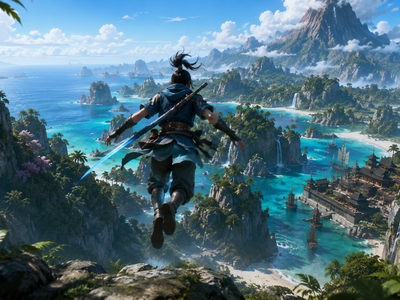
Live-action fantasy, cinematic, ultra-photorealistic. Preserve the exact warrior, clothing, hairstyle, sword, coastal mountain landscape, turquoise ocean, tropical islands, cliffs, waterfalls, coastal village, sailing ships, vegetation, sky, sunlight, and overall composition from the reference image. The warrior flies forward smoothly from the cliff edge toward the coastal landscape, leaning slightly forward with his arms extended for balance. His legs trail naturally behind him while his hair, clothing, and loose fabric stream backward in the wind. The camera follows directly behind him in a smooth aerial tracking shot, maintaining the same rear view and matching his speed. The ocean, islands, cliffs, waterfalls, and village move closer with realistic depth and natural parallax. Birds move through the sky, clouds drift around the distant mountain, and ocean waves move naturally below. Maintain consistent character appearance, environment, lighting, atmospheric haze, depth, and forward momentum throughout the shot. Keep the camera stable behind the character with no cuts or viewpoint changes.
MiniMax H3
Wan 2.2
LTX 2.3
What to look for: Whether the camera follows the character correctly, consistent character movement and pose, stable landscape and buildings, believable depth and perspective, consistent lighting, and whether the environment remains coherent as the camera moves through the scene.
Benchmark 4 · Extended motion + environment
Sustained character flight with camera tracking
Prompt
Monk flying scene. Same source image and prompt across all three models.
MiniMax H3
Wan 2.2
LTX 2.3
What to look for: Sustained forward motion, character pose consistency during flight, environment depth and parallax, camera stability, clothing and fabric physics, and whether the scene holds together over the full duration.
04 · Results
Output quality
| MiniMax H3 | Wan 2.2 | LTX 2.3 | |
|---|---|---|---|
| Motion coherence | Best overall | Good, stable motion | Good, more artifacts in complex scenes |
| Temporal consistency | Best | Very stable | More background drift |
| Character consistency | Best | Stable characters | Some character and pose drift |
| Visual fidelity | Best overall | Good (720p native) | Good, artifacts in difficult motion |
| Complex motion | Strongest | Strong | More artifacts |
| Long-duration stability | Strongest | Drops beyond ~10s | Drops beyond ~10s |
05 · Speed
Generation speed
Observed on Floyo / NVIDIA H100. These are platform-specific and will shift with hardware.
| Model | 10s clip | 20s clip |
|---|---|---|
| LTX 2.3 | ~8 min | Quality dropped |
| Wan 2.2 | ~18 min | Quality dropped |
| MiniMax H3 | ~10-14 min | ~28-30 min (quality held) |
LTX was the fastest at roughly 8 minutes for a 10-second clip. H3 came in at around 10 to 14 minutes, closer than expected but still the slowest. The gap widens at 20 seconds: H3 took about 28 to 30 minutes but held quality, while the other two showed degradation past 10 seconds.
06 · Duration
How long can each model hold quality?
These are observed quality results from our testing, not the models' official maximum durations.
| Model | Standard | Longest usable | Render time |
|---|---|---|---|
| MiniMax H3 | 10s | 20s | ~28-30 min |
| Wan 2.2 | 10s | ~10s | ~18m |
| LTX 2.3 | 10s | ~10s | ~8m |
H3 maintained strong quality at 20 seconds (~28-30 min render at 0.9 megapixels). Wan and LTX both showed noticeable degradation past about 10 seconds in our test.
07 · Model by model
The three models
What each model is actually like to use.
The best output in the test, and the slowest route to it.
H3 won the quality comparison across every category we measured: motion coherence, temporal consistency, character consistency, visual fidelity, and complex action handling. It produced the fewest artifacts and was the only model that held quality at 20 seconds.
The trade-off is still speed. A 10-second clip takes around 10 to 14 minutes on H100 at 0.9 megapixels. The 20-second test took about 28 to 30 minutes. Faster than the other two? No. But not the multi-hour wait it used to be. You come to H3 when the shot matters and you can wait a bit longer for it.
Reach for it when
Final delivery, character-driven shots, complex action, cinematic camera moves, anything that has to run longer than 10 seconds in one generation.
Skip it when
You are iterating fast, on a same-day turnaround, or your pipeline needs pose, depth or edge conditioning. H3 does not have those yet.
The safe pick for short-form. Predictable, well-supported, fast enough for most deadlines.
Wan sits in the middle on almost every axis. It does not win any single quality category, but it does not have a bad day either. Temporal consistency is very good, jitter is low, and the results are stable enough that you can hand it to a team and expect usable output on the first run.
Where it struggles: complex multi-step actions, anything past 10 seconds, and no native audio. The native resolution is 720p. For this test we set the workflow frame to 1920x1080, which is a workflow config, not native 1080p support. The open-source ecosystem around Wan is the largest of the three.
720p native. Wan 2.2 is a 720p-native model. For this comparison, the workflow output dimensions were configured to 1920x1080. This should not be interpreted as native 1080p support. No external upscaling was used.
Reach for it when
Social content, short clips under 10 seconds, anything where stability matters more than peak fidelity. Big ComfyUI ecosystem, lots of community workflows.
Skip it when
You need native audio, anything past 10 seconds with quality, complex multi-step actions, or native 1080p output.
Fastest by far, with the richest control stack. You can run three versions in the time H3 finishes one.
LTX is the model you reach for when the pipeline matters as much as the output. At about 8 minutes per 10-second clip it is still the fastest of the three, which means you can iterate, experiment, and throw away bad takes without watching the clock.
The control stack is the deepest of the three: LoRA, IC-LoRA, camera-control LoRAs, pose, depth, canny/edge conditioning, multi-keyframe, video extension, retake, and video-to-video. Plus native audio. The downside: more temporal drift and background inconsistencies than H3, especially in complex action. Quality dropped noticeably past about 10 seconds in our test.
Reach for it when
Fast turnaround, control-heavy pipelines, iteration-heavy work, anything that needs pose/depth/edge conditioning, native audio.
Skip it when
The shot needs rock-solid temporal consistency, or you have complex multi-character action that has to hold together. Background drift shows more here.
08 · Specifications
Native vs tested
What each model officially publishes vs what we configured in our workflow.
| MiniMax H3 | Wan 2.2 | LTX 2.3 | |
|---|---|---|---|
| Native resolution | 2K | 720p native | Up to 4K |
| Resolution tested | 1080p + 2K | 1080p comparison output | 1080p + 2K |
| Published FPS | 24 | 24 | Up to 50 |
| Audio | Yes, native | No native audio | Yes, native |
| LoRA | Yes | Yes | Yes |
Tested resolution is the output configuration used in our workflow. It is not the model's native resolution. Wan 2.2 is 720p-native; its 1920x1080 output was configured through the workflow without upscaling.
09 · Recommendations
Which model should you use?
| Job | Pick | Why |
|---|---|---|
| Real productions | MiniMax H3 | Highest fidelity and consistency in our test |
| Socials / short-form | Wan 2.2 | Good balance of quality, stability and speed |
| Fast iteration | LTX 2.3 | Fastest in our test |
| Control-heavy work | LTX 2.3 | Richest control/conditioning ecosystem |
| Complex cinematic | MiniMax H3 | Best motion coherence and temporal consistency |
| Longer generations | MiniMax H3 | Quality held at 20 seconds in our test |
| Gaming / stylized | Not tested |
Final takeaway
There is no universal winner. H3 is the quality choice. Wan is the balance choice. LTX is the speed and control choice. The right model depends on whether the priority is final-shot quality, iteration speed, control, or longer-duration consistency.
All three are on Floyo. All three use the same workflows published above. Try them on your own images and prompts.
Frequently asked questions
Which model should I start with?
New to AI video? Start with Wan 2.2. Most predictable, biggest community. Need the highest quality? H3. Want the fastest iteration and most control? LTX 2.3.
Is this a scientific benchmark?
No. One generation per prompt, no rerolls, no cherry-picking. This is what each model gave us on the first run.
Why test Wan at 1080p if it is a 720p model?
To compare all three at the same output target. The workflow frame was set to 1920x1080. No upscaling. Wan does not natively support 1080p.
Why is H3 open-weight and not open-source?
H3 publishes its weights but has a more restrictive license. Wan 2.2 and LTX 2.3 are fully open-source.
Can I run all three on Floyo right now?
Yes. All three are available as ComfyUI workflows. Browser-based, no local install, no API key.
Explore more on Floyo
The three workflows above are a starting point. Here is what else you can do with these models on Floyo.
%20(1)_1777105835912.webp?width=400&height=300&quality=80&resize=contain&format=origin)

floyoofficial
10.1k
image to video
lora
LoRAs
Video
Video Generation
wan 2.2
Generate high quality video from a start frame, as well as an optional end frame with this Wan2.2 14b Image to Video workflow!
Wan 2.2 14B: Image to Video + End Frame
Generate high quality video from a start frame, as well as an optional end frame with this Wan2.2 14b Image to Video workflow!

floyoofficial
11.5k
Audio
Image to Video
LoRAs
LTX2.3
Video
Animate a face and keep identity locked through the clip with LTX-2.3 and a face LoRA. Upload a portrait, describe the scene, get 1080p video with audio.
LTX-2.3 · Face Consistent Image to Video
Animate a face and keep identity locked through the clip with LTX-2.3 and a face LoRA. Upload a portrait, describe the scene, get 1080p video with audio.

jacob
1.7k
Audio
Controlnet
LoRA
LoRAs
LTX 2.3
Restyle
Video
Video to Video
Restyle video with LTX 2.3 using IC-LoRA Union Control for structure guidance
LTX 2.3 IC LoRA Union Control - Video to Video
Restyle video with LTX 2.3 using IC-LoRA Union Control for structure guidance


nikhil07
1.5k
Audio
image-to-video
LoRAs
LTX 2.3
LTXV
motion transfer
Video
video generation
video-to-video
Copy any video's motion onto a still character photo using LTX 2.3
LTX 2.3 - Motion Transfer
Copy any video's motion onto a still character photo using LTX 2.3


Audio
First and Last Frame
Image to Video
LTX2.3
Start and End Frame
Video
LTX 2.3 Image-to-Video Start and End Frame Control (First Frame-Last Frame/FLF)
LTX 2.3 Start and End Frame Control
LTX 2.3 Image-to-Video Start and End Frame Control (First Frame-Last Frame/FLF)
ai video
comfyui
image to video
lightricks
ltx 2.3
ltx-2.3
open weights
video with audio
Turn a still into a 1080p clip with synchronized sound using LTX-2.3, the open-weight 22B model from Lightricks. Upload an image, write the shot, hit run.
LTX-2.3: Image to Video With Audio
Turn a still into a 1080p clip with synchronized sound using LTX-2.3, the open-weight 22B model from Lightricks. Upload an image, write the shot, hit run.
floyoofficial
3.4k
Audio
hailuo 3.0
image to video
minimax h3
text to video
Video
video with audio
Generate 2K video with stereo sound from a start image and a prompt using MiniMax H3 (Hailuo 3.0), the open-weights model. Mute the image to go text-only.
MiniMax H3 Open Weights · Image & Text to Video
Generate 2K video with stereo sound from a start image and a prompt using MiniMax H3 (Hailuo 3.0), the open-weights model. Mute the image to go text-only.
floyoofficial
2.0k
Audio
hailuo 3.0
minimax h3
reference to video
Video
video editing
Swap a character or object into an existing clip with MiniMax H3 (Hailuo 3.0), the open-weights editor. Add a reference image, describe the change, and hit run.
MiniMax H3 Open Weights - Reference to Video
Swap a character or object into an existing clip with MiniMax H3 (Hailuo 3.0), the open-weights editor. Add a reference image, describe the change, and hit run.
%20(1)_1772692256095.webp?width=400&height=300&quality=80&resize=contain&format=origin)
nikhil07
1.8k
Animate
Image
LoRAs
Qwen
Video
Video2Video
Wan
Create a new video by restyling an existing video with a reference image.
Wan 2.2 and Qwen for V2V Restyle
Create a new video by restyling an existing video with a reference image.
alibaba
comfyui
image to video
lightx2v
open source
video generation
wan 2.2
wan22
Animate a still with Wan 2.2 14B, Alibaba's open-weight video model. Two experts split the render and a speed LoRA holds it to six steps. Upload and run.
Wan 2.2 14B: Image to Video
Animate a still with Wan 2.2 14B, Alibaba's open-weight video model. Two experts split the render and a speed LoRA holds it to six steps. Upload and run.
Ready to test them yourself?
The best model for your workflow depends on your own images, prompts and production requirements.
Start creating on Floyo >Which open video model should you use? We ran H3, Wan 2.2 and LTX 2.3 on identical inputs. Speed, quality, license, plus the prompts and live workflows to test it yourself.