

SeedVR2 · Video Upscaler For Kids Edu
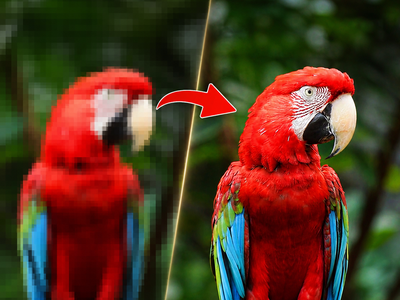
Upload a low-resolution video and SeedVR2 upscales it to 1080p in a single diffusion step, restoring fine detail, removing compression artifacts, and maintaining temporal consistency across every frame.
4x upscale
seedvr2
Video
video restoration
video upscale
235
_1784123816860.webp)
_1784123816861.webp)
_1784123816861.webp)

Nodes & Models
SeedVR2TorchCompileSettings
FloyoStickyNote
SeedVR2LoadDiTModel
seedvr2_ema_3b_fp16.safetensors
SeedVR2LoadVAEModel
ema_vae_fp16.safetensors
SeedVR2VideoUpscaler
SeedVR2TorchCompileSettings
SeedVR2LoadDiTModel
seedvr2_ema_3b_fp16.safetensors
SeedVR2LoadVAEModel
ema_vae_fp16.safetensors
SeedVR2VideoUpscaler
SeedVR2TorchCompileSettings
SeedVR2LoadDiTModel
seedvr2_ema_3b_fp16.safetensors
SeedVR2LoadVAEModel
ema_vae_fp16.safetensors
SeedVR2VideoUpscaler
LoadVideo
GetVideoComponents
CreateVideo
SaveVideo
ABOUT THE WORKFLOW
Upscale a Video to 1080p
Upload any low-resolution or compressed video. SeedVR2 processes the frames in overlapping batches, restores fine detail, removes noise and compression artifacts, and outputs a 1080p video. The batch processing with temporal overlap keeps frame-to-frame motion consistent so there is no flickering between frames. Audio from the original video carries through.
Model
SeedVR2 3B (EMA FP16) by ByteDance Seed Team. A one-step diffusion-based video restoration and upscaling model accepted at ICLR 2026. Trained on video frames for excellent temporal consistency and detail preservation, running one-step diffusion for fast processing compared to multi-step models.
HOW IT WORKS
Step 1. Upload your video
Any low-resolution, compressed, or degraded video file. Works best on footage with visible quality issues: noise, blur, or compression artifacts.
Works great with: AI-generated clips · phone footage · compressed web video · old recordings · low-res stock video
Step 2. Hit run
SeedVR2 loads the DiT and VAE models, extracts frames from the video, processes them in batches of 33 frames with temporal overlap for consistency, and upscales each batch to 1080p. The output recombines with the original audio.
Step 3. Download
The upscaled video saves as an MP4 at 30fps with the original audio embedded.
Ready for: Premiere · DaVinci Resolve · After Effects · YouTube · social media · broadcast
First time? Upload your video and hit run. All settings are preconfigured for 1080p output with temporal consistency.
RECOMMENDED SETTINGS
Quick-start guide. Find the goal that matches yours and copy the settings.
Standard 1080p upscale — Resolution 1080, batch size 33, temporal overlap 3, uniform batch True, color correction lab. Upload your video and run.
Less VRAM usage — Reduce batch_size from 33 to a lower value and enable blocks_to_swap in the DiT loader. Lower batch sizes use less VRAM but may introduce flicker between batches.
Reduce flickering between frames — Batch size is crucial for temporal consistency. Try to increase batch size as high as your VRAM allows. Lower batch sizes introduce flicker in the output.
Higher output resolution — Change the resolution value to 2160 for 4K. For progressive upscaling, run Stage 1 to 1024px, then Stage 2 to 2048px. This reduces artifacts by limiting each upscale to 2x.
Video looks oversharpened — SeedVR2 can overly generate details on inputs with very light degradations, such as 720p AI-generated videos, leading to oversharpened results. For already-clean footage, results may look less natural. Lower the input_noise_scale or use the model on footage with genuine degradation for the best results.
Color shift in the output — The color_correction setting defaults to "lab." This corrects color drift between the upscaled output and the original. Keep it on for most footage.
Prompt: No prompt is needed. SeedVR2 is a restoration model, not a generative one. It reads the video content and restores detail without text guidance.
LEARN
📹 Videos
ComfyUI 101 Free Course ft. Sebastian Kamph
Floyo 101 for Team Collaboration
✨ Quick links
USE CASES
🎬 AI-Generated Video Enhancement
Upscale AI-generated clips from 480p or 720p to 1080p or higher, restoring fine detail in faces, textures, and edges that low-resolution generation loses.
📹 Compressed Web Video Restoration
Restore quality to heavily compressed video downloaded from social platforms, removing blocking artifacts and restoring detail for re-editing or reposting.
🎥 Archive and Old Footage Upgrade
Bring low-resolution archival footage, phone recordings, and old video files up to modern display standards without manual frame-by-frame work.
🎮 Game Capture and Screen Recording Upscaling
Upscale compressed game captures, tutorial recordings, and screen recordings for higher-quality YouTube and social content.
WHAT WORKS BEST / WHAT TO AVOID
✅ Works great
Videos with genuine degradation: noise, blur, compression artifacts, or low resolution
AI-generated clips at 480p that need quality uplift before delivery
Compressed or downloaded video with visible blocking
Short clips under a few minutes (longer videos take proportionally longer)
⚠️ May produce softer results
Very large motions and heavy degradations can sometimes cause failure cases, including failing to fully remove the degradation or generating unpleasing details.
Already clean 720p or 1080p footage (may produce oversharpened output)
Very long videos that exceed available VRAM without block swapping configured
FAQ
What is SeedVR2?
SeedVR2 is a one-step video restoration model developed by ByteDance Seed Team, accepted at ICLR 2026. It uses diffusion adversarial post-training to restore and upscale video in a single denoising step. It is licensed under the Apache 2.0 license, permitting commercial use.
How is SeedVR2 different from traditional upscalers like RealESRGAN?
SeedVR2 represents a generational leap over previous upscalers. Traditional ESRGAN and older diffusion models process frames individually. SeedVR2 is trained on video frames, giving it excellent temporal consistency and detail preservation. Its one-step diffusion approach is fast compared to multi-step diffusion models.
What does temporal overlap do?
The video processes in overlapping batches. Each batch shares frames with the adjacent batches so the model can maintain motion consistency at the boundaries. Without overlap, the joins between batches may produce visible cuts or flicker.
What is color correction in the Video Upscaler node?
Color correction matches the color of the upscaled output back to the original video to prevent color drift. The "lab" mode corrects in LAB color space, which handles perceptual color matching more accurately than RGB. Keep it on for most footage.
Does SeedVR2 work on AI-generated video?
Yes, but with a caveat. The model can sometimes overly generate details on inputs with very light degradations, such as 720p AI-generated videos, leading to oversharpened results occasionally. For AI-generated content, test on a short clip first.
Is SeedVR2 licensed for commercial use?
SeedVR and SeedVR2 are licensed under the Apache 2.0 license. This permits commercial use. Review the full license terms on the ByteDance Seed GitHub repository for your specific use case.
How to run SeedVR2 video upscaling online?
You can run SeedVR2 video upscaling online through Floyo. No installation, no setup, no local GPU needed. Open the workflow in your browser, upload your video, and hit run. Free to try.
WHY FLOYO?
Floyo is the only platform with team collaboration for ComfyUI in the browser. You run workflows with no install. You share run history, assets, and models across your team. You pay only when you generate. Floyo supports open-source and closed-source models.
A designer runs an edit and likes the result. A teammate opens that exact run from shared history and keeps going. No file handoffs. No version confusion.
For studios and enterprise teams, Floyo adds private workspaces, pooled resources, and a team usage dashboard. Other ComfyUI cloud tools run for one person at a time. Floyo runs for the whole team, with transparent per-generation costs.
Ready to try it?
Upload a video and hit run. SeedVR2 handles the rest.
Questions? Watch the free course or check the FAQ above.
Read more




_1783949931860.webp?width=400&height=300&quality=80&resize=contain&format=origin)


