Image to Image with Flux ControlNet
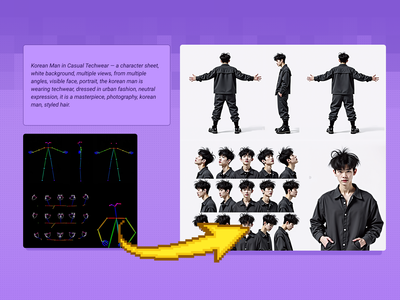
Transform your images into something completely new, yet retaining specific details and composition from your original using flexible controls. Key Inputs Image reference: Use any JPG or PNG showing your subject clearly Prompt: as descriptive a prompt as possible Denoise Strength: The amount of variance in the new image. Higher has more variance. Width & height: Try and match the aspect ratio of the original if possible.
Controlnet
Flux
Image
1.0k


Nodes & Models
VAELoader
UNETLoader
flux1-dev-fp8.safetensors
Ver Private
Comm Use
EmptyLatentImage
Note
DualCLIPLoader
clip_l.safetensors
Ver Private
Comm Use
t5xxl_fp8_e4m3fn.safetensors
Ver Private
Comm Use
LoadImage
CLIPTextEncodeFlux
PreviewImage
VAEDecode
SaveImage
Seed Everywhere
easy positive
LoadFluxControlNet
flux-depth-controlnet-v3.safetensors
Ver Private
Comm Use
ApplyFluxControlNet
XlabsSampler
Transform your images into something completely new, yet retaining specific details and composition from your original using flexible controls.
Key Inputs
Image reference: Use any JPG or PNG showing your subject clearly
Prompt: as descriptive a prompt as possible
Denoise Strength: The amount of variance in the new image. Higher has more variance.
Width & height: Try and match the aspect ratio of the original if possible.
Read more
N