Flux Text2Image w/ 2 Tone Color Grade
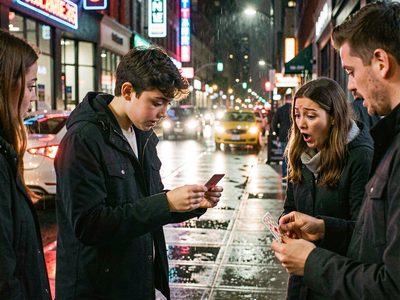
Generate cinematic images using Flux with the simple workflow to choose color tint in highlights and shadows Key Inputs Prompt: Set text prompt SDXLResolution: Choose your aspect ratio/resolution Seed: Choose either a fixed or random seed (default value: fixed) Highlights/Shadows: Choose color grade
Cinematic
Color Grade
Flux
Image
Text2Image
722



Nodes & Models
Seed (rgthree)
ColorMatch
CM_SDXLResolution
UNETLoader
flux1-dev-fp8.safetensors
Ver Private
Comm Use
DualCLIPLoader
clip_l.safetensors
Ver Private
Comm Use
t5xxl_fp16.safetensors
Ver Private
Comm Use
VAELoader
ae.safetensors
Ver Private
Comm Use
EmptyLatentImage
ModelSamplingFlux
CLIPTextEncode
FluxGuidance
ConditioningZeroOut
KSamplerAdvanced
VAEDecode
PreviewImage
VAEEncode
SaveImage
FL_ColorPicker
LayerUtility: ColorImage V2
LayerMask: Shadow & Highlight Mask
LayerUtility: ImageBlendAdvance V2
ColorMatch
Generate cinematic images using Flux with this simple workflow to choose color tints in highlights and shadows
Key Inputs
Prompt: Set text prompt
SDXLResolution: Choose your aspect ratio/resolution
Seed: Choose either a fixed or random seed (default value: fixed)
Highlights/Shadows: Choose color grade
Read more
N
m
mrosmar1973
• 4 months ago
OBJETIVO Crear un video institucional cinematográfico de aproximadamente 30 segundos para Instagram Reels, Facebook, TikTok y campañas publicitarias. El video debe transmitir profesionalismo, confianza y calidad, posicionando a Integral Home Paraguay como una empresa especializada en construcción, remodelación y mantenimiento integral. No debe sentirse como un anuncio de ventas. Debe parecer un pequeño documental donde un director de obra explica cómo trabaja la empresa. PERSONAJE Edad 32 a 38 años. Apariencia Hombre latino. Aspecto cuidado. Cabello corto. Barba perfectamente prolija (opcional). Sonrisa natural. Expresión tranquila. Mirada segura. Nunca exagerada. Vestimenta Camisa blanca o azul claro. Mangas arremangadas. Jean oscuro o pantalón beige. Botas de seguridad limpias. Casco blanco únicamente cuando la escena lo requiera. En algunas tomas sostiene una tablet. En otras lleva planos arquitectónicos. PERSONALIDAD Profesional. Cercano. Asesor. Nunca vendedor. Habla como alguien que lleva muchos años recorriendo obras. Su lenguaje transmite experiencia real. Habla pausadamente. Hace pequeñas pausas naturales. Sonríe ligeramente. Mira frecuentemente a cámara. TONO Conversacional. Elegante. Seguro. Optimista. Honesto. Sin exageraciones. Sin frases comerciales. Nunca utiliza un tono agresivo. Debe inspirar confianza. MENSAJE CENTRAL "Construimos como si fuera para nuestra propia familia." El espectador debe sentir que la empresa: ✔ cumple lo prometido ✔ utiliza materiales de calidad ✔ posee personal especializado ✔ cuida los detalles ✔ entrega garantía ✔ trabaja con transparencia VALORES Calidad. Puntualidad. Honestidad. Compromiso. Garantía. Transparencia. Atención personalizada. Innovación. Responsabilidad. ESTILO VISUAL Inspiración: • Arquitectura moderna • Obras premium • Hormigón visto • Estructuras metálicas • Vidrios • Terminaciones finas • Herramientas profesionales Mostrar constantemente: planos herramientas obra limpia trabajadores utilizando EPP detalles constructivos acabados mediciones soldaduras pintura instalaciones eléctricas instalaciones sanitarias cámaras de seguridad cercos eléctricos DIRECCIÓN DE FOTOGRAFÍA Aspect Ratio 9:16 Resolución 4K Lente 35 mm cinematográfico Profundidad de campo moderada Luz natural Golden Hour cuando sea posible Color grading cálido Contraste suave Movimiento estabilizado Look cinematográfico CÁMARA Travelling suave. Gimbal. Plano detalle. Plano americano. Plano medio. Plano abierto. Slow motion únicamente en momentos clave. Nunca movimientos bruscos. ESCENA 1 (0–4 s) Plano panorámico recorriendo una vivienda moderna en construcción. El influencer observa la obra. Se escuchan sonidos reales del ambiente. Voz "Cuando decidís construir, no buscás solamente levantar una obra... buscás tranquilidad." ESCENA 2 (4–9 s) El influencer camina por una estructura metálica. La cámara comienza detrás y termina frente a él. Voz "Por eso trabajamos con planificación, materiales de primera calidad y un equipo realmente especializado." ESCENA 3 (9–15 s) Plano medio. De fondo trabajadores ejecutando tareas. Se observan detalles constructivos. Voz "Desarrollamos construcciones nuevas, ampliaciones, remodelaciones y mantenimiento integral para hogares, comercios y empresas." ESCENA 4 (15–22 s) Montaje dinámico mostrando: Albañilería. Pintura. Herrería. Electricidad. Plomería. Instalación de cámaras. Cerco eléctrico. Terminaciones. Voz "Desde los cimientos hasta el último detalle, nos ocupamos de cada etapa para que vos tengas un solo equipo y una sola garantía." ESCENA 5 (22–27 s) Plano apoyado sobre una baranda. Leve sonrisa. Plano medio. Voz "Nuestro trabajo habla por nosotros, porque cada proyecto merece el mismo compromiso y la misma calidad." ESCENA FINAL (27–30 s) Plano abierto. Vista aérea con dron alejándose lentamente. El influencer mira directamente a cámara. Voz "En Integral Home Paraguay construimos confianza. Contanos tu proyecto y hagámoslo realidad." TEXTO EN PANTALLA Integral Home Paraguay Construcción • Remodelación • Mantenimiento Integral ✔ Albañilería ✔ Herrería ✔ Pintura ✔ Electricidad ✔ Plomería ✔ Cámaras de Seguridad ✔ Cercos Eléctricos ✔ Llave en Mano SUBTÍTULOS Modernos. Blancos. Con ligera sombra. Sincronizados con la voz. MÚSICA Instrumental moderna. Elegante. Inspiradora. Piano + percusión suave. Volumen bajo. La voz siempre debe ser protagonista. EFECTOS Transiciones suaves. Fade. Whip Pan cinematográfico. Motion Blur ligero. No utilizar efectos llamativos. No utilizar zoom digitales exagerados. EMOCIÓN FINAL El espectador debe pensar: "Si algún día construyo o remodelo mi casa, quiero que esta empresa haga el trabajo." Debe transmitir una imagen de empresa seria, organizada, moderna y confiable, donde la calidad, el compromiso y la atención personalizada son la prioridad. El cierre debe dejar una sensación de tranquilidad, profesionalismo y confianza duradera.
0
Reply