Z-Image Turbo · Text to Image With Diversity LoRA
Generate a different composition on every seed with Z-Image Turbo and the SDA diversity LoRA. Write a prompt, hit run, get layout variety. Apache 2.0.
diversity
Image
LoRAs
Text To Image
Z-Image
1
749



Nodes & Models
CLIPLoader
qwen_3_4b.safetensors
VAELoader
ae.safetensors
easy seed
UNETLoader
z_image_turbo_bf16.safetensors
EmptyLatentImage
LoraLoaderModelOnly
zit_sda_v1.safetensors
CLIPTextEncode
ConditioningZeroOut
KSampler
VAEDecode
SaveImage
CR Prompt Text
ABOUT THE WORKFLOW
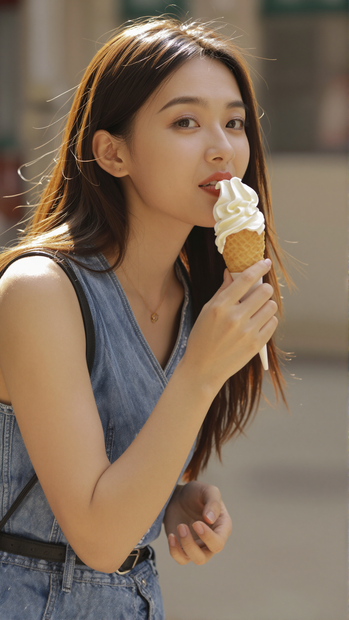
Generate Varied Pictures From Every Seed Write a prompt and hit run. The SDA diversity LoRA fixes the compositional collapse that distilled models suffer from, so each seed produces a different layout rather than the same picture with minor texture changes. One picture per run at portrait orientation.
Model
Z-Image Turbo by Tongyi-MAI under Alibaba. Released 26 November 2025. A 6 billion parameter single-stream diffusion transformer distilled to 8 steps with a Qwen 3 4B text encoder. Apache 2.0.
SDA diversity LoRA by F16 (community). A LoKr adapter that rotates the model's output directions so different seeds explore different compositions. Recovers about 70 percent of the undistilled teacher model's layout variety. Trade-off: more variation but higher risk of anatomy issues, especially on hands.
HOW IT WORKS
Step 1. Write your prompt Describe the picture. Short prompts let the SDA LoRA explore more layouts. Long detailed prompts anchor the composition and narrow the range. Works great with: characters · street scenes · action shots · concept art
Step 2. Hit run and download The model builds the picture in 21 passes and saves it under ComfyUI. Each seed gives a different composition. Ready for: Photoshop · Figma · Canva · any editor
First time? Leave every setting as-is. The defaults (1080 x 1920 · 21 steps · CFG 1 · SDA strength 1 · random seed) are the right starting point for almost everyone.
RECOMMENDED SETTINGS
Quick-start guide. Find the goal that matches yours and copy the settings.
Standard run (most people) — 1080 x 1920 · 21 steps · CFG 1 · SDA strength 1 · random seed. The right starting point for almost everyone.
Want landscape instead of portrait — Swap the width and height to 1920 x 1080.
Hands or limbs look wrong — Lower SDA strength from 1 toward 0.5. The adapter restores variety at the cost of anatomical stability, so pulling it back trades some layout range for cleaner bodies.
Every picture looks the same despite SDA — Make sure the seed is set to randomize, not fixed. SDA needs a different seed each run to produce a different composition.
Want to reproduce a result you liked — Set a fixed seed number. The same prompt, size, and seed return the same image.
Faster runs — Lower steps toward 8. Z-Image Turbo is distilled for 8 steps, and the SDA LoRA author recommends 6 to 8. This workflow ships at 21, which is above that range and costs extra time.
Stacking another LoRA — SDA can conflict with style LoRAs. Lower SDA strength first if the picture breaks when both are loaded.
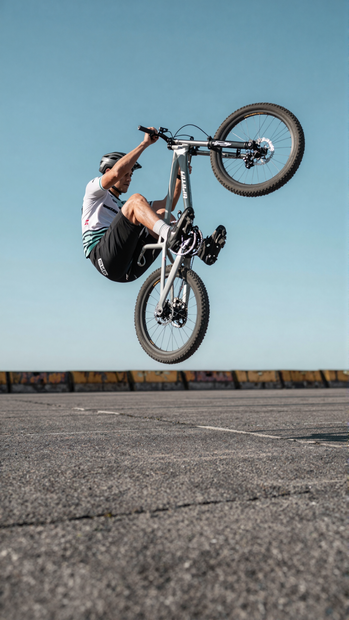
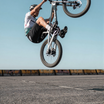
Prompt: Short prompts let SDA explore. "Bike rider doing some stunt" gives you a different layout on every seed. Long prompts anchor the composition: "Futuristic Asian girl, short fluorescent blue hair, mechanical ear headset, rain-soaked alley, neon reflections, cyberpunk colour grading, 35mm lens, film grain" pins the framing but still varies the pose and the background between seeds.
LEARN
📹 Videos
ComfyUI 101 Free Course ft. Sebastian Kamph
Floyo 101 for Team Collaboration
✨ Quick links
USE CASES
🎨 Concept Exploration Run the same prompt with different seeds and get a spread of compositions to choose from, rather than the same picture repeated.
📸 Social and Marketing Batches Generate a set of varied images from one brief for a campaign or a content calendar.
🖼️ Mood Board Building Explore different framings and layouts of one idea without rewriting the prompt each time.
⚡ Fast Iteration Test visual ideas at speed. Turbo's distilled schedule finishes each image in seconds.
WHAT WORKS BEST / WHAT TO AVOID
✅ Works great
Short prompts that leave room for layout variety
Random seed on every run
SDA strength between 0.5 and 1
Sizes at or near 1024
⚠️ May produce softer results
SDA at full strength on prompts with hands or complex poses
Fixed seed, which gives the same composition every time and removes the point of SDA
Sizes pushed well past 1024
Stacking SDA with another LoRA without lowering SDA first
FAQ
What is Z-Image Turbo? Z-Image Turbo is the distilled variant of Z-Image Base, built by Tongyi-MAI under Alibaba and released 26 November 2025. It runs the same 6 billion parameter architecture at 8 steps rather than 30 to 50, producing images in under a second on datacenter hardware. Open weights under Apache 2.0.
What is the SDA diversity LoRA? SDA stands for Stochastic Directional Alignment. It is a community LoKr adapter by F16 that fixes a known problem with distilled models: different seeds produce nearly identical compositions. SDA rotates the model's output directions so each seed explores a different layout, recovering about 70 percent of the undistilled teacher model's compositional diversity.
Why do hands sometimes look wrong with SDA? The adapter trades anatomical stability for layout variety. When it rotates the output space, hands and complex limb positions sit in regions the distilled model handles less reliably. Lowering SDA strength from 1 toward 0.5 reduces this.
What is the difference between Z-Image Turbo and Z-Image Base? They share the same architecture. Turbo is distilled to 8 steps for speed. Base runs 30 to 50 steps and is the version used for LoRA training and fine-tuning. Without SDA, Turbo produces near-identical compositions across seeds. Base does not have this problem because its full schedule explores the output space more completely.
Why is the step count at 21 instead of 8? The Z-Image Turbo model is distilled for 8 steps, and the SDA author recommends 6 to 8. This workflow ships at 21, which is above both recommendations. Lowering to 8 finishes faster and sits closer to what both the model and the adapter were tuned for.
Is Z-Image Turbo free for commercial use? Yes. It is released under Apache 2.0, which allows commercial use, modification, fine-tuning, and self-hosted deployment with no revenue threshold and no territory restrictions. The SDA LoRA is a community adapter with its own terms. Check both before building on them.
How to run Z-Image Turbo online? You can run Z-Image Turbo online through Floyo. No installation, no setup, no model downloads. Open the workflow in your browser, write a prompt, and hit run. Free to try.
WHY FLOYO?
Floyo is the only platform with team collaboration for ComfyUI in the browser. You run workflows with no install. You share run history, assets, and models across your team. You pay only when you generate. Floyo supports open-source and closed-source models.
A designer runs an edit and likes the result. A teammate opens that exact run from shared history and keeps going. No file handoffs. No version confusion.
For studios and enterprise teams, Floyo adds private workspaces, pooled resources, and a team usage dashboard. Other ComfyUI cloud tools run for one person at a time. Floyo runs for the whole team, with transparent per-generation costs.
Ready to try it? Write a prompt and run it. Each seed gives you a different composition.
Questions? Watch the free course or check the FAQ above.
Read more
_1786518453053.png?width=400&height=300&quality=80&resize=cover)