Qwen Image Edit 2511 + Style Transfer LoRA
Create new images from your lineart drawing or sketch using the style transfer LoRA and Qwen Image Edit 2511
Image
Image Editing
LoRA
LoRAs
Qwen Image Edit 2511
Style Transfer
2.1k
_1773665122278.png?width=1400&height=620&quality=80&resize=contain)

_1773665122278.png?width=104&height=104&quality=80&resize=cover)

Nodes & Models
LoadImage
CLIPLoader
qwen_2.5_vl_7b.safetensors
VAELoader
qwen_image_vae.safetensors
UNETLoader
qwen_image_edit_2511_bf16.safetensors
WorkflowGraphics
Note
ImageScaleToTotalPixels
LoraLoaderModelOnly
Qwen-Image-Edit-2511-Lightning-8steps-V1.0-fp32.safetensors
style-transfer-1_20.safetensors
VAEEncode
ModelSamplingAuraFlow
TextEncodeQwenImageEditPlus
ImageStitch
CFGNorm
FluxKontextMultiReferenceLatentMethod
VAEDecode
KSampler
PreviewImage
LayerUtility: ImageReelComposit
LayerUtility: ImageReel
What it is
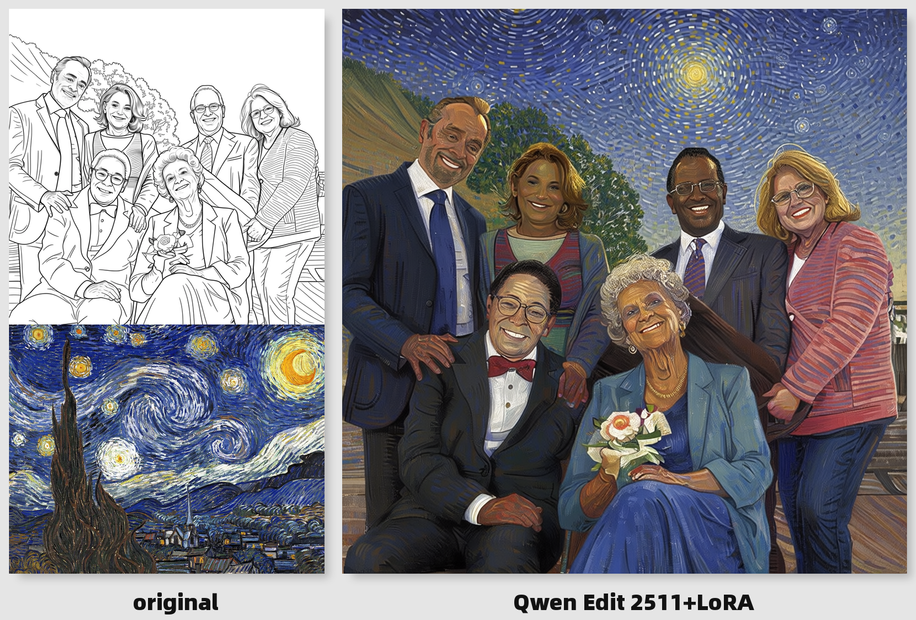
A workflow where you feed your lineart or sketch into Qwen Image Edit 2511 and attach dx8152’s Qwen‑Image‑Edit‑2511‑Style‑Transfer LoRA so the model turns the drawing into a full, colored artwork in the style of a reference or target look.
Key features
Style Transfer LoRA is trained specifically for style transfer on Qwen Image Edit 2511, with trigger phrase
style transferand prompts like: “Change the style of Figure 1 to the style of Figure 2.”Qwen Image Edit 2511 has strong structure and identity preservation, so it can follow your sketch lines while filling in lighting, colors, materials, and detailed rendering.
Supports multi‑image inputs (e.g., base lineart + reference style image) and text prompts, letting you combine your drawing’s composition with the colors/brushwork of another artwork.
Best use cases
Turning hand‑drawn lineart, pencil sketches, or digital outlines into polished, colored illustrations in a chosen style (anime, painterly, semi‑realistic).
Applying the style of an existing piece (your own past art or a reference image) to new lineart while keeping poses and proportions from the sketch.
Rapid concept art iteration, where you rough out compositions in black and white, then generate multiple styled versions for comparison.
Read more
_1786522681696.png?width=400&height=300&quality=80&resize=cover)

_1786518453053.png?width=400&height=300&quality=80&resize=cover)