Qwen Edit 2511 - inpainting
inpainting
Image
inpainting
qwenedit
qwen edit 2511
qwenedit2511
5.2k






Nodes & Models
Note
MarkdownNote
VAELoader
qwen_image_vae.safetensors
CLIPLoader
qwen_2.5_vl_7b_fp8_scaled.safetensors
LoadImage
UNETLoader
qwen_image_edit_2511_bf16.safetensors
LoraLoader
Qwen\2511\Qwen-Image-Edit-2511-Lightning-4steps-V1.0-bf16.safetensors
ImageScaleToTotalPixels
ModelSamplingAuraFlow
CFGNorm
VAEEncode
TextEncodeQwenImageEditPlus
SetLatentNoiseMask
FluxKontextMultiReferenceLatentMethod
KSampler
VAEDecode
SaveImage
ImageResizeKJv2
ImageResizeKJv2
GrowMaskWithBlur
InpaintCropImproved
InpaintStitchImproved
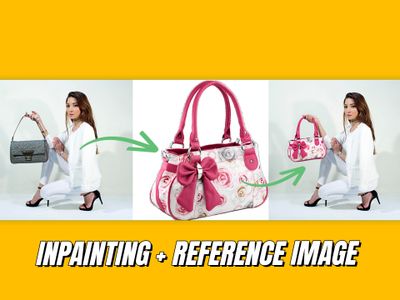
This workflow allows you to perform inpainting with the Qwen edit 2511 model.
Load the image you want to inpaint.
Change the image size if necessary (it should not be too large. Recommended size 1024×1024 (≈1 Mpx)
The advantage of inpainting instead of modifying the entire image is that you only make changes in the mask. This leaves the structure of the rest of the image intact.
Create the mask
Right-click on the image and select “Open in mask editor” from the context menu.
Draw the mask for the area you want to inpaint.
Note:
Make the mask slightly larger than the area you want to modify.
Enlarge and/or blur the mask.
In the “Grow Mask With Blur” node, extend the mask if necessary and add blur to improve the insertion.
In the Inpaint Crop (Improved) node, set the size of the painted area. (Recommended size: 1024 x 1024)
Prompt
In the positive prompt, indicate what you want to see in the painted area.
#qwenedit2511 #inpainting
Read more