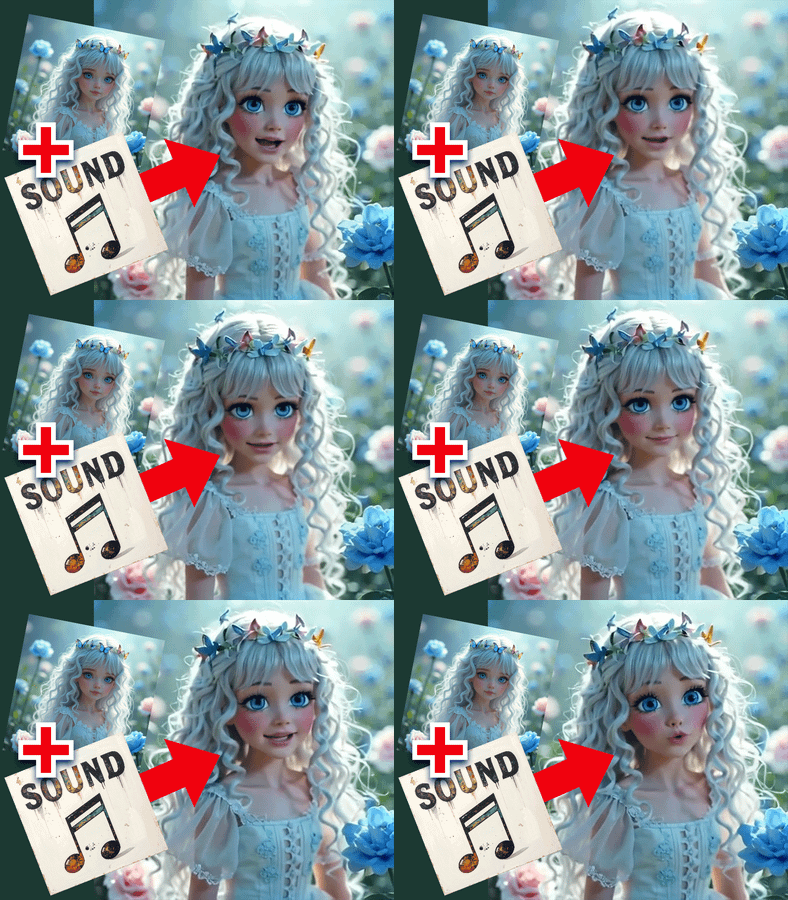
Kling AI Avatar V2 Pro · Photo to Talking Video
Upload a portrait and an audio file, and Kling AI Avatar V2 Pro generates a lip-synced talking avatar video with natural expressions, head movement, and 1080p output.
Audio
image to video
kling avatar v2 pro
lipsync
talking avatar
Video
175
_1783072269036.webp)
Nodes & Models
KlingAIAvatarV2Pro_floyo
VideoToFrames
LoadAudio
LoadImage
FloyoStickyNote
VHS_VideoCombine
ABOUT THE WORKFLOW
Animate a Portrait with Audio
Upload a portrait image and an audio file of speech, narration, or singing. The model animates the face with precise lip-sync, natural micro-expressions, blinking, and head movement matched to the audio. An optional text prompt steers the avatar's emotion and body language. The output is an MP4 with your audio embedded.
Partner node. This workflow calls an external API, so each run uses credits from your API wallet. No API key needed. Floyo handles the connection.
Model
Kling AI Avatar V2 Pro by Kuaishou. A dedicated audio-driven avatar model that transforms a single portrait into a talking video with 1080p output, up to 5 minutes of continuous generation, and support for realistic humans, animals, cartoons, and stylized characters.
HOW IT WORKS
Step 1. Upload your image
A portrait or headshot of the person, character, or creature you want to animate. Front-facing, well-lit, with a visible mouth and jaw.
Works great with: portraits · headshots · AI-generated faces · cartoon characters · animal photos
Step 2. Upload your audio
A recording of speech, narration, singing, or dialogue. The model syncs the avatar's mouth and expression to this audio. Audio can be up to 5 minutes long.
Works great with: voiceovers · podcast clips · narration · singing · dialogue recordings
Step 3. Write a short prompt (optional)
Guide the avatar's emotion and body language. "Man teaching mathematics" tells the model to animate with an instructive, engaged expression. "Woman smiling warmly while speaking" shifts the mood. Leave blank for neutral performance.
Step 4. Hit run and download
Kling AI Avatar V2 Pro generates the talking avatar video with your audio and returns an MP4.
Ready for: Premiere · DaVinci Resolve · TikTok · YouTube · Reels · course platforms
First time? Upload a clear front-facing portrait and a short audio clip. Leave the prompt blank or write a brief scene description. Hit run.
RECOMMENDED SETTINGS
Quick-start guide. Find the goal that matches yours and copy the settings.
Standard talking avatar — Upload a portrait and an audio clip. Write a one-line prompt or leave it blank. No other changes needed.
Control the avatar's emotion — Write a prompt that describes the mood. "Excited presenter explaining a product" or "Calm narrator reading a bedtime story" shapes the facial expression and energy level.
Singing instead of speech — Upload a vocal track. The model handles singing lip-sync the same way it handles speech. Write "woman singing softly" or similar in the prompt to match the performance style.
Animate a non-human character — Upload a cartoon, anime character, or animal photo. The model supports stylized and non-human faces alongside photorealistic portraits.
Long-form content — Upload audio up to 5 minutes. The model generates continuous video for the full duration without quality degradation or identity drift.
Lip-sync looks off — Use cleaner audio with less background noise. The model reads vocal features from the audio waveform, so reverb, music bleed, or overlapping voices reduce sync accuracy.
Face looks distorted or identity drifts — Use a higher-quality, front-facing portrait with even lighting. Avoid extreme angles, heavy occlusion, or photos where hair or accessories cover the lower face.
Prompt: Keep it short and focused on mood and performance, not scene description. "Confident speaker presenting to an audience" is specific. "A person in a room" adds nothing the model can use.
LEARN
📹 Videos
ComfyUI 101 Free Course ft. Sebastian Kamph
Floyo 101 for Team Collaboration
✨ Quick links
USE CASES
🎓 Educational Content and Course Videos
Upload a presenter photo and a lecture recording to produce a talking instructor video without filming on camera.
📱 Social Media and Marketing Clips
Turn a brand mascot, spokesperson photo, or character into a talking video for TikTok, Reels, Shorts, and ad placements.
🎙️ Podcast and Narration Visuals
Give audio-only content a face by uploading a host portrait and a podcast clip to generate a talking head video for YouTube and social distribution.
🐾 Animated Characters and Animals
Upload a cartoon, mascot, or pet photo and an audio clip to create a talking character video for entertainment, kids' content, or brand campaigns.
WHAT WORKS BEST / WHAT TO AVOID
✅ Works great
Front-facing portraits with visible mouth, jaw, and chin
Clean audio with isolated speech or vocals
Short performance prompts describing emotion and body language
Realistic humans, stylized characters, cartoons, and animal faces
⚠️ May produce softer results
Profile or extreme-angle portraits where the mouth is partially hidden
Audio with heavy background music, reverb, or overlapping voices
Very low-resolution or blurry source images
Portraits with hands, objects, or hair covering the lower face
FAQ
What is Kling AI Avatar V2 Pro?
Kling AI Avatar V2 Pro is Kuaishou's premium audio-driven avatar model. It takes a single portrait image and an audio track and generates a talking avatar video with precise lip-sync, natural micro-expressions, head and shoulder movement, and 1080p output at up to 48 FPS. It supports realistic humans, animals, cartoons, and stylized characters, with continuous generation up to 5 minutes.
Does Kling AI Avatar V2 Pro work with singing audio?
Yes. The model handles both speech and singing. It reads acoustic features from the audio waveform and syncs mouth movement to the phonetics regardless of whether the input is spoken dialogue or a vocal performance.
Can I animate cartoon characters or animals with this model?
Yes. Kling AI Avatar V2 Pro supports a wide range of visual inputs including photorealistic human portraits, anime-style characters, illustrated figures, cartoon mascots, and animal faces. The model adapts its animation to the style of the input image.
How long can the generated avatar video be?
Up to 5 minutes of continuous video from a single generation. Upload audio of any length up to 5 minutes and the model generates a matching video for the full duration without identity drift or quality loss.
What does the text prompt do in this workflow?
The prompt guides the avatar's emotion, body language, and performance style. "Excited teacher explaining a concept" produces different head movement and expressions than "calm narrator reading quietly." The prompt is optional. Leave it blank for a neutral performance driven by the audio alone.
Is Kling AI Avatar V2 Pro licensed for commercial use?
Kling AI Avatar V2 Pro is a proprietary Kuaishou model. Commercial use is governed by Kuaishou's terms of service. Review the current terms for your specific use case, and make sure you have the rights to any portrait and audio you upload.
How to run Kling AI Avatar V2 Pro online?
You can run Kling AI Avatar V2 Pro online through Floyo. No installation, no setup, no API key to wire up. Open the workflow in your browser, upload your inputs, and hit run. Free to try.
WHY FLOYO?
Floyo is the only platform with team collaboration for ComfyUI in the browser. You run workflows with no install. You share run history, assets, and models across your team. You pay only when you generate. Floyo supports open-source and closed-source models.
A designer runs an edit and likes the result. A teammate opens that exact run from shared history and keeps going. No file handoffs. No version confusion.
For studios and enterprise teams, Floyo adds private workspaces, pooled resources, and a team usage dashboard. Other ComfyUI cloud tools run for one person at a time. Floyo runs for the whole team, with transparent per-generation costs.
Ready to try it?
Upload a portrait and an audio clip, and hit run.
Questions? Watch the free course or check the FAQ above.
Read more