InsightFace for Filtering Character LoRA Dataset
Upload a reference face, point to your dataset, and InsightFace filters out images that don't match. Cosine, L2 Norm, and Euclidean distance all supported.
character design
character sheet
FaceAnalysis
Image
Image2Image
Image Dataset
InsightFace
lora
LoRAs
lora training
971


Nodes & Models
Batch Load Images
Note
Fast Groups Bypasser (rgthree)
PrimitiveString
WorkflowGraphics
LoadImage
SaveImage
PreviewImage
PreviewAny
FaceAnalysisModels
FaceAnalysisModels
FaceEmbedDistance
easy imageListToImageBatch
CR Combine Prompt
Description:
Filter a character LoRA dataset down to the images that look most like your reference face.
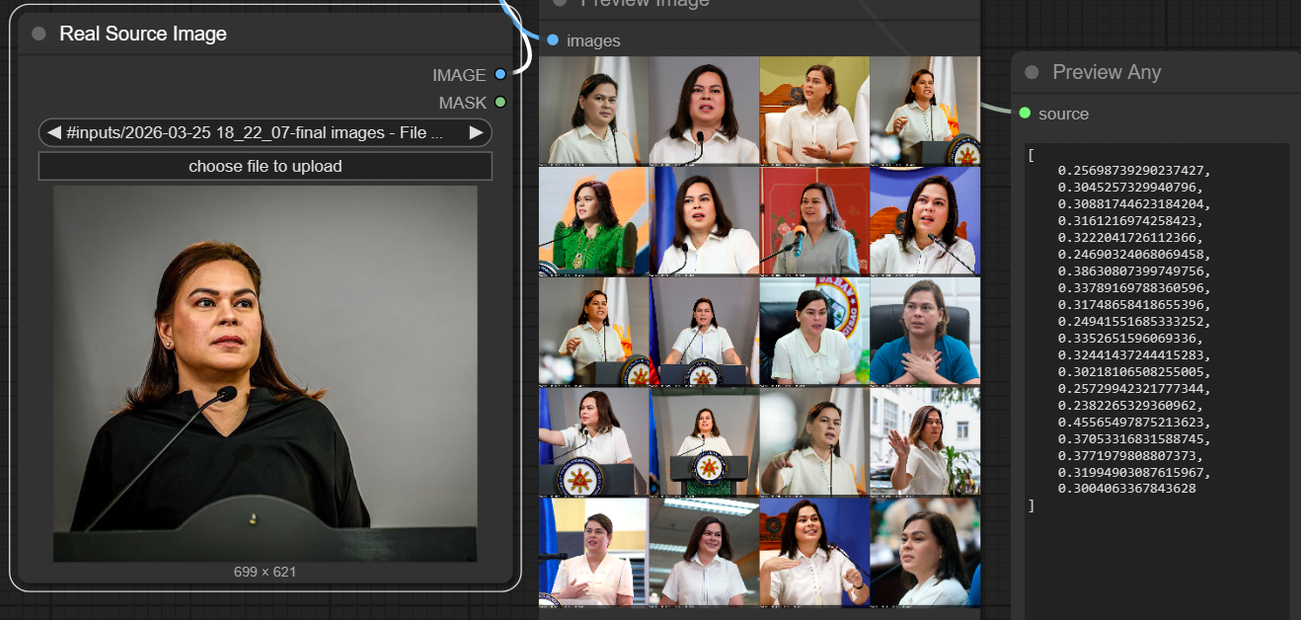
Upload one clear photo of the character and point the workflow at your dataset folder. InsightFace compares every image in the batch against your reference and scores how close each face is. Images that pass your threshold get saved. The rest get dropped.
No generation, no GPU model loading. This runs on CPU.
How do you filter a LoRA training dataset with InsightFace?
Upload a reference face and your full image dataset. InsightFace extracts face embeddings from each image and scores them against the reference. Set a similarity threshold to keep only the closest matches, or use filter_best to grab the top N images. Filtered images save to a new folder, ready for training.
Reference Image (Real Source Image) This is the face you want your dataset to match. Pick the clearest, most representative photo of the character. Front-facing, good lighting, minimal occlusion. This image sets the standard for every comparison.
Dataset Folder (Batch Load Images) Point this at your full image set. The workflow loads every image in the folder and runs them through InsightFace one by one.
Distance Method Three options:
Cosine: Compares facial features independent of lighting and environment. This is the default and the best starting point for most use cases.
L2 Norm: A balanced middle ground between feature similarity and overall appearance.
Euclidean: Factors in how lighting impacts the character. Useful when your dataset has consistent lighting and you want that reflected in the filter.
Start with Cosine. Switch to the others if your results feel too loose or too tight.
filter_thres Controls how strict the match needs to be. Closer to zero means the filtered images will look much closer to the reference. The useful range is about 0.1 to 0.68. Start around 0.4 and adjust based on what gets through.
Want a tight match for a specific face? Go lower, around 0.1 to 0.3. Need a wider net that still catches the right person? Try 0.4 to 0.6.
filter_best Set this when you want a fixed number of results instead of a threshold. If you need the top 25 closest matches from a set of 200, set filter_best to 25. Leave it at 0 to use threshold mode instead.
Character Name Names the output folder. Set this to your character's name so filtered datasets stay organized.
What is InsightFace dataset filtering good for?
InsightFace filtering is for anyone training a character LoRA who needs a clean, consistent face dataset. It removes images where the character looks off, catches wrong-person images mixed into large scrapes, and saves hours of manual sorting.
If you scraped 500 images of a character and half of them are group shots, side profiles, or someone else entirely, this workflow cuts the set down to the ones that matter. You get a tighter dataset, which means a more consistent LoRA.
This is especially useful for characters with a lot of available reference images where manual sorting would take forever. Celebrities, fictional characters from large media franchises, public figures with thousands of photos online.
For datasets under 30 images, you might be faster sorting by hand. This workflow earns its keep when you have 100+ images and need to pull out the best 20 to 30 for training.
FAQ
What distance method should I use for InsightFace LoRA filtering? Start with Cosine. It compares facial structure independent of lighting and environment, which makes it the most reliable for mixed-source datasets. Switch to L2 Norm if Cosine feels too permissive, or Euclidean if your dataset has uniform lighting conditions.
What filter_thres value works best for character LoRA datasets? It depends on how strict you want to be. For tight face matching, try 0.1 to 0.3. For a broader net that still catches the right person, 0.4 to 0.6. Start at 0.4 and tune from there based on what gets through.
Can I use InsightFace filtering with any LoRA training workflow? Yes. This workflow outputs a filtered image folder. That folder works as input for any LoRA training pipeline, whether you are using Flux, SDXL, SD 3.5, or anything else that trains on image datasets.
Does InsightFace dataset filtering need a GPU? No. InsightFace runs on CPU. There is no generative model involved, so there is no GPU requirement. Processing time depends on dataset size, but most sets finish in under a minute.
How do I run InsightFace dataset filtering online? You can run InsightFace dataset filtering online through Floyo. No installation, no setup. Open the workflow in your browser, upload your inputs, and hit run. Free to try.
Read more
_1786522681696.png?width=400&height=300&quality=80&resize=cover)