Block-wise Image Upscaling with Qwen
Block-wise Image Upscaling with Qwen
Diffusion
Image
LoRA
LoRAs
Memory Efficient
Qwen Model
Upscale
653
_1774789046971.png?width=1400&height=620&quality=80&resize=contain)



_1774789046971.png?width=104&height=104&quality=80&resize=cover)



Nodes & Models
KSamplerSelect
UpscaleModelLoader
4x_NMKD-Siax_200k.pth
RandomNoise
VAELoader
qwen_image_vae.safetensors
CLIPLoader
qwen_2.5_vl_7b_fp8_scaled.safetensors
WorkflowGraphics
UNETLoader
qwen_image_edit_fp8_e4m3fn.safetensors
LoadImage
CLIPTextEncode
LoraLoaderModelOnly
Qwen-Image-Lightning-4steps-V1.0.safetensors
Reroute
ModelSamplingAuraFlow
ImageUpscaleWithModel
BasicScheduler
ImageScaleToTotalPixels
TTP_Tile_image_size
TTP_Image_Tile_Batch
PreviewImage
VAEEncode
BasicGuider
CFGGuider
SamplerCustomAdvanced
VAEDecodeTiled
TTP_Image_Assy
SaveImage
Image Comparer (rgthree)
DownloadAndLoadFlorence2Model
Florence2Run
DownloadAndLoadFlorence2Model
Florence2Run
easy imageBatchToImageList
easy imageListToImageBatch
ShowText|pysssss
ShowText|pysssss
Block-wise Image Upscaling with Qwen
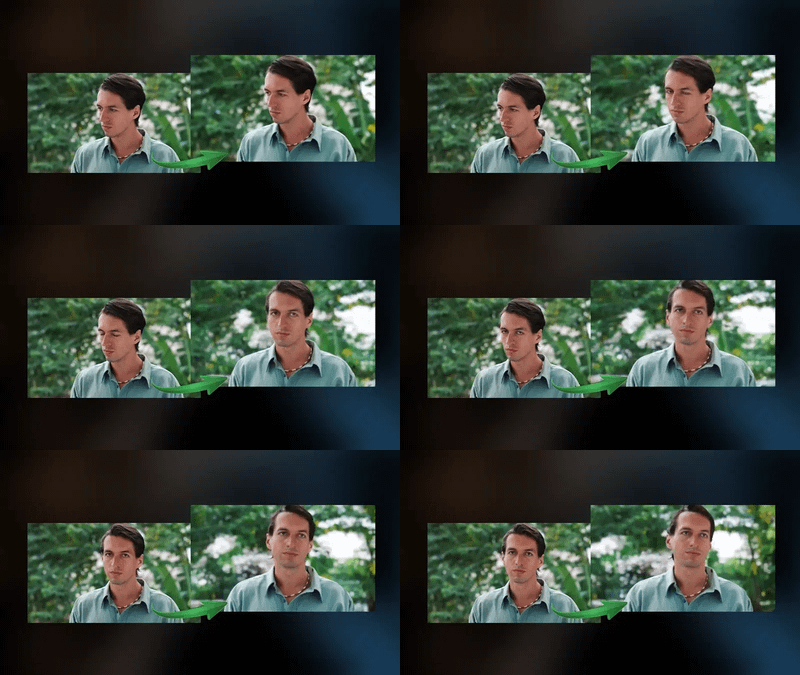
This workflow performs high-quality image upscaling using a block-wise (tile-based) processing approach, powered by the Qwen Image model and LoRA enhancements. It is designed to upscale large images efficiently while preserving fine details and avoiding memory limitations.
What this workflow does
Takes an input image from the user
Splits the image into smaller tiles (blocks)
Processes each tile individually using AI upscaling and diffusion models
Reconstructs the tiles back into a single high-resolution image
Optionally generates detailed captions and metadata for the output.
Key Features
Tile-based upscaling for large images
Fast inference using optimized Qwen + LoRA setup
High detail preservation with CFG and scheduler tuning
AI caption generation for image understanding
Efficient memory usage
Use Cases
Upscaling AI-generated images
Enhancing low-resolution photos
Preparing images for printing or high-res display
Batch processing large images without crashes
Read more
_1786518453053.png?width=400&height=300&quality=80&resize=cover)

_1786522681696.png?width=400&height=300&quality=80&resize=cover)