One-Video Sprite Sheet Pipeline
Crate video sprite sheet character
Image
Image to Video
Nanobanana
Sprite-Sheet
Video
1.2k
_1778514715081.png?width=1400&height=620&quality=80&resize=contain)
_1778514715081.png?width=104&height=104&quality=80&resize=cover)

Nodes & Models
NanoBananaEdit_floyo
GetNode
PrimitiveInt
LoadImage
WorkflowGraphics
InvertMask
BatchImagesNode
GetImageSize
SaveVideo
RepeatImageBatch
CreateVideo
ImageCrop
ImageBatchMulti
ImageResizeKJv2
ImageFromBatch
SplitImageWithAlpha
ImagePadForOutpaintMasked
ColorToMask
ImageCompositeMasked
Reroute
SetNode
PreviewImage
MaskBoundingBox+
SimpleMath+
SimpleMath+
LayerUtility: ColorImage V2
This workflow is basically a “one-click sprite/animation factory” built around NanoBananaEdit_floyo — and it’s designed to output clean, production-ready frames (with masks + consistent sizing) instead of “pretty but messy” generations.
What this workflow does (at a glance)
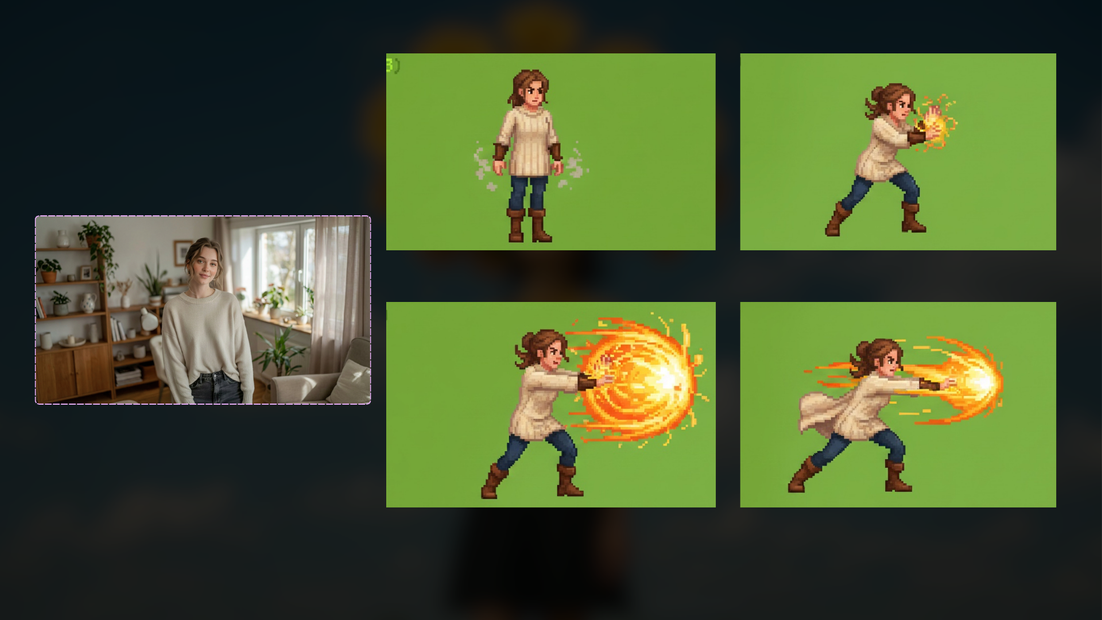
It takes an input image (or batch), runs it through Nano Banana to generate a 4-frame attack animation sprite sheet, then automatically:
splits the 2×2 sheet into individual frames
builds masks (chroma / alpha / bounding boxes)
crops + pads + resizes frames consistently
composites layers with masked merges (so edges stay clean)
re-batches frames into the right order
and can export as a video (or a final processed batch), depending on your output path
The “big win”: reliable keying + consistent framing
Most sprite workflows fall apart in two places:
backgrounds aren’t truly uniform, so keying is annoying
frames don’t align, so the character jitters between frames
This workflow solves both by enforcing:
hard chromakey green background (hex
#00FF00) in the NanoBanana prompta full chain of masking → bounding box → crop/pad → resize
repeated ImageCompositeMasked steps to keep silhouettes clean and centered
So your output frames come out ready to drop into a game engine or timeline.
What the node chain is doing (in practical terms)
Here’s the “story” of the pipeline:
1) Generation (the creative brain)
NanoBananaEdit_floyo generates a 2×2 grid sprite sheet with strict rules:
no green on the subject
no gradients/shadows in the background
no black borders between frames
consistent character design across all 4 frames
2) Frame extraction (turning sheet → frames)
SplitImageWithAlpha / ImageFromBatch / RepeatImageBatch
slices the sheet into 4 usable frames
ensures each frame is treated consistently downstream
3) Mask + alignment (the “no jitter” part)
ColorToMask + InvertMask + MaskBoundingBox+
isolates the character cleanly (by chroma / alpha logic)
finds the tight bounding box
ImageCrop + ImagePadForOutpaintMasked + GetImageSize
normalizes framing so each frame is aligned
pads where needed so you don’t clip motion/extremities
4) Cleanup + compositing (edges and polish)
ImageCompositeMasked (multiple stages)
merges layers using masks so edges don’t get crunchy
keeps background handling predictable
5) Output packaging
BatchImagesNode / CreateVideo
reassembles frames into a batch or timeline-ready output
optionally exports a video preview so you can review motion fast
The workflow is now cleaner with Set/Get nodes
I updated the workflow so the mask-splitting reroutes are replaced with SetNode/GetNode pairs:
SetNode stores each mask once (
mask_1,mask_2,mask_3)GetNode pulls those masks anywhere they’re needed downstream
What that gives you:
easier debugging (you can tap a GetNode anywhere and preview that exact mask)
less spaghetti wiring
safer edits (you won’t break three branches when you adjust one mask path)
Where this shines (real use cases)
Game sprites: consistent frame alignment + clean silhouettes
Storyboard panels: swap the prompt and you get a repeatable “panel → cleanup → output” system
Content packs: batch input characters and mass-generate attack animations quickly
Fast iteration: tune mask thresholds/crop logic once, and everything stays stable
Read more