



ทำได้มากขึ้นกับภาพ
สำรวจทั้งหมด



เวิร์กโฟลว์สำหรับ Inpainting ทั้งหมดเวิร์กโฟลว์สำหรับ Inpainting
Workflows ทั้งหมด

FLUX.2 Klein 9B: Image Inpainting
Inpainting image using Flux.2 Klein and LanPaint

Qwen Edit 2511 - inpainting
inpainting
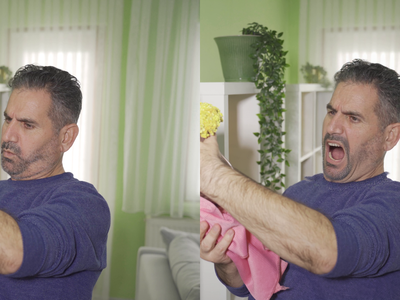

Flux Kontext Inpainting
Inpaint with the power of Flux Kontext, providing additional content-awareness.
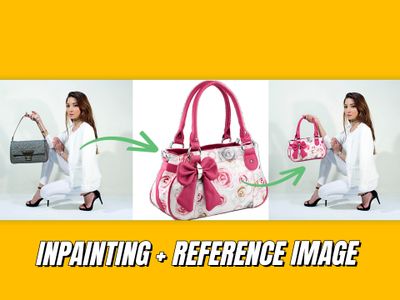
Inpainting with reference image
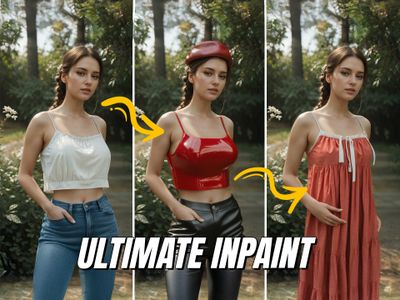
Flux Inpaint - ULTIMATE workflow.
Flux inpainting with Flux fill model and regular Flux dev model. All in one Flux inpainting workflow that easily AI retouches any image.

Flux. 2 Klein INPAINT Segment Edit Accurate Image

VOID · Video Object Removal
Erase any object from a video and fill the gap with coherent motion using VOID by Netflix and SAM3 by Meta. Type the object name, hit run. Apache 2.0.
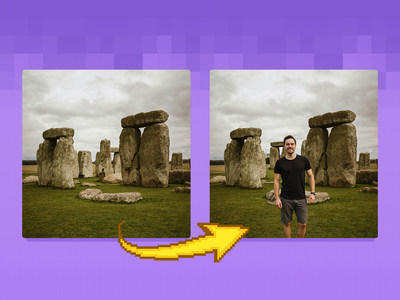
Image Inpainting with LoRA
Change specific details on just a portion of the image for inpainting or Erase & Replace, adding a LoRA for extra control.

Z-Image Turbo · Inpainting
Repaint any masked area with a text instruction using Z-Image Turbo and depth-guided ControlNet. Upload an image, paint the mask, describe the edit, run.


Z Image Turbo Ipainting + Upscale
A workflow process of recreating, filling in, or fixing missing, damaged, or undesirable portions of any image to generate a smooth, complete vision
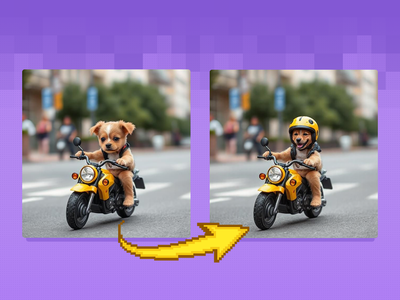
Image Inpainting
Change specific details on just a portion of the image, sometimes known as inpainting or Erase & Replace. Key Inputs Image reference: Use any JPG or PNG showing your subject clearly Masking tools: Right-click to reveal the masking tool option, and create a mask of the desired area to inpaint Prompt: as descriptive a prompt as possible to help guide what you would like replaced in the masked area

Flux 2 Klein 9B Panorama Inpainting
Edit 360 panoramas with Flux 2 Klein 9B. Select a region, describe the change, and the edit gets composited back into your full panoramic image. No warping.
Workflows = API
ทุกเวิร์กโฟลว์คือ API endpoint ใส่การสร้างงานด้วย AI ลงในผลิตภัณฑ์ของคุณได้โดยไม่ต้องสร้างแบ็กเอนด์ เลือกเวิร์กโฟลว์ ปรับแต่ง คลิก "คัดลอกโค้ด Floyo API" เท่านี้ก็เสร็จ

MCP
ทุกเวิร์กโฟลว์บนแพลตฟอร์มเข้าถึงได้จากเอเจนต์และเครื่องมือภายในของคุณเอง ภายใต้การควบคุมของผู้ดูแลแบบเดียวกัน
mcp.floyo.ai/mcp
เทมเพลตใช้ง่าย
เปิดเวิร์กโฟลว์สำเร็จรูป อ่านคำแนะนำ เปลี่ยนอินพุต แล้วคลิกรัน คนส่วนใหญ่ไม่เคยต้องเปิดดูโหนดเลย ความซับซ้อนเป็นทางเลือก และซ่อนอยู่เบื้องหลัง

Trust Center
รู้ว่าอะไรปลอดภัยก่อนที่ใครจะรัน ทุกโมเดลมีสถานะ Verified Private และ Commercial Use พร้อมการควบคุมระดับทีมเพื่อบล็อกโมเดลที่คุณไม่อนุมัติผู้ดูแลเลือกได้ว่าทีมใช้โมเดล ผู้ให้บริการ และโหนดใดได้บ้าง

เทมเพลตใช้ง่าย
เปิดเวิร์กโฟลว์สำเร็จรูป อ่านคำแนะนำ เปลี่ยนอินพุต แล้วคลิกรัน คนส่วนใหญ่ไม่เคยต้องเปิดดูโหนดเลย ความซับซ้อนเป็นทางเลือก และซ่อนอยู่เบื้องหลัง
Trust Center
รู้ว่าอะไรปลอดภัยก่อนที่ใครจะรัน ทุกโมเดลมีสถานะ Verified Private และ Commercial Use พร้อมการควบคุมระดับทีมเพื่อบล็อกโมเดลที่คุณไม่อนุมัติผู้ดูแลเลือกได้ว่าทีมใช้โมเดล ผู้ให้บริการ และโหนดใดได้บ้าง
Workflows = API
ทุกเวิร์กโฟลว์คือ API endpoint ใส่การสร้างงานด้วย AI ลงในผลิตภัณฑ์ของคุณได้โดยไม่ต้องสร้างแบ็กเอนด์เลือกเวิร์กโฟลว์ ปรับแต่ง คลิก "คัดลอกโค้ด Floyo API" เท่านี้ก็เสร็จ
