



ทำได้มากขึ้นกับภาพ
สำรวจทั้งหมด


เวิร์กโฟลว์สำหรับ แก้ไขภาพ ทั้งหมดเวิร์กโฟลว์สำหรับ แก้ไขภาพ
Workflows ทั้งหมด

Nano Banana Pro: Generate & Edit Images
Google just released Nano Banana Pro, and honestly, it's a pretty big step up from the original Nano Banana. The main thing? It can actually put legible text in images now. Like, real text that you can read, not the garbled nonsense most AI models spit out.


Flux 2 Klein 9b - Perfect Face swap
Instead of using outdated or unstable techniques, this workflow was designed to take full advantage of FLUX 2 KLEIN's editing capabilities—using a face image and a reference character image to produce clean, highly consistent results.

Z-Image Turbo · Text or Image to Image
Z-Image Turbo is Alibaba's open-source 6B model that turns a text prompt into photorealistic images in about 8 steps. Type a prompt, or rework an image.

Qwen Image Edit 2509: Build a LoRA Dataset
Create Character LoRA Dataset

FLUX.2 Klein 9B · Image to Image
Edit images with consistency of the subject or things using Flux.2 Klein 9B and a LoRA

Qwen Image Edit 2509 · Face Swap
Swap a face between two photos with Qwen Image Edit 2509. Upload a main image and a reference, paint a mask on each face, hit run. Apache 2.0 open weights.

FLUX.2 Klein 9B: Realistic Photo Enhancer
Create realistic image but in an enhanced details using FLUX.2 Klein 9B and with LoRA

SeedVR2 · Image Upscaler
Upscale to Extreme Clarity

FLUX.2 Klein 9B: Image Inpainting
Inpainting image using Flux.2 Klein and LanPaint

Z-Image Turbo: ControlNet Image to Image
Image to Image
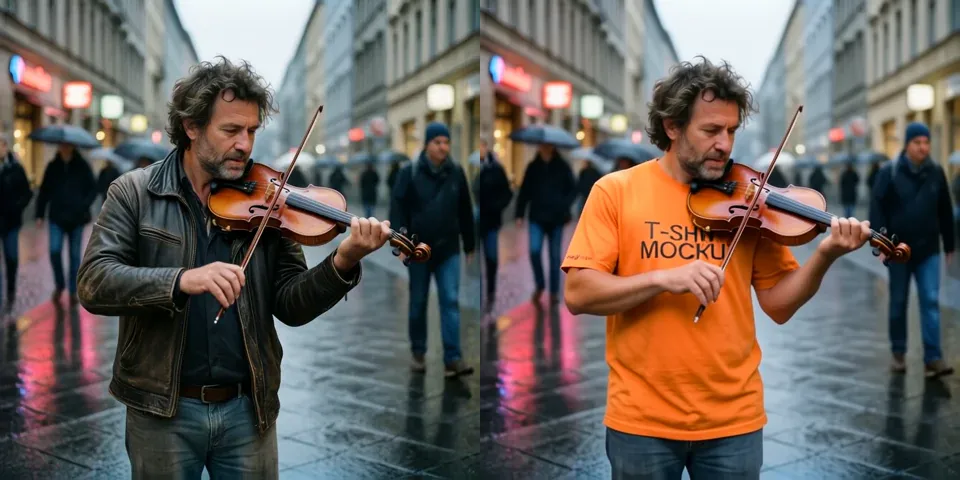
FLUX.2 Klein 4B · Swap Clothes
Swap clothes on any person using FLUX.2 Klein 4B and LanPaint. Upload a person and a garment photo, describe the swap, and hit run. Apache 2.0 open weights.

Nano Banana 2 · Image Generation & Editing
The top-ranked image model on Artificial Analysis and LM Arena. 4K output, text rendering, and subject consistency across 5 characters.
Workflows = API
ทุกเวิร์กโฟลว์คือ API endpoint ใส่การสร้างงานด้วย AI ลงในผลิตภัณฑ์ของคุณได้โดยไม่ต้องสร้างแบ็กเอนด์ เลือกเวิร์กโฟลว์ ปรับแต่ง คลิก "คัดลอกโค้ด Floyo API" เท่านี้ก็เสร็จ

MCP
ทุกเวิร์กโฟลว์บนแพลตฟอร์มเข้าถึงได้จากเอเจนต์และเครื่องมือภายในของคุณเอง ภายใต้การควบคุมของผู้ดูแลแบบเดียวกัน
mcp.floyo.ai/mcp
เทมเพลตใช้ง่าย
เปิดเวิร์กโฟลว์สำเร็จรูป อ่านคำแนะนำ เปลี่ยนอินพุต แล้วคลิกรัน คนส่วนใหญ่ไม่เคยต้องเปิดดูโหนดเลย ความซับซ้อนเป็นทางเลือก และซ่อนอยู่เบื้องหลัง

Trust Center
รู้ว่าอะไรปลอดภัยก่อนที่ใครจะรัน ทุกโมเดลมีสถานะ Verified Private และ Commercial Use พร้อมการควบคุมระดับทีมเพื่อบล็อกโมเดลที่คุณไม่อนุมัติผู้ดูแลเลือกได้ว่าทีมใช้โมเดล ผู้ให้บริการ และโหนดใดได้บ้าง

เทมเพลตใช้ง่าย
เปิดเวิร์กโฟลว์สำเร็จรูป อ่านคำแนะนำ เปลี่ยนอินพุต แล้วคลิกรัน คนส่วนใหญ่ไม่เคยต้องเปิดดูโหนดเลย ความซับซ้อนเป็นทางเลือก และซ่อนอยู่เบื้องหลัง
Trust Center
รู้ว่าอะไรปลอดภัยก่อนที่ใครจะรัน ทุกโมเดลมีสถานะ Verified Private และ Commercial Use พร้อมการควบคุมระดับทีมเพื่อบล็อกโมเดลที่คุณไม่อนุมัติผู้ดูแลเลือกได้ว่าทีมใช้โมเดล ผู้ให้บริการ และโหนดใดได้บ้าง
Workflows = API
ทุกเวิร์กโฟลว์คือ API endpoint ใส่การสร้างงานด้วย AI ลงในผลิตภัณฑ์ของคุณได้โดยไม่ต้องสร้างแบ็กเอนด์เลือกเวิร์กโฟลว์ ปรับแต่ง คลิก "คัดลอกโค้ด Floyo API" เท่านี้ก็เสร็จ
