



Faça mais com imagens
Ver tudo


Todos os workflows de edição de imagensWorkflows de Edição de imagens
Todos os Workflows

Nano Banana Pro: Generate & Edit Images
Google just released Nano Banana Pro, and honestly, it's a pretty big step up from the original Nano Banana. The main thing? It can actually put legible text in images now. Like, real text that you can read, not the garbled nonsense most AI models spit out.


Flux 2 Klein 9b - Perfect Face swap
Instead of using outdated or unstable techniques, this workflow was designed to take full advantage of FLUX 2 KLEIN's editing capabilities—using a face image and a reference character image to produce clean, highly consistent results.

Z-Image Turbo · Text or Image to Image
Z-Image Turbo is Alibaba's open-source 6B model that turns a text prompt into photorealistic images in about 8 steps. Type a prompt, or rework an image.

Qwen Image Edit 2509: Build a LoRA Dataset
Create Character LoRA Dataset

FLUX.2 Klein 9B · Image to Image
Edit images with consistency of the subject or things using Flux.2 Klein 9B and a LoRA

Qwen Image Edit 2509 · Face Swap
Swap a face between two photos with Qwen Image Edit 2509. Upload a main image and a reference, paint a mask on each face, hit run. Apache 2.0 open weights.

FLUX.2 Klein 9B: Realistic Photo Enhancer
Create realistic image but in an enhanced details using FLUX.2 Klein 9B and with LoRA

SeedVR2 · Image Upscaler
Upscale to Extreme Clarity

FLUX.2 Klein 9B: Image Inpainting
Inpainting image using Flux.2 Klein and LanPaint

Z-Image Turbo: ControlNet Image to Image
Image to Image
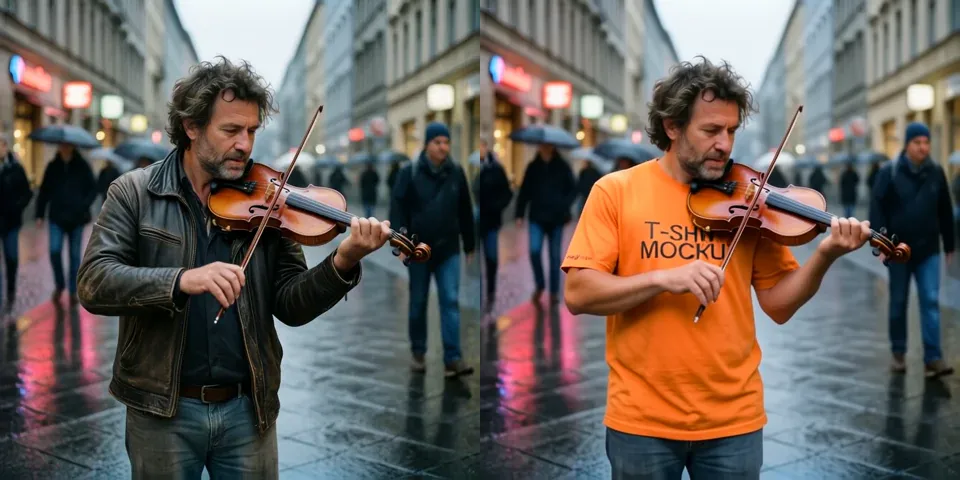
FLUX.2 Klein 4B · Swap Clothes
Swap clothes on any person using FLUX.2 Klein 4B and LanPaint. Upload a person and a garment photo, describe the swap, and hit run. Apache 2.0 open weights.

Nano Banana 2 · Image Generation & Editing
The top-ranked image model on Artificial Analysis and LM Arena. 4K output, text rendering, and subject consistency across 5 characters.
Workflows = APIs
Todo workflow é um endpoint de API. Leve geração com IA para o seu produto sem criar um backend. Escolha um workflow, personalize, clique em “Copiar snippet da Floyo API” e pronto.

MCP
Todos os workflows da plataforma, ao alcance dos seus agentes e ferramentas internas, com os mesmos controles de administração.
mcp.floyo.ai/mcp
Templates fáceis
Abra um workflow pronto, leia as instruções, troque a entrada e clique em Run. A maioria das pessoas nunca abre um node. A complexidade é opcional e fica nos bastidores.

Trust Center
Saiba o que é seguro antes que alguém execute. Status Verified Private e Commercial Use para cada modelo, além de controles de equipe para bloquear os que você não aprovar.Os administradores escolhem quais modelos, provedores e nodes a equipe pode usar.

Templates fáceis
Abra um workflow pronto, leia as instruções, troque a entrada e clique em Run. A maioria das pessoas nunca abre um node. A complexidade é opcional e fica nos bastidores.
Trust Center
Saiba o que é seguro antes que alguém execute. Status Verified Private e Commercial Use para cada modelo, além de controles de equipe para bloquear os que você não aprovar.Os administradores escolhem quais modelos, provedores e nodes a equipe pode usar.
Workflows = APIs
Todo workflow é um endpoint de API. Leve geração com IA para o seu produto sem criar um backend.Escolha um workflow, personalize, clique em “Copiar snippet da Floyo API” e pronto.
Comece agora
Curso gratuito
ComfyUI 101
curso gratuito com Sebastian KamphCurso gratuito com Sebastian Kamph
Dez aulas, da tela em branco ao ControlNet. Nodes, texto para imagem, modelos, LoRA, upscale e configurações do KSampler. Nada para instalar. Todas as aulas rodam aqui, então você termina com workflows que você mesmo criou.
