



画像でさらにできること
すべて見る



インペインティングのワークフロー一覧インペインティングのワークフロー
すべての Workflows

FLUX.2 Klein 9B: Image Inpainting
Inpainting image using Flux.2 Klein and LanPaint
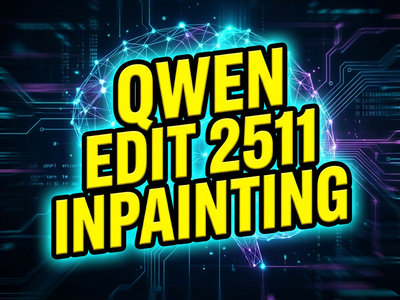

Qwen Edit 2511 - inpainting
inpainting


Flux Kontext Inpainting
Inpaint with the power of Flux Kontext, providing additional content-awareness.
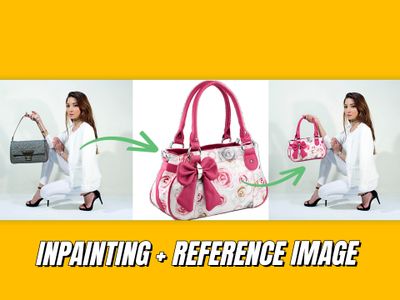
Inpainting with reference image
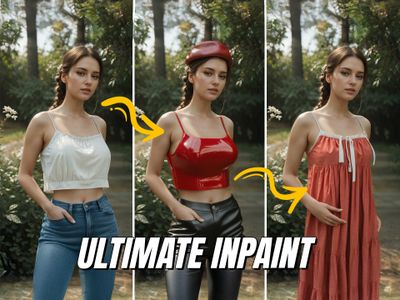
Flux Inpaint - ULTIMATE workflow.
Flux inpainting with Flux fill model and regular Flux dev model. All in one Flux inpainting workflow that easily AI retouches any image.

Flux. 2 Klein INPAINT Segment Edit Accurate Image

VOID · Video Object Removal
Erase any object from a video and fill the gap with coherent motion using VOID by Netflix and SAM3 by Meta. Type the object name, hit run. Apache 2.0.
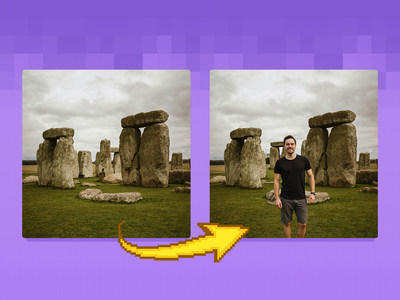
Image Inpainting with LoRA
Change specific details on just a portion of the image for inpainting or Erase & Replace, adding a LoRA for extra control.

Z-Image Turbo · Inpainting
Repaint any masked area with a text instruction using Z-Image Turbo and depth-guided ControlNet. Upload an image, paint the mask, describe the edit, run.


Z Image Turbo Ipainting + Upscale
A workflow process of recreating, filling in, or fixing missing, damaged, or undesirable portions of any image to generate a smooth, complete vision
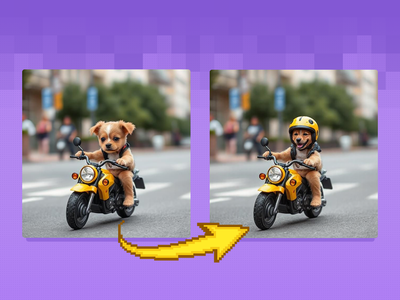
Image Inpainting
Change specific details on just a portion of the image, sometimes known as inpainting or Erase & Replace. Key Inputs Image reference: Use any JPG or PNG showing your subject clearly Masking tools: Right-click to reveal the masking tool option, and create a mask of the desired area to inpaint Prompt: as descriptive a prompt as possible to help guide what you would like replaced in the masked area

Flux 2 Klein 9B Panorama Inpainting
Edit 360 panoramas with Flux 2 Klein 9B. Select a region, describe the change, and the edit gets composited back into your full panoramic image. No warping.
Workflows = API
すべてのワークフローが API エンドポイントです。 バックエンドを作らずに、AI 生成を自社のプロダクトに組み込めます。 ワークフローを選んでカスタマイズし、「Floyo API スニペットをコピー」をクリックすれば完了です。

MCP
プラットフォーム上のすべてのワークフローに、自分のエージェントや社内ツールから、同じ管理設定のもとでアクセスできます。
mcp.floyo.ai/mcp
かんたんテンプレート
既製のワークフローを開き、説明を読んで入力を変え、Run をクリックするだけ。ほとんどの人はノードを開くこともありません。複雑な部分は、必要なときのために裏側にあります。

Trust Center
誰かが実行する前に、安全かどうかがわかります。すべてのモデルに Verified Private と Commercial Use のステータスがあり、承認していないモデルはチームの管理設定でブロックできます。管理者は、チームが使えるモデル、プロバイダー、ノードを選べます。

かんたんテンプレート
既製のワークフローを開き、説明を読んで入力を変え、Run をクリックするだけ。ほとんどの人はノードを開くこともありません。複雑な部分は、必要なときのために裏側にあります。
Trust Center
誰かが実行する前に、安全かどうかがわかります。すべてのモデルに Verified Private と Commercial Use のステータスがあり、承認していないモデルはチームの管理設定でブロックできます。管理者は、チームが使えるモデル、プロバイダー、ノードを選べます。
Workflows = API
すべてのワークフローが API エンドポイントです。 バックエンドを作らずに、AI 生成を自社のプロダクトに組み込めます。ワークフローを選んでカスタマイズし、「Floyo API スニペットをコピー」をクリックすれば完了です。
