

Z-Image Base · Text to Image With LoRA
Generate stylized images with Z-Image Base and a community LoRA. Write a prompt starting with the trigger word, pick a size, hit run. Apache 2.0 open weights.
Base
Image
LoRA
LoRAs
Text to Image
Z-image
1.0k


Nodes & Models
VAELoader
ae.safetensors
MarkdownNote
EmptySD3LatentImage
CLIPLoader
qwen_3_4b.safetensors
UNETLoader
z_image_bf16.safetensors
CLIPTextEncode
LoraLoaderModelOnly
br14nne_zimage-z-image-base-text-to-i-OaEXINkX.safetensors
ModelSamplingAuraFlow
KSampler
VAEDecode
SaveImage
ABOUT THE WORKFLOW
Generate a Stylized Image Write a prompt and hit run. A community style LoRA is loaded on top of Z-Image Base, so the output carries that adapter's look out of the box. Swap the LoRA file for a different one and the same workflow takes on a different style.
Model
Z-Image Base by Tongyi-MAI under Alibaba. A 6 billion parameter single-stream diffusion transformer with a Qwen 3 4B text encoder. The undistilled foundation model of the Z-Image family, built for full-step generation and fine-tuning. Ranked first among open-source models on the Artificial Analysis leaderboard at launch. Strong at photorealistic skin, fabric, lighting, and readable bilingual text.
Community style LoRA. Shapes the visual style of the output. Loaded at strength 1 by default.
HOW IT WORKS
Step 1. Write your prompt Start with the LoRA trigger word, then describe the picture. The loaded LoRA expects its trigger as the first token. Works great with: character art · illustrations · portraits · stylized scenes
Step 2. Set your size Width and height default to 1024 x 1024. Stay near that range for clean results.
Step 3. Hit run and download The model builds the picture in 30 passes and saves it under z-image. A preview appears on screen alongside the saved file. Ready for: Photoshop · Figma · Canva · any editor
First time? Leave every setting as-is. The defaults (1024 x 1024 · 30 steps · CFG 4 · LoRA strength 1 · random seed) are the right starting point for almost everyone.
RECOMMENDED SETTINGS
Quick-start guide. Find the goal that matches yours and copy the settings.
Standard image (most people) — 1024 x 1024 · 30 steps · CFG 4 · LoRA strength 1 · random seed. The right starting point for almost everyone.
Sharper detail — Raise steps toward 50. Z-Image Base is undistilled, so more passes keep adding clarity up to about 50 before returns flatten.
The style is too strong — Lower LoRA strength below 1. At 0.5 the adapter still shapes the look, but the base model's own tendencies come through more.
The style is not strong enough — Raise LoRA strength above 1. Higher values push the adapter harder, though artifacts can appear past about 1.3.
Picture drifts from your prompt — Raise CFG one point at a time. The tested range is 3 to 5. Higher values hold the model to your words more tightly.
Reproduce a picture you liked — Set a specific seed number instead of leaving it on random. The same prompt, size, seed, and LoRA strength give you the same image back.
Want a different LoRA — Replace the file on the LoRA loader with any Z-Image compatible adapter. The rest of the workflow stays the same.
Want to steer away from something — Add the word or phrase to the negative prompt. It is empty by default and ready to use.
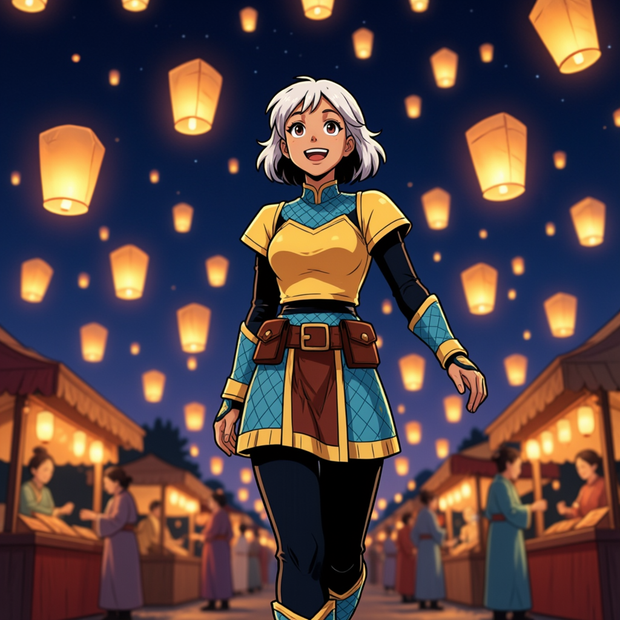
Prompt: Start with the trigger word, then describe the scene as a picture. "br14nne, a digital illustration in anime style, a young woman with white hair walking through a night festival lit by floating lanterns, deep navy sky, warm amber light" gives you more than "br14nne, anime girl." Name the lighting, the palette, and the framing after the scene description.
LEARN
📹 Videos
ComfyUI 101 Free Course ft. Sebastian Kamph
Floyo 101 for Team Collaboration
✨ Quick links
USE CASES
🎨 Character and Illustration Generate stylized character art and illustrations with the loaded LoRA defining the look.
🖼️ Style Exploration Swap LoRAs and rerun the same prompt to compare different visual styles on one composition.
📸 Portraits With a Look Generate portraits where the adapter handles the film stock, the grain, or the colour grade without writing it into the prompt.
🛍️ Branded Visuals Train or load a LoRA that matches a brand style, then generate images that stay on look across a set.
WHAT WORKS BEST / WHAT TO AVOID
✅ Works great
Prompts that start with the LoRA trigger word
Detailed scene descriptions with lighting, palette, and framing
Sizes at or near 1024 x 1024
Step counts of 30 to 50
⚠️ May produce softer results
Short keyword prompts with no context
Sizes pushed well past 1024
Step counts below 30, where the undistilled model has not resolved
Forgetting the trigger word when the LoRA expects one
FAQ
What is Z-Image Base? Z-Image Base is the undistilled foundation model of the Z-Image family, built by Tongyi-MAI under Alibaba and released 26 November 2025. It is a 6 billion parameter single-stream diffusion transformer with a Qwen 3 4B text encoder, designed for full-step generation at 30 to 50 passes and for fine-tuning. It ranked first among open-source models on the Artificial Analysis text-to-image leaderboard at launch.
What is the difference between Z-Image Base and Z-Image Turbo? They share the same architecture. Turbo is distilled down to 8 steps for speed, producing images in under a second on datacenter hardware. Base runs the full schedule at 30 to 50 steps and is the version used for LoRA training and fine-tuning, since distillation changes the loss landscape. Pick Turbo for production speed and Base when you are training adapters or want the undistilled quality ceiling.
Is Z-Image Base free for commercial use? Yes. It is released under Apache 2.0, which allows commercial use, modification, fine-tuning, and self-hosted deployment with no revenue threshold and no territory restrictions. The LoRA loaded on this workflow is a community adapter with its own terms, so check its license separately.
Why does this workflow need 30 steps when Turbo uses 8? Base is undistilled. The full-step schedule gives it more room to resolve detail, especially when a LoRA is pushing the model in a direction it was not trained for. Below about 30 the picture softens noticeably. Turbo's 8-step speed comes from distillation that compresses that schedule, and LoRAs trained for Base do not transfer cleanly to Turbo.
Can I use a different LoRA with this workflow? Yes. Replace the file on the LoRA loader node with any adapter trained for Z-Image or compatible with its architecture. Adjust the strength to taste and update the trigger word in your prompt if the new LoRA expects one.
What resolution does Z-Image Base support? The model was trained at 1024 x 1024 and supports a range of aspect ratios in that neighbourhood. Going much larger costs memory and generation time without a matching gain in detail. The MarkdownNote in the workflow lists tested dimensions.
How to run Z-Image Base online? You can run Z-Image Base online through Floyo. No installation, no setup, no model downloads. Open the workflow in your browser, write a prompt, and hit run. Free to try.
WHY FLOYO?
Floyo is the only platform with team collaboration for ComfyUI in the browser. You run workflows with no install. You share run history, assets, and models across your team. You pay only when you generate. Floyo supports open-source and closed-source models.
A designer runs an edit and likes the result. A teammate opens that exact run from shared history and keeps going. No file handoffs. No version confusion.
For studios and enterprise teams, Floyo adds private workspaces, pooled resources, and a team usage dashboard. Other ComfyUI cloud tools run for one person at a time. Floyo runs for the whole team, with transparent per-generation costs.
Ready to try it? Write a prompt starting with the trigger word and run it. The LoRA and settings are already loaded.
Questions? Watch the free course or check the FAQ above.
Read more
_1786518453053.png?width=400&height=300&quality=80&resize=cover)

_1786522681696.png?width=400&height=300&quality=80&resize=cover)




