



Allez plus loin avec l’image
Tout explorer


Tous les workflows de type retouche d’imagesWorkflows : Retouche d’images
Tous les Workflows

Nano Banana Pro: Generate & Edit Images
Google just released Nano Banana Pro, and honestly, it's a pretty big step up from the original Nano Banana. The main thing? It can actually put legible text in images now. Like, real text that you can read, not the garbled nonsense most AI models spit out.


Flux 2 Klein 9b - Perfect Face swap
Instead of using outdated or unstable techniques, this workflow was designed to take full advantage of FLUX 2 KLEIN's editing capabilities—using a face image and a reference character image to produce clean, highly consistent results.

Z-Image Turbo · Text or Image to Image
Z-Image Turbo is Alibaba's open-source 6B model that turns a text prompt into photorealistic images in about 8 steps. Type a prompt, or rework an image.

Qwen Image Edit 2509: Build a LoRA Dataset
Create Character LoRA Dataset

FLUX.2 Klein 9B · Image to Image
Edit images with consistency of the subject or things using Flux.2 Klein 9B and a LoRA

Qwen Image Edit 2509 · Face Swap
Swap a face between two photos with Qwen Image Edit 2509. Upload a main image and a reference, paint a mask on each face, hit run. Apache 2.0 open weights.

FLUX.2 Klein 9B: Realistic Photo Enhancer
Create realistic image but in an enhanced details using FLUX.2 Klein 9B and with LoRA

SeedVR2 · Image Upscaler
Upscale to Extreme Clarity

FLUX.2 Klein 9B: Image Inpainting
Inpainting image using Flux.2 Klein and LanPaint

Z-Image Turbo: ControlNet Image to Image
Image to Image
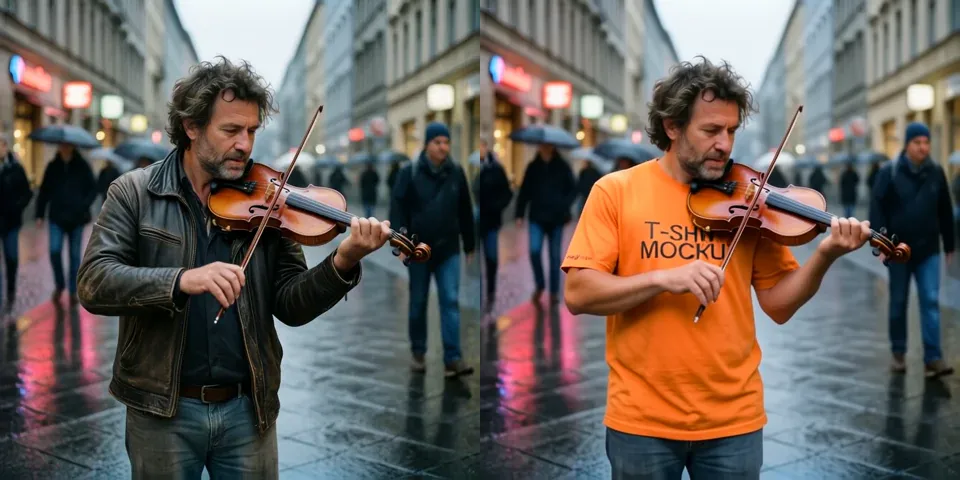
FLUX.2 Klein 4B · Swap Clothes
Swap clothes on any person using FLUX.2 Klein 4B and LanPaint. Upload a person and a garment photo, describe the swap, and hit run. Apache 2.0 open weights.

Nano Banana 2 · Image Generation & Editing
The top-ranked image model on Artificial Analysis and LM Arena. 4K output, text rendering, and subject consistency across 5 characters.
Workflows = API
Chaque workflow est un endpoint d’API. Intégrez la génération par IA à votre produit sans développer de backend. Choisissez un workflow, personnalisez-le, cliquez sur « Copier l’extrait de code Floyo API », et c’est fait.

MCP
Tous les workflows de la plateforme, accessibles depuis vos propres agents et outils internes, avec les mêmes contrôles d’administration.
mcp.floyo.ai/mcp
Templates simples
Ouvrez un workflow prêt à l’emploi, lisez les instructions, changez votre entrée, cliquez sur Exécuter. La plupart des gens n’ouvrent jamais un nœud. La complexité est facultative et reste sous le capot.

Trust Center
Sachez ce qui est sûr avant que quiconque ne l’exécute. Statuts Verified Private et Commercial Use pour chaque modèle, et des contrôles d’équipe pour bloquer ceux que vous n’approuvez pas.Les administrateurs choisissent les modèles, les fournisseurs et les nœuds que l’équipe peut utiliser.

Templates simples
Ouvrez un workflow prêt à l’emploi, lisez les instructions, changez votre entrée, cliquez sur Exécuter. La plupart des gens n’ouvrent jamais un nœud. La complexité est facultative et reste sous le capot.
Trust Center
Sachez ce qui est sûr avant que quiconque ne l’exécute. Statuts Verified Private et Commercial Use pour chaque modèle, et des contrôles d’équipe pour bloquer ceux que vous n’approuvez pas.Les administrateurs choisissent les modèles, les fournisseurs et les nœuds que l’équipe peut utiliser.
Workflows = API
Chaque workflow est un endpoint d’API. Intégrez la génération par IA à votre produit sans développer de backend.Choisissez un workflow, personnalisez-le, cliquez sur « Copier l’extrait de code Floyo API », et c’est fait.
Premiers pas
Cours gratuit
ComfyUI 101
cours gratuit de Sebastian KamphCours gratuit de Sebastian Kamph
Dix leçons, d’un canevas vierge jusqu’à ControlNet. Nœuds, texte vers image, modèles, LoRA, upscaling et réglages du KSampler. Rien à installer. Chaque leçon s’exécute ici : vous terminez avec des workflows que vous avez construits vous-même.
