

Qwen Image Max Edit for Editing Images
Editing images using the flagship model of Qwen Image Max Edit
API
Image
Image2Image
Image Editing
Qwen Image Max Edit
543



Nodes & Models
QwenImageMaxEdit_floyo
WorkflowGraphics
LoadImage
GetImageSize
ImageConcanate
SaveImage
PreviewImage
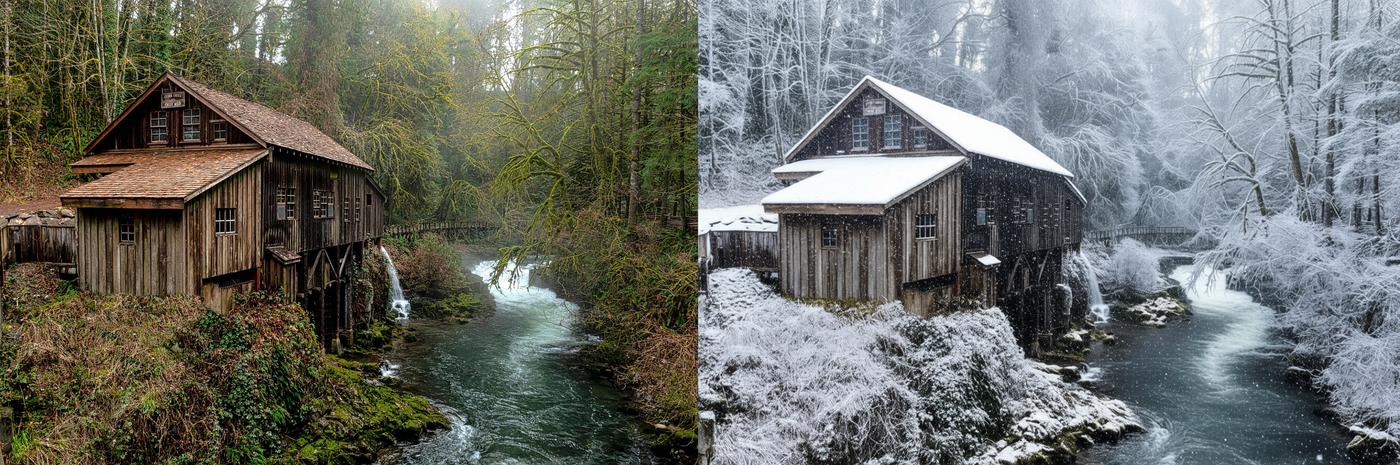
Qwen Image Max Edit is the high‑end editing version of Qwen Image Max: it takes one or more images plus a text instruction and performs precise, context‑aware edits while preserving composition, lighting, and style.
Overview
Built on the same 20B backbone as Qwen Image Max, with a dual‑path architecture: a multimodal encoder for semantics and a VAE‑style path for appearance (color, texture, lighting).
Extends Qwen’s strong text rendering into editing, so it can add, remove, or modify text in images while keeping fonts, size, and typographic style consistent.
What it does well
Precise text editing: Add, change, or delete text in signage, UI, labels, and documents in both English and Chinese, keeping layout and font appearance.
Semantic edits: High‑level changes like changing outfits, rotating or re‑posing objects, re‑styling characters, or altering scene layout while keeping identities intact.
Appearance edits: Low‑level operations such as color correction, style transfer, adding/removing objects, or adjusting background elements.
Multi‑image edits: Up to about 6 input images can guide the result (for example, keep character from image 1, outfit from image 2, background from image 3).
Key capabilities / parameters
From a typical API like Qwen Image Max Edit:
Inputs:
prompt(required): text describing the edit, up to ~800 characters.images(required): 1–6 images, usually between 384–5000 px on the long side.
Size control:
sizefor preset ratios (1:1, 16:9, 9:16, 4:3, 3:4, 3:2, 2:3), or explicitwidth/height(256–1536 px) if you want custom resolution.
Output format:
jpeg,png, orwebp, defaulting to JPEG.seed: for reproducibility across runs.
Why use it
Combines layout‑aware text editing with high‑quality visual editing, so you can update both imagery and on‑image copy in one pass instead of juggling Photoshop plus a T2I model.
Bilingual support makes it ideal for localization workflows where you must swap signage, labels, or UI text between languages without re‑designing assets.
Multi‑image semantics let you enforce character or product consistency across edits, which is crucial for brand assets and multi‑panel designs.
Typical use cases
Marketing & product: Change packaging text, swap colors or variants, add/remove props, or localize copy on the same hero image.
UI and docs: Fix or translate UI labels, charts, and document screenshots while preserving layout and typography.
Creative and style transfer: Re‑skin characters, apply new art styles, or adjust environments (season, time of day) while keeping core composition and identities.
Read more


_1786522681696.png?width=400&height=300&quality=80&resize=cover)




