Qwen Image 2512 · Text to Image
Text to image
Image
Photography
Qwen
Qwen Image 2512
Text2Image
1.4k


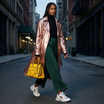

Nodes & Models
EmptySD3LatentImage
PrimitiveStringMultiline
CLIPLoader
qwen_2.5_vl_7b_fp8_scaled.safetensors
UNETLoader
qwen_image_2512_bf16.safetensors
VAELoader
qwen_image_vae.safetensors
CLIPTextEncode
ModelSamplingAuraFlow
KSampler
VAEDecode
SaveImage
PreviewImage
ABOUT THE WORKFLOW
Generate an Image From a Prompt Write what you want to see, hit run, and get a picture. Prompts work in both English and Chinese. Long descriptions with lighting, mood, and composition are followed closely.
Model
Qwen Image 2512 by the Qwen team at Alibaba Cloud. A 20 billion parameter open-weight diffusion transformer released 31 December 2025 under Apache 2.0. Ranked strongest open-source image model on AI Arena across more than 10,000 blind evaluations. Strong at readable text in both languages, natural skin and fabric, and scenes with many layered elements.
HOW IT WORKS
Step 1. Write your prompt Describe the picture. Say what is in the frame, the lighting, the camera angle, and the mood. English and Chinese both work. Works great with: portraits · landscapes · product scenes · posters with text
Step 2. Hit run The model builds the picture in 50 passes and saves it under Qwen-Image-2512.
Step 3. Review and download The saved image and a preview both appear. One picture per run at 1328 x 1328. Ready for: Photoshop · Figma · Canva · any editor
First time? Leave every setting as-is. The defaults (1328 x 1328 · 50 steps · CFG 4 · random seed) are the right starting point for almost everyone.
RECOMMENDED SETTINGS
Quick-start guide. Find the goal that matches yours and copy the settings.
Standard image (most people) — 1328 x 1328 · 50 steps · CFG 4 · random seed. The right starting point for almost everyone.
Want a different shape — Change width and height to one of the tested sizes listed in the workflow. Keep both as multiples of 16. Landscape, portrait, and wide formats all work within about 2 megapixels total.
Picture drifts from your prompt — Raise CFG one point at a time. Higher values hold the model closer to your words, but push too far and contrast gets harsh.
Reproduce a picture you liked — Set a specific seed number instead of leaving it on random. The same prompt, size, and seed give you the same image back.
Faster runs at some cost to detail — Lower the step count. Below about 30 the picture softens noticeably, so 35 to 40 is the floor for usable output.
Want text in the image — Spell it out in the prompt, in quotes, and say where it goes. The model reads both English and Chinese characters and renders them legibly into the picture.
The image looks too smooth or too harsh — Leave the shift at 3.1. It controls the noise schedule and the default matches what the model was tuned for.
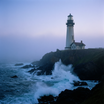
Prompt: Describe the picture as a scene, not a list of keywords. "At dawn, a thin mist veils the sea, an ancient stone lighthouse stands at the cliff edge, its beacon faintly visible through fog, waves send up bursts of white spray, sky glows in soft blue-purple under cool hazy light" gives you more than "lighthouse, cliff, ocean, fog." Adding a mood or feeling at the end anchors the tone.
LEARN
📹 Videos
ComfyUI 101 Free Course ft. Sebastian Kamph
Floyo 101 for Team Collaboration
✨ Quick links
USE CASES
📸 Portraits and Character Design Generate faces with natural skin, real-looking wrinkles, and individually rendered hair strands rather than the usual smooth-plastic look.
🪧 Posters and Graphics With Text Embed readable English or Chinese text directly in the image, for signage, titles, or labels, where most models garble the lettering.
🏞️ Landscapes and Environment Art Produce detailed natural scenes where fur, water, foliage, and atmospheric light are rendered with depth rather than smeared flat.
🛍️ Product and E-commerce Build product scenes with accurate materials, controlled lighting, and legible packaging copy in a single generation.
WHAT WORKS BEST / WHAT TO AVOID
✅ Works great
Long scene descriptions with lighting, mood, and composition
Prompts that ask for readable text in the image
Portraits and human subjects at close range
Detailed natural textures like fur, fabric, and water
⚠️ May produce softer results
Short keyword-style prompts with no context
Dimensions far from the tested aspect ratio list
Step counts below 30
Speed-sensitive workflows where generation time matters
FAQ
What is Qwen Image 2512? Qwen Image 2512 is a 20 billion parameter open-weight text-to-image model from the Qwen team at Alibaba Cloud, released 31 December 2025 as the December update to the Qwen Image series. It is a multimodal diffusion transformer that takes text in English or Chinese and returns images at up to about 2 megapixels. In over 10,000 blind evaluations on AI Arena it ranked as the strongest open-source image model.
Is Qwen Image 2512 free for commercial use? Yes. It is released under Apache 2.0, which allows commercial use, modification, fine-tuning, and self-hosted deployment with no revenue threshold and no territory restrictions. That makes it one of the most permissive image models available.
Does Qwen Image 2512 render text in images? Yes, and it is one of its strengths. The model renders readable text in both English and Chinese directly in the image, covering signs, labels, titles, and mixed text-and-image compositions. Spell out the exact words you want in quotes and say where they go.
How does Qwen Image 2512 compare to Nano Banana Pro? Nano Banana Pro is Google's proprietary Gemini 3 Pro image model, closed and API-only. Qwen Image 2512 is open weight under Apache 2.0. On realism and text rendering they trade blows, but Nano Banana Pro natively outputs up to 4K and runs through an API with no local hardware required. Qwen Image 2512 is the choice when you want open weights, commercial freedom, and local or self-hosted deployment.
Why does this workflow take 50 steps? The model is not distilled, so it needs the full 50 step schedule to reach its published quality. Cutting to 35 or 40 gives a usable image faster, but below about 30 the picture softens. Expect generation to take roughly three times longer than a distilled model of similar size on comparable hardware.
What resolutions does Qwen Image 2512 support? The model handles a range of aspect ratios within about 2 megapixels. This workflow ships at 1328 x 1328. A cheat sheet of tested sizes sits inside the workflow near the loaders. Keep both dimensions as multiples of 16 and stay near the listed sizes to avoid memory issues.
How to run Qwen Image 2512 online? You can run Qwen Image 2512 online through Floyo. No installation, no setup, no 20B model to download. Open the workflow in your browser, write a prompt, and hit run. Free to try.
WHY FLOYO?
Floyo is the only platform with team collaboration for ComfyUI in the browser. You run workflows with no install. You share run history, assets, and models across your team. You pay only when you generate. Floyo supports open-source and closed-source models.
A designer runs an edit and likes the result. A teammate opens that exact run from shared history and keeps going. No file handoffs. No version confusion.
For studios and enterprise teams, Floyo adds private workspaces, pooled resources, and a team usage dashboard. Other ComfyUI cloud tools run for one person at a time. Floyo runs for the whole team, with transparent per-generation costs.
Ready to try it? Write a prompt and run it. The settings are already set.
Questions? Watch the free course or check the FAQ above.
Read more