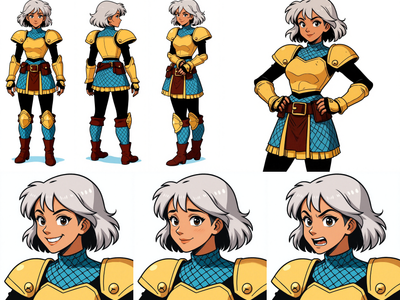
Character + Outfit → High-End Editorial Shoot
character-to-photoshoot
Image
Nano banana
studio-photoshoot
2.3k
_1767601871879.png?width=1400&height=620&quality=80&resize=contain)


_1767601871879.png?width=104&height=104&quality=80&resize=cover)

Nodes & Models
NanoBananaProUnified_floyo
Note
WorkflowGraphics
LoadImage
PrimitiveInt
PrimitiveStringMultiline
GetImageSize
ResizeAndPadImage
ImageBatch
Reroute
SaveImage
ImageCrop
PreviewImage
ImageFromBatch
SimpleMath+
ImageBatchMulti
ImageResizeKJv2
ImageBatchMulti
ImageBatchMulti
ImageResizeKJv2
ImageResizeKJv2
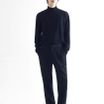
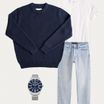
This workflow transforms a single character image and a separate outfit reference into a polished, high-fashion photoshoot sequence.
It is designed to generate studio-quality editorial imagery where the character’s identity is preserved while the outfit is consistently applied across multiple poses and compositions.
The result is a professional photoshoot grid that looks like it was captured in a controlled studio environment—ideal for fashion, lookbooks, and brand visuals.
✨ What This Workflow Does
Applies an outfit from a reference image onto a character with high accuracy
Generates multiple full-body photoshoot-style images of the same character
Maintains consistent identity, face, and body proportions
Produces a clean, borderless multi-image layout
Upscales and refines the final output while preserving realism
🎨 How the Workflow Works
1️⃣ Character Identity Lock
The main subject image is treated as the identity anchor:
Facial structure, expression, and likeness remain unchanged
Body proportions and pose realism are preserved
No identity drift across generated variations
This ensures the character stays recognizable in every shot.
2️⃣ Outfit Transfer & Consistency
A separate outfit image is used as a strict reference:
Clothing, accessories, and textures are applied precisely
No missing garments or altered details
The same outfit appears consistently in every generated pose
This enables reliable outfit visualization without deformation.
3️⃣ Photoshoot Grid Generation
The workflow generates a 2×2 grid of full-body images:
Each frame shows a slightly different pose
No visible borders, gutters, or grid artifacts
All images share the same studio lighting and background
The output mimics a professional fashion contact sheet.
4️⃣ Studio Lighting & Camera Aesthetic
A controlled studio look is enforced:
White studio background
Uniform lighting across all images
Film-inspired rendering (Fuji Velvia look, 55mm prime lens feel)
Focused light on the subject for editorial clarity
This creates a cohesive, high-end photoshoot appearance.
5️⃣ Refinement & Upscaling
The final selected image is enhanced:
Composition and pose are preserved
Facial consistency is reinforced
Outfit details are sharpened
Subtle details are added without over-processing
The result is a clean, upscale-ready image suitable for production use.
⚡ Why Use This Workflow
Separates character identity and outfit reference cleanly
Prevents clothing inconsistencies and identity drift
Produces reliable, repeatable fashion imagery
Eliminates the need for complex prompt-only generation
🎯 Best Use Cases
Fashion lookbooks
Model digitization
Outfit previews and styling concepts
Brand and catalog visuals
Studio-style character presentations
✅ Core Principles of the Workflow
✔ Identity-locked character
✔ Outfit-accurate generation
✔ Studio-consistent lighting
✔ Multiple pose variations
✔ Editorial-quality output
✔ Clean, upscale-ready images
Read more