3D Print LoRA and Flux Kontext for Image to 3D
3D Print
Flux Kontext
Imageto3D
Mockup
2
438
_1778129692947.png?width=1400&height=620&quality=80&resize=cover)
_1778129692948.png?width=1400&height=620&quality=80&resize=cover)
_1778129692947.png?width=104&height=104&quality=80&resize=cover)
_1778129692948.png?width=104&height=104&quality=80&resize=cover)

Nodes & Models
GetNode
KSamplerSelect
VAELoader
ae.safetensors
Note
PrimitiveInt
RandomNoise
UNETLoader
FLUX1/flux1-dev-kontext_fp8_scaled.safetensors
LoadImage
DualCLIPLoader
t5xxl_fp16.safetensors
clip_l.safetensors
CLIPTextEncode
FluxKontextImageScale
EmptySD3LatentImage
ModelSamplingFlux
SetNode
LoraLoaderModelOnly
3DPrinted-3d-print-lora-and-flux-k-3HFhIMkm.safetensors
FluxGuidance
VAEEncode
BasicScheduler
ReferenceLatent
BasicGuider
SamplerCustomAdvanced
VAEDecode
SaveImage
PreviewImage
Overview
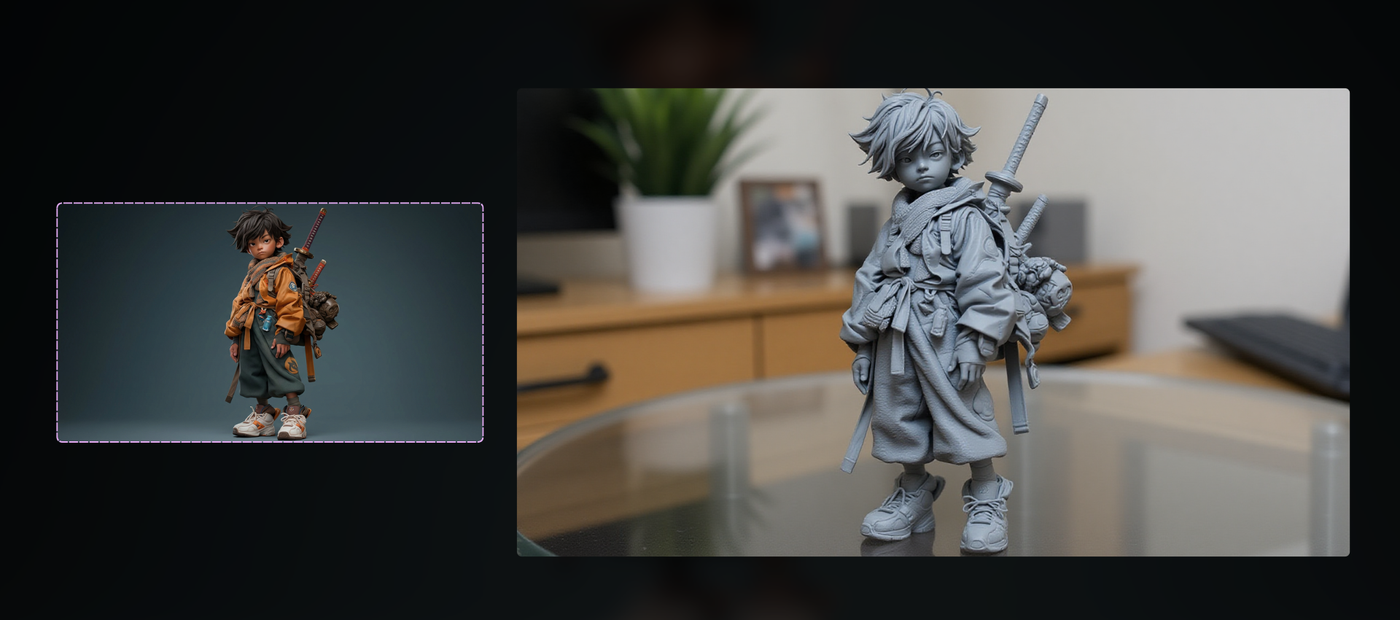
Flux Kontext is a powerful image‑editing model that can transform an input image while preserving structure, perspective, and character identity. A specialized 3D Print LoRA on top of Flux Kontext is trained to reinterpret subjects as if they were FDM 3D prints: visible layer lines, slightly matte PLA plastic, realistic thickness, and grounded placement on a desk or in a hand. The result is an image that reads like a real 3D object photo, not just a flat filter, making it ideal as a “mockup” for how a sculpt or model might look once printed.
Who can use it
This Flux Kontext + 3D Print LoRA workflow is useful for:
3D artists and character designers who want quick “printed” previews of sculpts or 2D concepts without running a full mesh/print pipeline.
Toy, figure, and merch designers needing realistic mockups for client decks, crowdfunding pages, or internal approvals.
Architects and product designers creating visualization of models as table‑top prints, maquettes, or display pieces.
ComfyUI users who want an image‑to‑image node that outputs a consistent “3D printed” look across a whole batch of concept images.
Use case
A typical workflow in ComfyUI is: load your character or object image, select Flux.1 Kontext (Dev/Pro/Max) as the edit model, enable the 3D Print LoRA, and use a prompt like “convert this into a realistic FDM 3D print in gray PLA, visible layer lines, placed on a wooden desk, studio lighting.” Flux Kontext keeps the design, pose, and proportions while the LoRA adds print artifacts, surface texture, and a believable scene, giving you a finished 3D mockup image you can use in presentations, social posts, or as a reference before commissioning an actual 3D model or physical print.
Read more

_1758863167371.webp?width=400&height=300&quality=80&resize=cover)